
Drip primarily focuses on automation and funnels, covering all essential aspects of email marketing for businesses. This detailed Drip review will help you determine if it’s the right fit for your current business needs.
Selecting an email marketing platform is a critical decision for any online business, as it plays a vital role in generating sales. You need a platform that reliably delivers emails to the inbox and simplifies your workflow, saving you time and money. Automation is key to achieving this efficiency, and businesses not leveraging email automation risk falling behind.
Drip enables businesses to automate entire sales funnels, including:
- Executing live and automated product launches
- Crafting effective onboarding sequences
- Building advanced email courses
- Delivering personalized email offers based on user actions
Let’s explore Drip’s capabilities to see if it aligns with your business objectives.
Understanding Drip: Core Features and What to Expect
If you’re familiar with other email marketing platforms, you’ll find Drip’s interface intuitive, with a minimal learning curve. A standout feature of Drip is its visual Workflow builder, which makes creating complex email sequences both engaging and straightforward. Drip’s support for Liquid, a powerful templating language developed by Shopify, allows for the creation of highly advanced and personalized funnels.
Unlike many email marketing platforms, Drip operates as a CRM rather than a list-based system. Each unique email address is treated as a distinct contact in a single database, with segmentation powered by an extensive tagging system. This approach offers unparalleled flexibility for segmenting your subscribers.
Drip’s primary focus is on automation, offering numerous rules and triggers to help businesses run on autopilot. This review will guide you through Drip’s functionalities, exploring its strengths and limitations from the perspective of a new account setup.
Here are some of the key areas we’ll cover:
- How to track subscriber actions on your website and send triggered emails based on their behavior
- The robust segmentation and personalization options available within Drip
- Multiple methods for sending emails to your audience
- The powerful visual builder, where much of your automation work will take place
- Other impressive features, including Liquid language support, auto-resends, and lead scoring
Initial Setup Essentials for Drip
Before diving into Drip’s advanced features, several initial setup steps are crucial.
Installing the Drip Tracking Code
Upon creating a new Drip account, the first prompt you’ll encounter is to install their snippet code on your website. This step is fundamental to unlocking Drip’s full potential.
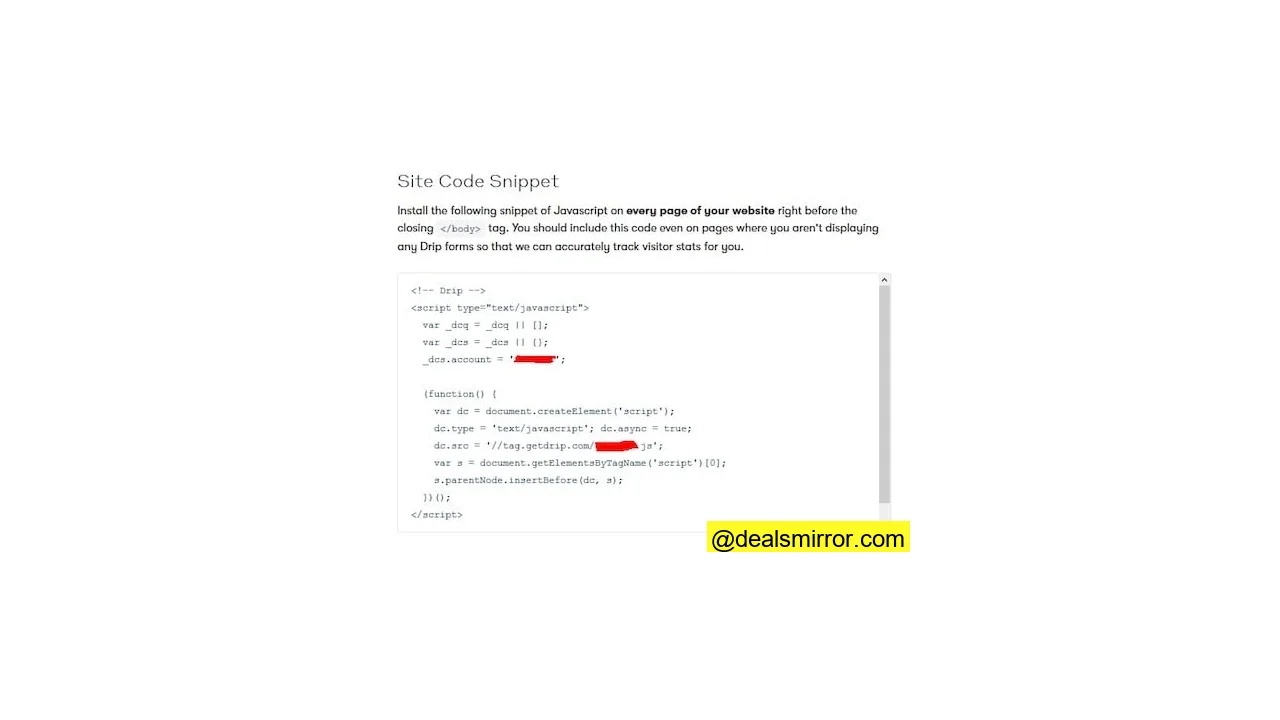
Installing this code enables form widgets for subscriber collection and facilitates tracking website actions. Crucially, if a website visitor is already subscribed, their on-site activity is recorded directly in your Drip account. This data empowers you to send highly relevant, triggered emails based on subscriber actions or segment them into specific groups.
For example, if a subscriber reads three articles about list building on your website, you can automatically tag them as “interested in list building.” This tag can then trigger an automated email sequence offering valuable content or products related to list building, ensuring the right message reaches the right person at the optimal time.
Flexible Unsubscribe Options
Drip offers advanced unsubscribe management. If you’re running a specific promotion alongside your regular emails, subscribers can opt out of the promotional campaign without unsubscribing from all your communications. Drip allows you to configure the unsubscribe link to direct users to a subscription management page, where they can selectively opt out of specific campaigns while continuing to receive your main emails.
Analytics Integration
For those who rely on Google Analytics for detailed reporting, Drip simplifies the process. You can easily set up all your Drip links with specific UTM codes, allowing you to accurately track campaign performance within GA.
Sending Domain Setup for Deliverability
Drip provides the option to use your own custom sending domain for emails. This eliminates the “via” text that sometimes appears next to the sender’s email address in recipients’ inboxes, making your emails appear solely from your domain.
While Drip maintains high-reputation servers and prioritizes deliverability, using a custom sending domain offers greater control, especially for businesses with large lists. The platform consistently achieves excellent sender scores, as seen in this example from sender score:
Templates and Building Emails
Historically, Drip lacked a drag & drop email builder, which was a barrier for users without coding knowledge. However, Drip has responded to customer feedback by recently introducing a flexible drag & drop builder. This new tool allows you to customize layouts, add various sections, and even include background images.
As the drag & drop builder is still new, it currently has some limitations, such as not allowing custom designs with multiple editable columns. For now, if you use a custom template, editable content is limited to a single box.
For those who prefer highly custom designs, you can still import complete HTML emails (without editable areas) directly into Drip. Alternatively, you can use external responsive email editors to design your emails and then paste the code into Drip for sending.
Many users, however, find simple text-based emails more effective, as they often achieve better placement in Gmail’s primary inbox. Drip’s initial focus on text-based emails was largely due to data indicating their superior performance.
Forms and List Building Options
Drip’s form builder provides robust options for capturing new subscribers, surpassing many other email platforms. The editor is user-friendly, allowing you to add custom fields, images, and configure post-signup actions, including enabling or disabling double opt-in (recommended for list hygiene).
Once created, you can embed the form code on your website, use the Drip WordPress plugin, or direct people to a self-hosted form link.
Integrated List Building Pop-up Widget
One of Drip’s standout features is its built-in pop-up widget, eliminating the need for external services. This widget offers extensive customization for placement and behavior.
You can configure the widget to appear after a specific time delay, on exit intent, or be hidden on mobile devices (crucial for SEO). It also supports page-specific targeting, allowing for highly personalized lead magnets. For instance, an article about cats could display a cat-owner-focused lead magnet, while a dog article offers a dog-owner lead magnet, significantly boosting conversions.
While it may not offer full-screen overlays or an extensive layout library, Drip’s widget provides ample functionality for most list-building needs.
Automation Rules in Forms
Drip forms can immediately trigger automation rules, enabling complex automated actions both within Drip and with integrated platforms. Examples include:
- Automatically adding new subscribers to a Facebook Custom Audience for targeted advertising.
- Sending new subscriber data to a sales CRM like Salesforce.
- Moving subscribers between Drip workflows, triggering custom events, or applying tags for instant segmentation.
Subscriber Management: CRM-Based System
Drip’s CRM-based system is a key differentiator from list-based platforms like Mailchimp. Instead of separate lists, Drip maintains a single database of unique email contacts. This means one email address counts as one subscriber, preventing inflated charges from duplicate entries across multiple lists.
Segmentation in Drip is managed primarily through a powerful tagging system. Clicking on a specific subscriber reveals a complete timeline of their interactions with your emails and website, along with all applied tags and recorded events.
Tags and Events for Advanced Segmentation
Drip’s tagging system offers granular segmentation capabilities, allowing you to tag subscribers based on virtually any action. These tags drive specific automated emails, enable personalized content, and facilitate advanced segmentation. Tags are particularly useful for creating decision paths in automation workflows, such as sending content A if a user has tag A, or content B if they have tag B.
Tags are typically applied once per action. For example, if someone makes a purchase, they might be tagged “bought something” once.
However, if you need to track how many times an action occurs, **events** are used. Events record the date and frequency of specific actions. They are ideal for triggering automations that should fire every time an action happens, such as sending a “thank you” email each time a purchase is made.
Imports and Bulk Operations
Importing subscribers from another provider into Drip is a straightforward process, requiring just a few clicks. Beyond simple imports, Drip’s bulk operations provide powerful capabilities for managing large segments of subscribers:
- Applying or removing a tag for a group of subscribers.
- Adding or removing a group of subscribers from an automation workflow.
- Manually recording events for a group of subscribers.
These actions extend beyond Drip. For instance, with a connected Facebook account, you can filter a segment of subscribers and add them to a custom audience for targeted advertising. Bulk operations are invaluable for automating manual tasks and saving time.
Sending Emails with Drip: Broadcasts, Campaigns, and Workflows
Drip offers three distinct methods for sending emails, which can initially be confusing for new users: Broadcasts, Campaigns, and Workflows. Each serves a specific purpose:
Broadcast Emails
Broadcasts are your one-off emails, akin to standard email blasts found in most platforms. You select your audience, craft an email, and schedule it for immediate or future delivery. They are ideal for announcements, timely updates, or regular digests like daily or weekly newsletters.
Campaigns (Triggered Email Series)
Campaigns in Drip are similar to ongoing email series in other platforms. They allow you to create a predefined sequence of emails that are sent out periodically. Campaigns are best suited for simple automated sequences such as onboarding series, cart abandonment sequences, or short-term sales campaigns.
To spark creativity, Drip provides “Blueprints” – pre-designed ideas for email sequences, complete with email copy templates to overcome writer’s block.
Examples of available blueprints include:
- Email mini-courses
- Follow-up sequences (e.g., post-demo, free report, subscription trial)
- Cart abandonment series
- Flash sales campaigns
Automation Workflows
Automation Workflows are the cornerstone of Drip’s powerful marketing automation capabilities. They enable you to automate nearly every aspect of your email marketing, embodying the concept of “making money while you sleep.” Workflows can handle everything from simple tasks like capitalizing first names to complex, evergreen sales funnels.
A notable limitation in workflows is the native A/B testing functionality, which requires advanced users to employ Liquid language hacks. While this is feasible for experienced users, it presents a challenge for the majority.
Workflows are generally preferred for any automation involving branching logic or advanced conditions. If you need a simple email series without conditional paths, Campaigns are sufficient; for anything more sophisticated, Workflows are the go-to tool.
More on Automation
Visual Workflow Builder
The visual workflow editor significantly simplifies the setup and understanding of your automations, allowing you to clearly visualize the paths subscribers take. For more detailed information, consult Drip’s getting started guide.
A useful feature of the visual builder is the basic statistics displayed for each step, showing how many subscribers have passed through. Subscribers can also be exported from specific steps if needed.
However, editing existing workflows can be challenging. If subscribers are currently in a workflow step, you cannot directly remove that step. This necessitates manually exporting subscribers, editing the workflow, and then using bulk operations to re-import them into their appropriate new steps. This process can be intricate for new users.
Another area for improvement is the lack of drag-and-drop functionality for reordering steps. Moving an email to a different point in a workflow requires copying its content, deleting the original email, and creating a new one in the desired location. In summary, editing existing workflows typically involves:
- Manually moving subscribers out of the workflow.
- Creating new or modified steps.
- Importing subscribers back into the workflow at their correct positions.
Despite these editing nuances, the visual map greatly enhances the clarity and manageability of complex automations.
Automation Rules
Automation Rules are a fundamental part of Drip’s automation suite, capable of performing many actions similar to workflows. While workflows excel at building full email funnels, rules focus on executing actions based on specific triggers. They are ideal for setting up global automations that apply across your entire Drip account.
For instance, you can create a rule to monitor page visits on your website, recording an event or applying a tag when a specific page is visited. This event or tag can then trigger other automations. To maintain clarity, it’s crucial to name rules very specifically to their function.
Reporting in Drip
Drip’s reporting is an area that could benefit from improvement. The analytics section requires users to select various reports from a dropdown menu, which can be cumbersome as related metrics are often split across different reports.
While campaigns and broadcasts offer basic overview statistics, retrieving even fundamental stats like opens and clicks for workflow emails necessitates navigating through this reporting section. This process is further complicated by lengthy dropdown menus if you have many automation emails. To mitigate this, consistently use categorized and specific naming conventions for your emails and rules.
A more intuitive approach would be a consolidated list of emails with basic stats, allowing users to click for more detailed reports. While Drip does allow bulk downloading of all stats for a specific period, the CSV output provides only basic, unformatted data, requiring manual conversion of numbers to percentages.
To enhance reporting, consider integrating Drip with external analytics tools. If a direct integration isn’t available, Zapier can bridge the gap, sending Drip data to your preferred analytics platform for better visualization.
Other Cool Features
Several unique features distinguish Drip from other Email Service Providers (ESPs).
Liquid Language Support
Drip’s support for Liquid language significantly boosts its automation capabilities. While it has a learning curve for those unfamiliar with coding, Liquid enables highly advanced personalization and conditional logic. Drip’s Liquid reference articles provide guidance for dynamic subscriber data and personalized content based on user tags. For users who enjoy technical customization, Liquid offers extensive possibilities for sophisticated automations.
Content Snippets
For users who might find Liquid coding daunting or prone to forgetting syntax, Drip offers Content Snippets. These act as a personal library for frequently used Liquid code or any text block. Once a Liquid code snippet is written, it can be saved and reused effortlessly via the “personalize” menu when composing an email.
Snippets are not limited to Liquid code; they can store any recurring text, such as a personalized greeting:
Drip Integrations
Drip boasts robust integration capabilities with many popular services. A comprehensive list of direct integrations is available, and for apps not natively supported, Zapier provides a flexible solution to connect Drip with a vast array of other applications.
Auto Resend Broadcast
This convenient feature allows you to automatically resend a broadcast email to non-opens, with the option to use a different subject line. Follow-up emails are proven to boost engagement and offers, as many recipients simply miss or forget to act on the initial email. This automation saves significant time and maximizes campaign reach. Currently, this feature is exclusive to Broadcasts.
Expiring Links
Expiring links are an excellent tool for time-sensitive promotions. You can set a deadline for a link to a landing page, and after the deadline passes, Drip will automatically redirect anyone who clicks that link to a different designated page. This effectively manages offer expiration without manual intervention.
Lead Scoring
Drip’s integrated lead scoring system helps identify your most engaged and high-quality subscribers, as well as those who are becoming inactive. This eliminates the need for manual review of individual subscriber activity.
In the settings, lead scoring can be customized with advanced rules, assigning points for specific actions like visiting certain pages on your website. Drip also automatically reduces scores for inactive subscribers on a weekly basis, ensuring scores reflect current engagement levels.
Workflow Sharing
Drip enables users to share their automation workflows, a valuable feature especially for those new to marketing automation. Experienced users can create and share complex workflows, which others can easily import into their Drip accounts with a few clicks. This facilitates learning from advanced strategies and quickly deploying proven funnels by simply adjusting the content.
Grouping and Automation Management
As Drip automations grow in complexity, organization becomes vital. Drip’s grouping feature helps manage campaigns, broadcasts, forms, workflows, and rules by categorizing them. You can assign different colors to groups for visual identification, which is incredibly useful for organizing specific promotional campaigns and maintaining clarity across numerous automations.
Drip Pricing and Support
Pricing for Drip
Drip’s pricing is competitive, especially considering its comprehensive feature set. Unlike many platforms that tier features, Drip offers all functionalities across every plan. Pricing scales solely based on your subscriber count. The lowest plan starts at $19 per month for up to 500 contacts, providing an affordable entry point to explore Drip’s full capabilities before committing to a higher contact tier.
Support
Drip’s support team is highly regarded. They offer responsive chat support and are knowledgeable in resolving technical and advanced queries. Email support typically responds within 24 hours, ensuring users receive timely assistance.
Drip Marketing Automation Review Summary
Here’s a concise overview of Drip’s strengths and areas for improvement:
The Good
- A powerful automation engine offered at a fair price point.
- Excellent customer support and strong email deliverability.
- Ability to manage multiple domains under a single account.
- Content snippets and grouping features enhance organization and efficiency.
- Convenient auto-resend functionality for broadcasts.
- Extensive integrations with a wide array of popular applications.
- Built-in lead scoring system for identifying engaged subscribers.
- Easy subscriber import and advanced segmentation capabilities.
- Subscription management page for tailored unsubscribe options.
- Includes a drag & drop builder for HTML emails.
The Not So Good
- Custom email templates currently lack support for multiple editable sections.
- Potential confusion regarding when to use Campaigns vs. Workflows, given their overlapping functionalities.
- Native A/B testing is not as straightforward as it could be, often requiring Liquid language hacks.
- Reporting features can be challenging to navigate and use effectively.
- Users without coding knowledge may miss out on some advanced features leveraging Liquid language.
- The visual workflow builder could be more flexible with true drag-and-drop rearrangement of steps.
The Awesome
- The visual workflow builder makes creating complex email funnels intuitive and easy.
- CRM-based system eliminates the complexities of managing multiple lists.
- Robust tags and events enable incredibly advanced subscriber segmentation.
- Ability to track website visitor actions and trigger automations based on behavior.
- Campaign blueprints and shareable workflows simplify getting started with automations.
- Liquid language support allows for highly dynamic and personalized content.
- Expiring links are a clever tool for managing time-sensitive promotions.
- Built-in pop-up widget removes the need for external list-building services.
Drip is far more than just an email sending platform; it’s a robust automation powerhouse capable of driving an entire business when utilized to its full extent. While sending simple emails is user-friendly, Drip truly shines in its advanced automation capabilities, requiring users to delve into its more technical aspects to unlock its full potential.
Drip excels at supporting sophisticated email automation strategies. While there are areas for improvement, such as reporting and more accessible A/B testing, the platform is continually evolving. Its support team is highly capable, ready to assist users in leveraging Drip for advanced applications. With ongoing development, Drip is likely to further refine its interface and reporting, making complex automations even more seamless.