
In today’s competitive landscape, Australian businesses, regardless of their size, require robust Customer Relationship Management (CRM) software. Modern CRM solutions are no longer confined to sales and marketing departments; they empower any team interacting with customers, from support to accounting, by providing accurate, organized, and actionable customer data. To simplify your decision-making, we’ve compiled a comprehensive list of the 10 best CRM software options tailored for the Australian market.
| CRM | Free plan or free trial | Monthly starting price |
| Monday.com | Yes | $10/user |
| Pipedrive | Yes, 14 days | $14/user |
| HubSpot | Yes | $10/user |
| ActiveCampaign | Yes, 14 days | $15/user |
| Freshsales | Yes, 21 days | $18/user |
| BenchmarkONE | Yes | $49 (unlimited users) |
| Thryv | Yes | $299 (5 users) |
| Salesforce | Yes, 30 days | $25/user |
| Netsuite | No | Custom |
| Zoho | Yes, 15 days | $20/user |
Note: All the prices in this article are in USD. Most vendors don’t publish prices in AUD, and these help keep prices consistent and comparable.
The ideal CRM software seamlessly integrates marketing and sales automation to significantly boost productivity. These powerful tools offer visual sales pipelines, making it easy to track leads, manage opportunities, and close deals efficiently. Let’s dive deeper into the top CRMs for Australian businesses, exploring their features, benefits, and pricing.
1. Monday.com
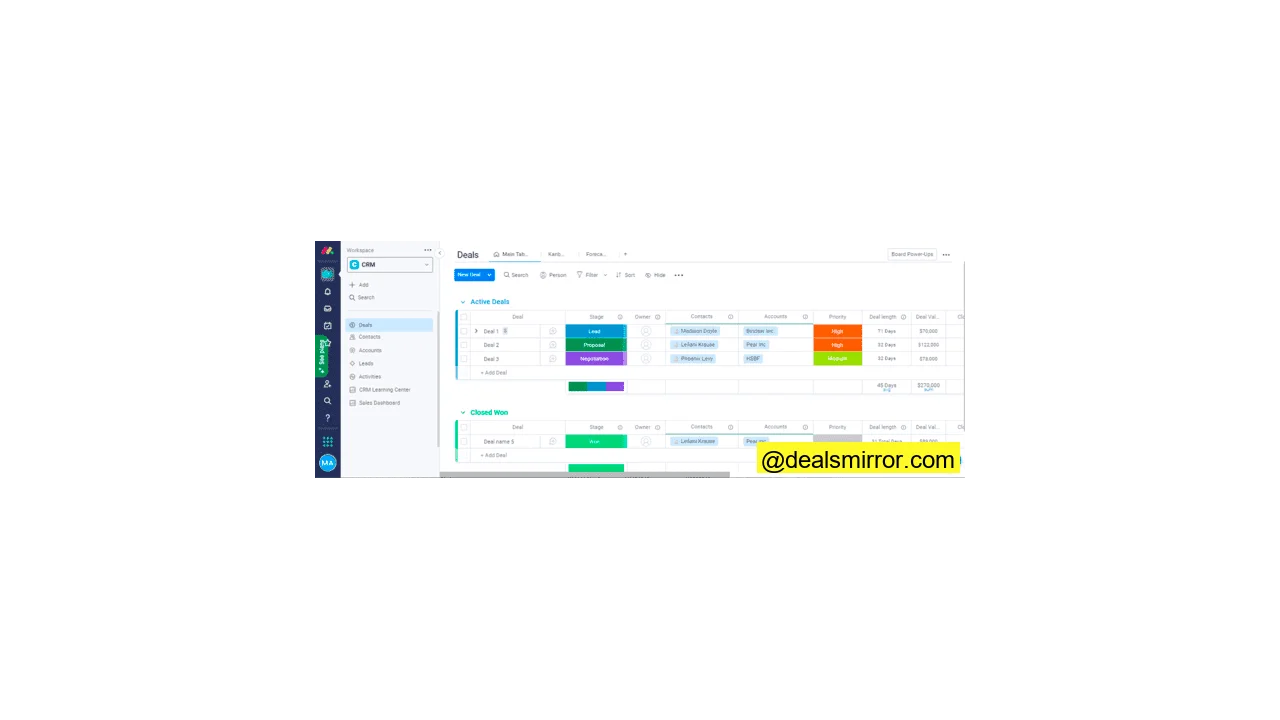
Monday.com is well-known for its project management tools, often referred to as a work OS. Beyond project management, it offers robust sales CRM software complete with customizable pipelines, comprehensive contact management, efficient lead capture, task tracking, and insightful analytics.
Its clean and intuitive interface helps users quickly identify the current stage of any prospect. Monday.com provides a variety of CRM templates and boards designed for sales pipelines, tracking marketing activities, customer onboarding, and sales enablement. Users also benefit from customizable analytics dashboards and automated workflows to streamline operations.
Monday.com offers a free plan that includes 200 contacts, 3 boards, support for 2 users, over 200 templates, and forms. Paid plans start at $10/user/month, granting access to unlimited boards and free viewers. The Standard plan, which includes automations, integrations, timeline view, and map view, begins at $12/month/user. Additionally, you can take advantage of a 14-day free trial for the Pro plan to test all advanced features.
Pros
- Fully customizable interface
- Very easy-to-use and navigate
- Advanced project and task management
Cons
- No automatic archiving of board stats
2. Pipedrive
Pipedrive is a streamlined and modern sales CRM specifically designed for small businesses. It offers an easy-to-use experience, free from unnecessary complexity or distractions, ensuring that everything is focused on empowering salespeople to sell more effectively. It helps build strong customer relationships through integrated email, live chat, and sales automation. Users can monitor key sales metrics, accurately predict sales, and generate comprehensive reports on various channels.
You can customize deal pipelines to precisely match your unique sales process. Robust lead, deal, calendar, and pipeline management features facilitate thorough sales tracking. Additionally, Pipedrive allows you to automate repetitive sales tasks and execute targeted email marketing campaigns. It boasts over 400 integrations with popular tools like Zapier, Microsoft Teams, Zendesk, and Trello.
Pipedrive offers a 14-day free trial with access to all features, allowing you to thoroughly test its capabilities. Pipedrive pricing starts at $14/user/month, which includes lead, deal, contact, calendar, and pipeline management for up to 3000 open deals.
Pros
- Easy to learn
- Full view of the sales pipeline
- iOS and Android apps to sell on the go
Cons
- Can’t trigger automation based on dates
3. HubSpot
HubSpot is a comprehensive CRM platform offering an integrated suite of sales, marketing, service, CMS, and operations tools. It extends far beyond traditional customer relationship management, providing products for nearly every aspect a business needs to thrive online. With HubSpot, you can build websites to generate leads, send targeted email marketing campaigns, track and manage customer communication, provide exceptional customer support, and much more.
The sales CRM within HubSpot includes features like sales funnels, pipelines, automation, deal tracking, sales forecasting, meeting scheduling, reporting, seamless Gmail and Outlook integration, a dedicated mobile app, and pre-built sales email templates. A significant advantage for companies choosing HubSpot is its robust ecosystem, where marketing, sales, and service tools work together harmoniously. This integrated approach simplifies performance tracking and contact management for businesses.
However, HubSpot also has specific limitations. Starter plans lack comprehensive campaign reporting or custom report capabilities, and dashboards and reports are limited to 10. The basic landing page and email templates may not be the most professional, even on premium Starter plans. While you can purchase more aesthetically pleasing templates from the Asset Marketplace or acquire the reporting add-on for $200/month, these additional costs can quickly add to the overall price. This brings us to HubSpot‘s primary drawback: its pricing structure.
HubSpot offers a free plan that includes CRM, forms, ticketing, basic automation, ads, email templates, live chat, landing pages, email marketing, website building, and hosting. The free plan is limited to 100 contacts for each engagement. Paid HubSpot plans start at $50/month for the CRM Suite, which covers 2 users and 1,000 contacts, along with Starter features for marketing, sales, service, CMS, and operations hubs. The Sales Hub Starter begins at $18/month. Thus, starting with HubSpot can be comparable in initial cost to other CRMs.
For advanced functionalities such as omnichannel automation, lead scoring, and dynamic personalization, you’ll need to upgrade to a Professional plan. This costs $1,780 for 2,000 contacts and 5 users, a substantial investment. Additionally, the Pro plan requires a mandatory, one-time onboarding fee of $4,500.
Pros
- Full CRM software platform with different products working well together
- Lots of free tools
- Easy to use and navigate
- Mobile CRM
Cons
- Basic reporting on Starter plans
- The templates aren’t professional looking
- It gets expensive quickly
4. ActiveCampaign
ActiveCampaign is primarily known as a powerful email marketing automation tool that also incorporates a robust sales CRM. It boasts sophisticated automations, precise segmentation capabilities, and comprehensive customer management features. Its library of over 500 pre-built automation templates is particularly beneficial for companies new to marketing automation.
The intuitive visual automation builder simplifies the creation of complex workflows, ensuring that even users new to the platform can navigate it easily. The ActiveCampaign CRM includes pipelines, deal management, task tracking, reporting, automation, and email content generation tools.
For businesses seeking an integrated marketing automation and CRM software solution on a budget, ActiveCampaign offers a smooth start and is relatively easy to set up, especially if your website is already established. If you’re looking for a similar tool with a website builder, you might consider alternatives like Mailchimp.
ActiveCampaign offers a 14-day free trial with access to all the features you need for a thorough test. Pricing for the Starter plan begins at $15/month, which includes email marketing automation, a drag & drop editor, over 150 templates, and site and event tracking. For combined CRM and marketing automation functionalities, you’ll need to opt for the Pro plan, which starts at $79/month for 1,000 contacts and 3 users.
Pros
- Wide range of features for advanced automation and segmentation
- Great deliverability right out the gate
- 500+ automation templates
- Integrated sales CRM
- Over 100 integrations like Shopify, BigCommerce, Woocommerce, Mailchimp, Basecamp, Calendly, and WordPress
- Machine learning to optimize your marketing results
Cons
- It takes some time to wrap your head around the advanced features if you’re new to email marketing automation
5. Freshsales
Freshsales is a dedicated sales CRM system tailored for small to midsize businesses. It offers a complete and fairly easy-to-use CRM platform, featuring customizable pipelines, intuitive dashboards, automation capabilities, robust lead generation and scoring, and comprehensive analytics. A significant advantage is its 24/5 phone and email support available on weekdays.
All paid plans include AI-powered contact scoring, which intelligently helps sales teams prioritize leads by recommending the optimal time to reach out, based on both demographic and behavioral data. This saves valuable time compared to traditional lead scoring methods. The WhatsApp integration can be particularly useful for businesses that leverage this channel for customer communication. Furthermore, the mobile apps enable sales teams to manage activities on the go. Freshsales is an excellent choice for international sales teams, offering support for 10 languages and over 150 currencies.
Freshsales offers a free plan that includes essential features such as account and contact management, contact lifecycle stages, an activity timeline, deal management, and 24×5 customer support. The Growth plan, starting at $18/user/month, introduces visual sales pipelines, predictive contact scoring, sales sequences, and WhatsApp Business integration.
Pros
- Affordable pricing
- Easy onboarding and setup
- 24×5 phone and email customer service
- 17+ integrations, including Zapier, Shopify, Google Apps, and Mailchimp
Cons
- We noticed some errors for contact imports but it was fixed quickly
- Some templates are outdated
6. BenchmarkONE (formerly Hatchbuck)
BenchmarkONE is an all-in-one CRM software solution that seamlessly combines CRM and marketing automation capabilities to cover the entire sales funnel. It offers comprehensive contact management, robust email marketing, powerful automation, and effective lead generation tools.
Key CRM features include website tracking, detailed tagging and segmentation, email integration, and visual sales pipelines. It stands out as powerful email marketing software, equipped with a drag-and-drop email builder, over 59 pre-designed email templates, automated email autoresponders, and in-depth email statistics reports. BenchmarkONE integrates with over 5000 apps through Zapier, including EZ Texting, Google Apps, Unbounce, WooCommerce, and Zendesk.
BenchmarkONE’s free plan is ideal for startups, supporting up to 250 contacts. Pricing scales according to the number of contacts. Paid plans start at $29/month for 500 contacts, offering full contact management, email marketing, automation, and landing page features.
Pros
- Packed full of features for sales and marketing
- High-quality email templates, landing pages, and forms
- Simple setup and navigation
- Drag and drop editor for email and landing page
- Generous free plan to get started
Cons
- Can add more videos, articles, and FAQs in the knowledge base
7. Thryv
Thryv is designed for small businesses that prefer to manage a wide range of operations from a single platform. It seamlessly handles your communications, marketing efforts, and financial processes.
Its core offering is the Thryv Business Center, which effectively bridges sales and marketing. The platform supports lead generation, allowing you to run online advertising campaigns, build compelling landing pages, and create sign-up forms. You can also manage your online listings and customer reviews, enhancing your digital presence.
From lead generation, you can seamlessly transition to executing email and SMS campaigns. Should leads convert into customers, Thryv provides robust payment and invoicing tools to manage all transactions. Throughout these processes, Thryv meticulously logs and manages all customer data. As a CRM, it focuses on the essentials, serving as a comprehensive record of every prospect and customer, every interaction, and every response.
Simplicity is a key strength of Thryv, making it exceptionally user-friendly. This includes excellent mobile apps that provide full access to all tools and features, allowing you to manage your business on the go. Thryv also offers 24/7 support, including a dedicated phone line for Australian users.
The Thryv Business Center suite costs $199 a month per location, plus a $9 monthly support fee. There is also a one-time $350 onboarding fee. Notably, there are no user limits per location, making it cost-effective for growing teams.
Pros
- All-in-one business platform for small businesses
- Email marketing, SMS campaigns, ads, and landing pages
- Simple and user-friendly CRM
- iOS and Android apps
Cons
- Pricey compared to other small business CRMs
8. Salesforce
Salesforce pioneered the cloud CRM system, launching its first edition in 1999. It has since evolved into a complete CRM platform, offering comprehensive tools for lead generation, nurturing, sales, and marketing.
The Salesforce sales CRM includes robust pipeline, account, contact, and lead management functionalities. Its marketing platform provides advanced email marketing automation, a powerful CMS, a visual automation editor, and mobile messaging capabilities.
Salesforce boasts over 4,000 integrations with leading platforms, including:
- Marketing Automation, like Pardot
- Customer Service, like Zendesk, Freshdesk
- E-commerce, DocuSign, Slack, and more.
You can try Salesforce for free with a 30-day trial. Paid plans start at $25/user/month when committing to an annual subscription. This Starter plan includes essential features such as account, contact, deal, and opportunity management, seamless Gmail and Outlook integration, and powerful process automation.
Pros
- Extensive feature set for sales, email marketing, social media marketing, website creation, and online ads
- Comprehensive training and technical support
Cons
- Complex workflows and processes
- Requires Salesforce experts to fully leverage its potential
9. Netsuite
Netsuite is an enterprise resource planning (ERP) platform renowned for its traditional focus on areas like procurement, inventory, logistics, and finance. However, Netsuite goes further by integrating applications for HR, eCommerce, and CRM, creating a truly all-encompassing business solution.
These modules are available as add-ons to the main ERP system. The Netsuite CRM, in itself, is a substantial piece of software. It covers sales, marketing, and customer service processes, with a strong emphasis on automation. This makes it an ideal choice for businesses seeking a single CRM solution to manage the entire customer journey, aiming to save time and effort in the process.
Netsuite is highly adaptable to all types of sales operations. For B2B environments, it can efficiently handle quotations, commissions, partner relationships, and sales forecasts, all supported by robust sales force automation tools. In B2C sales scenarios, it excels at automating up-sell and cross-selling initiatives. Furthermore, Netsuite can be seamlessly connected to most eCommerce platforms, enabling it to manage the majority of back-end processes for your online store.
On the marketing front, automation significantly reduces the workload for email and social media campaigns. If a prospect clicks a link or responds to a social media post, Netsuite captures this behavior. This tracking feeds into automated workflows, ensuring the right message is delivered at the optimal time. The tracking data also contributes to Netsuite’s advanced analytics, helping businesses accurately attribute sales back to specific marketing activities and calculate the true ROI of their campaigns.
Netsuite does not publicly publish its prices; you need to request a quote upon application. However, prospective users should anticipate enterprise-level pricing.
Pros
- Complete business software solution
- Advanced automation capabilities
- Customizable to fit diverse business needs
Cons
- Doesn’t have a free trial or public pricing
- Requires purchasing the ERP to access the CRM
10. Zoho
Zoho is a vast cloud-based software suite encompassing products across 12 different categories, including comprehensive sales and CRM tools, marketing software, collaboration solutions, and project management. Its highly customizable Zoho CRM platform is designed to adapt to the needs of growing businesses and large enterprises alike, helping to automate sales processes so that sales representatives can focus on closing deals.
The Zoho CRM is one of the most feature-rich CRM systems available, offering seamless G-Suite integration. This allows you to link all your Google apps, easily adding Zoho CRM features to your existing ecosystem. For Gmail users, you gain the benefits of Zoho’s intelligent automation tools, including automatic contact record updates and sophisticated sentiment analysis.
You can try Zoho CRM for free on all plans, and there’s a permanent free plan available. The Zoho Professional plan costs $30/user/month and includes features like tasks, calls, events, segmentation, lead scoring, and support for multiple currencies.
Pros
- Premium consulting/integration services available
- Easy customization of fields and modules
- Convenient to track leads and sales funnel
Cons
- Can be challenging to get started for new users
- Costs can escalate quickly with advanced features
How to Choose a Small Business CRM
In Australia, 98% of businesses are small and medium-sized, with 0-19 employees. Understanding the unique needs of these companies is crucial for selecting the right CRM. Small businesses often look for different features and considerations compared to larger enterprises. Here are the essential steps for choosing a small business CRM:
- Define Your Needs and Challenges: Clearly outline your current business needs and the specific challenges you aim to solve with a CRM.
- Anticipate Growth: Consider any issues you foresee as your business expands and ensure the CRM can scale with you.
- List Essential Features: Document all the specific features that will be necessary for your CRM to function effectively.
Some crucial features you should consider include:
- Lead management and scoring
- Contact management
- Social media management with detailed analytics
- Campaign management
- Email tracking
- Reporting
- Shortlist Providers: Identify CRM providers that offer the features you’ve deemed essential.
- Review Websites: Thoroughly examine their websites for pricing structures, customer support options, third-party integrations, and any other specific requirements you may have.
- Examine Case Studies and Testimonials: Read through case studies and testimonials to understand if the CRM has successfully served businesses in a similar industry or with comparable needs to yours.
- Prioritize Ease of Use: Ensure the CRM is user-friendly and doesn’t require extensive time to set up and learn, minimizing disruption to your operations.
Conclusion: The Best CRM Software for Australia
To summarize, here’s a quick guide to help you pinpoint the best CRM for your Australian business:
- If you’re looking for a specialized sales CRM, opt for Pipedrive.
- If you want to manage projects and customers from the same integrated tool, try Monday.com.
- If you’d like a powerful marketing automation and CRM combo, get started with ActiveCampaign.
- If you want an easy-to-use email marketing and CRM platform, sign up to BenchmarkONE.
- If you’re searching for a comprehensive CRM platform for marketing, sales, and service teams, HubSpot and Salesforce are excellent options.
Frequently Asked Questions about CRM Software in Australia
Are CRM and marketing automation different?
CRM is primarily used for contact management, sales management, fostering customer relationships, and managing communications with prospects and existing customers. It plays an important role at the bottom of the sales funnel.
Marketing automation is mostly deployed at the top and middle of the funnel. It helps in lead nurturing, setting up autoresponders, and tracking sales activities.
However, there are integrated tools that offer both CRM and marketing automation features. ActiveCampaign is a great combo for small businesses, while Salesforce and HubSpot are geared towards the enterprise market.
What is the size of the CRM market in Australia?
Is Campaign Monitor a CRM?
What’s the top CRM in Australia?
- If you’re looking for a specialized sales CRM, go for Pipedrive.
- If you want to manage projects and customers from the same tool, try Monday.com.
- If you’d like a marketing automation and CRM combo, get started with ActiveCampaign.
- If you want an easy-to-use email marketing and CRM platform, sign up to BenchmarkONE.
- If you’re searching for a CRM platform for marketing, sales, and service teams, HubSpot and Salesforce are good options.