
Mailchimp is a widely recognized email marketing software, favored by both newcomers and seasoned marketers alike. If you’re exploring email marketing, you’re likely wondering whether Mailchimp is the right platform for your needs or how to get started.
While Mailchimp offers many appealing features, it’s crucial to understand its nuances before committing. For many small businesses, it may not always be the most cost-effective or feature-rich option. This guide will walk you through how to use Mailchimp from the ground up, alongside a comprehensive look at its pros and cons to help you make an informed decision.
What is Mailchimp?
Mailchimp stands as one of the pioneers in email marketing, launched in 2001. With over 13 million active users, it initially gained traction by simplifying bulk email campaigns: build a contact list, design emails, and send them out. Its early success was significantly boosted by offering a freemium version, making email marketing accessible to many. The brand’s endearing mascot, Freddie the Chimp, also contributed to its lovable image. Today, Mailchimp’s functionality has expanded considerably, as has its pricing structure, leading to the rise of numerous email software alternatives.
Things You Wish You Knew Before Using Mailchimp (Pros & Cons)
Mailchimp remains a popular choice, but its suitability largely depends on your specific goals. Like any service, it has its strengths and weaknesses. Here are key considerations to be aware of.
1. Potentially Higher Costs and Complex Pricing
While every marketer aims to grow their email list, a direct comparison of Mailchimp‘s pricing with other platforms can be misleading. Mailchimp’s pricing model can become confusing and costly as your list expands:
- Sharp Cost Increases: Your costs can rise significantly as your contact list grows.
- Tier Gaps: You might pay for a higher contact tier than you fully utilize. For instance, moving from 5,000 to 10,000 contacts can rapidly increase your bill, with no intermediate tiers.
- Charges for Inactive Contacts: Even contacts who no longer engage with your emails are counted towards your limit.
- Charges for Duplicate Contacts: If the same contact appears in multiple “Audiences” (lists), Mailchimp counts them as separate contacts, inflating your bill.
- Dual Limits: Mailchimp imposes caps on both the number of contacts and the total emails you can send, a less common approach among email marketing services that typically cap one or the other.
- Interlinked Limits: On the Standard plan, the email cap is 12 times your contact count. This can restrict daily sending or extensive segmentation, potentially forcing you into a higher-priced plan.
For context, consider these alternatives:
- Moosend offers 500 contacts and 5,000 email sends on its Starter plan for $9 a month.
- AWeber provides 2,500 contacts with unlimited emails for $22.50 a month.
- Constant Contact (3,000 contacts for $32) and MailerLite (3,000 contacts for $32) both offer unlimited emails on all paid plans.
These alternatives can be significantly more cost-effective than Mailchimp for similar contact levels.
2. Basic Automation Features Compared to Competitors
Mailchimp includes basic automation features, similar to most email marketing platforms. While it offers a variety of automation templates, many are quite fundamental.
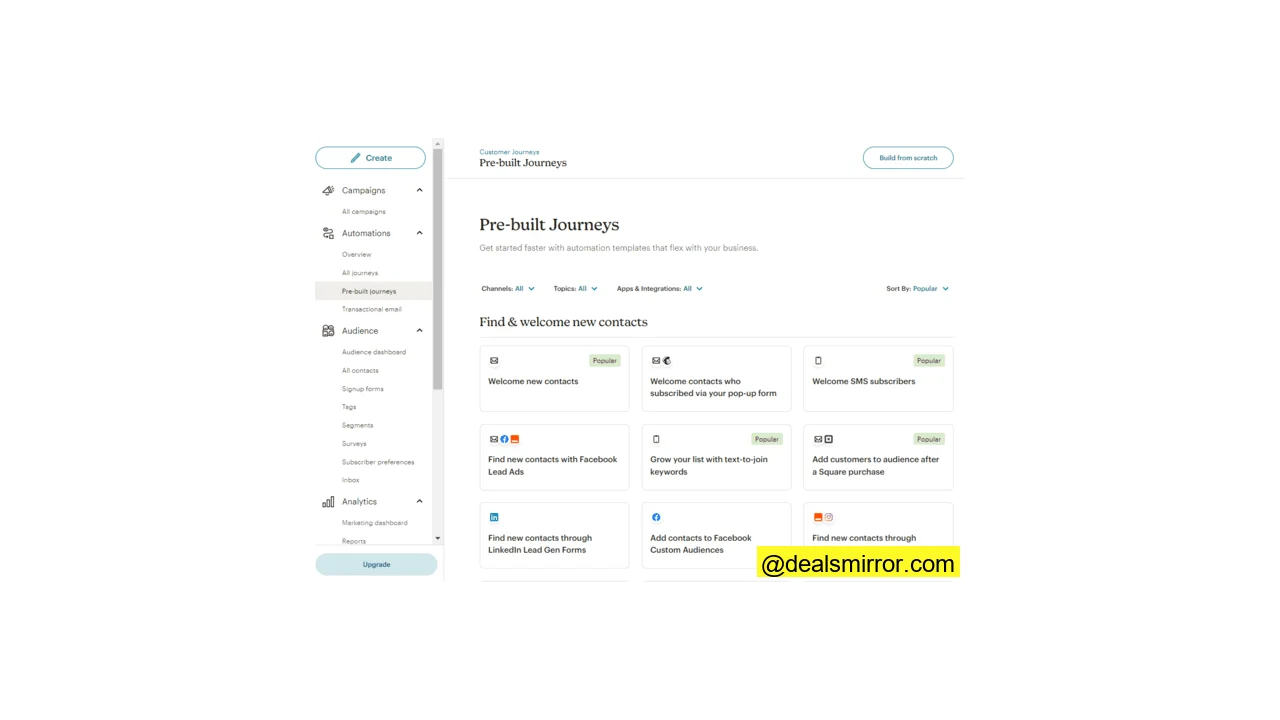
For more advanced automation, several platforms offer superior options, regardless of your budget:
- MailerLite, for example, features advanced multi-step automations and user-friendly sequence builders.
- Brevo allows you to build multichannel automations that incorporate SMS and WhatsApp.
- For the most comprehensive marketing automation, ActiveCampaign excels with an advanced workflow builder for highly precise sequence customization, unlimited steps, and automation of processes beyond email with goals and rules.
3. Limited Sales CRM Functionality
Mailchimp includes what it calls a marketing CRM, which allows for building contact profiles, adding tags, and tracking behavioral data for segmentation and personalized customer journeys. However, it lacks robust sales CRM features.
You won’t find sales pipelines, deals management, or lead conversion tools within Mailchimp. While some businesses prefer to keep email marketing separate from sales CRM, others seek an integrated solution to manage both sales and marketing efforts from a single platform.
If you prefer an all-in-one platform, GetResponse and Brevo offer built-in sales CRM tools, while ActiveCampaign provides superior conversion and sales-focused automation options.
Pros of Using Mailchimp
Despite its drawbacks, Mailchimp retains its popularity for several compelling reasons:
You Can Start and Use It for Free
Mailchimp offers a generous “free forever” plan, allowing you to send up to 1,000 emails per month and manage 500 contacts without any cost. While this plan comes with limited features and Mailchimp branding on your emails, it’s an excellent entry point for beginners in email marketing. Paid plans also typically include a month-long free trial, providing ample time to assess if the service meets your requirements.
A Well-Known and Trustworthy Brand
With over two decades in the industry, Mailchimp has established itself as a reliable and trustworthy platform. Its long history means a stable user experience and a wealth of online resources, tutorials, and community support available to help you navigate the platform effectively.
Ideal for Simple Newsletters Without Complex Needs
If your primary goal is to send straightforward newsletters and you don’t require extensive e-commerce features or advanced automations, Mailchimp is a highly capable tool. It boasts integrations with over 250 different apps, including website builders and CRMs, allowing for seamless synchronization of contacts and data across platforms.
Should You Choose Mailchimp?
For those new to email marketing, a Mailchimp account presents a safe bet. Its free testing option, user-friendly interface, abundant resources, and established brand reputation offer comfort and ease of use. However, when considering long-term value, scalability, and advanced features, other platforms often present stronger alternatives.
MailerLite and Moosend are excellent, beginner-friendly email marketing options that offer great value. MailerLite provides a straightforward, no-frills experience for core email marketing tasks, while Moosend includes more features for automation and e-commerce, all at competitive prices. Neither of these platforms cap the number of emails you can send on paid plans. For deeper insights, explore our full Moosend review and MailerLite review.
If you’re concerned about rising costs as your contact list expands, Brevo (formerly Sendinblue) is a compelling option. Its robust free plan allows for up to 100,000 contacts and 9,000 emails per month, far exceeding Mailchimp’s free tier. Discover more about its free plan, pricing, features, pros, and cons in our comprehensive Brevo review.
For all-round marketing automation with a solid CRM package, ActiveCampaign is difficult to surpass. If your business is projected to grow beyond basic email marketing into broader marketing automation and e-commerce, consider GetResponse. It offers an adaptable plan structure that starts with affordable email marketing and scales with your business needs. Get the full overview in our GetResponse review and ActiveCampaign review.
Choose these Mailchimp alternatives for:
- Great value email marketing software with unlimited emails: Moosend and MailerLite
- Feature-rich free plan and sales CRM on all plans: Brevo
- Best email marketing automation platform with CRM: ActiveCampaign
How to Get Started with Mailchimp
Mailchimp is designed to be user-friendly, making the signup process quick and straightforward. Initially, you’ll only need an email address, a username, and a password.
Once your account is authenticated, Mailchimp will prompt you for additional details, such as your business name and physical address. You’ll also be asked about your objectives and needs, covering:
- Your primary business goal for signing up.
- The platform features most important to you.
- Your current number of contacts.
- How you sell to your customers (e.g., via your own website, online marketplaces, physical shop).
While these “get to know you” steps are optional, the information helps Mailchimp customize your experience, including personalizing the ‘Get Started’ wizard based on your stated goals.
For example, if your goal is to send helpful emails, Mailchimp might suggest a setup path like this:
A helpful feature is that Mailchimp estimates the time required for each step, e.g., “4 steps, 18 minutes” for email setup. Additionally, the “Import your brand” feature allows you to input your website URL, and Mailchimp will automatically pull in brand elements like your logo, colors, and fonts for use in your email designs.
Send Email Campaigns with Mailchimp
Designing and sending email campaigns is at the core of email marketing, and Mailchimp simplifies this process. It supports various campaign types:
- Newsletters: Regular updates about your business and brand, fostering audience engagement over time.
- Product Updates and Announcements: Effective for promoting new products or services.
- Sales and Special Offers: Ideal for raising awareness about promotions or offering discounts to loyal subscribers.
Mailchimp provides two email builders: a classic drag-and-drop version and a newer one featuring generative AI tools for content assistance. These builders offer a straightforward way to create professional email templates without coding, utilizing pre-made HTML templates and elements that you can simply drag, drop, and customize with your content and style.
Email templates offer pre-set layouts and styles, ranging from basic structures to fully designed emails ready for your content. Mailchimp provides 137 email templates. Some templates require a paid plan, where the Creative Assistant can even design custom templates based on your website. On the free plan, only the most basic templates are available. For more options, many free Mailchimp templates are available online.
The email builder interface typically looks like this after you select a template:
The left-hand menu offers three main options:
- Under the Add button, you can insert content blocks or adjust layouts. Blocks are pre-built elements for images, various text types, buttons, videos, products, and more.
- The Styles menu allows you to customize the visual appearance of your emails, with separate previews for desktop and mobile.
- The Optimize button, available in the new builder, integrates AI tools that provide content suggestions based on analytics from high-performing emails.
Adding and editing content in the Mailchimp builder is intuitive; simply click a content block and make changes in the left sidebar.
Once your design is complete, proceed to campaign settings:
Here, you configure recipients, add a compelling subject line, and schedule the campaign send time. You can send test emails to yourself or colleagues before the final launch. Mailchimp includes safeguards, preventing sends if your email content is incomplete.
Start With These Email Automations
Email automation leverages software to manage the sending of emails automatically. Instead of manually hitting ‘send’ for every campaign, automation tools handle it for you. Despite sounding complex, platforms like Mailchimp make it accessible by using sequences of triggers, actions, and conditions (e.g., if event X occurs, action Y follows).
You can set emails to send when a contact signs up, clicks a link, or based on other behaviors. Multiple emails can be chained into long sequences, with different paths based on conditions. Email automation is valuable for:
- Welcome Emails: Triggered when a new subscriber completes a sign-up form.
- Abandoned Cart Workflows: Sends an email to users who leave an online store checkout without completing a purchase.
- Special Occasion Emails: Automatically sends emails on contacts’ birthdays or anniversaries.
- Targeted Offers: Delivers special offers and discounts based on behavior, such as sending an email to someone who repeatedly visits a product page but doesn’t buy.
- Feedback and Follow-ups: Automates outreach for post-sale feedback or to offer further assistance.
- Nurturing Campaigns: Aims to guide leads toward conversion through a sequence of messages.
- Re-engagement Campaigns: Designed to tempt lapsed customers back into engagement.
To create an automated Welcome sequence in Mailchimp, navigate to the Automations menu and select the pre-built journeys tab for templates.
You’ll find several Welcome journeys. Clicking on one provides a preview, such as this for “Welcome New Contacts”:
This simple sequence is triggered when a new contact joins an ‘Audience’ (a list via a form), with the action being to send a welcome email.
Building longer sequences is straightforward. For instance, you could create a sequence that monitors whether new subscribers open the welcome email. If not opened within three days, a follow-up email is sent:
This is Mailchimp’s workflow editor. The blue plus signs allow you to add ‘journey points,’ which can be rules (like if/else conditions to split sequences based on subscriber behavior) or time delays. Journey points are also where you define actions, such as sending emails (including SMS messages or surveys) or updating contact records.
Create Forms and Landing Pages in Mailchimp
Forms and landing pages are essential for growing your email list by capturing new leads. Here’s how to build both within Mailchimp.
Mailchimp Signup Forms
Lead capture options in Mailchimp are found under the Audience menu:
Mailchimp’s signup form page offers six options:
- The form builder is the primary tool for creating forms from scratch.
- Separate options for pop-up, contact, and embedded forms provide shortcuts with pre-made formatting and design.
- Form integrations connect signup forms from external landing page and form builders to Mailchimp.
- The final option is to build a signup landing page.
The signup form builder offers a comprehensive interface:
From the drop-down menu in the top left, you can choose your signup form type. On the right, you can add and format fields beyond the standard name and email address, including checkboxes, drop-down menus, phone, website, and image fields.
For quicker form creation, the shortcut options are useful. For example, the pop-up form builder has a simpler interface:
The ‘+’ sign on the form reveals options to add new fields, while the left menu allows you to style various elements or choose from pre-formatted layouts. You can further customize the form’s appearance and timing in the Settings panel.
Mailchimp Landing Pages
Mailchimp‘s navigation for landing pages can be a bit indirect. While there isn’t a direct link in the main menu, you can access options by following the path: Audience > Signup Forms > Signup Landing Page.
The Begin button here allows you to create a page with an embedded form. Clicking the separate Landing Page option, which appears nearly identical, lets you build general landing pages for other purposes. This dual entry point can sometimes be confusing.
Similar to email creation, building a landing page in Mailchimp begins with selecting a template.
Templates are available for lead generation and product pages. Product landing pages are particularly useful for promoting special offers, directing users to a dedicated “offer” page rather than a regular product page. This simplifies tracking conversions from email campaigns.
The landing page editor closely resembles the email builder. You can drag and drop content blocks into position from the right sidebar and then click on blocks to edit their content and style.
Analyze Email Performance in Mailchimp
Under the Analytics menu, the Marketing dashboard provides an excellent starting point for email marketing analytics, displaying all critical metrics at a glance.
The Performance tab on the dashboard shows key data:
Here, you can monitor total sends, open rates, click rates, and unsubscribe rates, along with their trends over time via detailed graphs. The objective is to maximize open and click rates while minimizing unsubscribe rates.
It’s important to note that Mailchimp requires you to manually activate open and click tracking for each campaign. Forgetting this step will prevent these metrics from being measured, which can be an annoying oversight.
The dashboard also provides delivery data, with the goal of achieving the highest possible delivery rate. A crucial metric to watch is Bounces. A bounce signifies an email that failed to reach the recipient’s inbox. High bounce rates not only waste effort but can also negatively impact your sender reputation, making email deliverability more challenging. This indicates to email servers that you might be a “spammy” sender.
While this dashboard offers sufficient detail for beginners, you can also create customized Reports for more in-depth analysis. Reports allow you to select from a broader range of metrics and extend your analysis beyond email and SMS campaigns to include the performance of automations or landing pages.
For a complete overview, including all pros and cons, refer to our comprehensive Mailchimp review.
Keep Your Email List Clean
Maintaining a healthy email list is paramount in email marketing. This involves ensuring you only send to genuine, verified email addresses and periodically removing old, unused, or potentially fake ones. A dirty list leads to more undelivered emails, higher bounce rates, and a damaged sender reputation. Email servers may flag you as a “spammy” sender, making future campaigns harder to deliver.
While Mailchimp automatically “cleans” addresses from your list if a bounce occurs, these blocked addresses still count towards your contact limit. This means you could be paying for contacts you cannot even send emails to.
Therefore, proactive list cleaning is even more critical when using Mailchimp. This can be done using email validation software like Hunter, which allows you to upload and verify email addresses before sending campaigns, ensuring a cleaner, more effective list.
Mailchimp Pricing and Plans
Mailchimp offers various plans. For example, a basic plan might start at approximately $13 a month for 500 contacts, allowing 5 users, 5 lists, and 6,000 emails.
The Standard plan includes all of Mailchimp’s core marketing features. Note that website building and transactional email products are priced separately. All paid plans typically come with a one-month free trial.
Conclusion: How to Use Mailchimp
Overall, Mailchimp is a beginner-friendly platform that is easy to navigate, with ample guidance for building and sending your initial campaigns.
However, a critical consideration with Mailchimp is its strict email sending and contact limits. As your email marketing efforts expand, costs can escalate quickly, particularly concerning contacts. Mailchimp charges for duplicate contacts across multiple lists and even for blocked contacts you can no longer send to due to its “cleaning” policy.
So, what are the best alternatives? For beginner-friendly email tools at a competitive price, consider MailerLite and Moosend. Brevo stands out with a superior free plan compared to Mailchimp, offering higher send limits and accommodating up to 100,000 contacts.
For those requiring more advanced features, explore GetResponse or ActiveCampaign. GetResponse allows you to begin with affordable, straightforward email marketing and scale up as your business grows. ActiveCampaign is a strong contender for growing businesses needing advanced automation and robust CRM capabilities.