
ActiveCampaign is renowned as a leading email marketing and automation platform, founded in 2003 with over 150,000 customers across 170 countries. Agencies and marketing professionals, from small businesses to large enterprises, widely appreciate this robust tool.
However, many are unaware that it also features powerful sales automation and CRM capabilities, known as ActiveCampaign Sales. This comprehensive review delves into ActiveCampaign CRM, examining its features, support, cost, and overall pros and cons. If you’ve heard great things about ActiveCampaign’s marketing automation, you’ll likely be impressed by its sales automation tools too.
ActiveCampaign CRM Software Summary
ActiveCampaign Sales is an excellent tool for growing sales teams. Here are the main highlights:
- It’s easy to use. Even with its advanced tools, ActiveCampaign provides comprehensive guidance. The interface is intuitive, and extensive on-page support is available.
- ActiveCampaign Sales is affordable. While there isn’t a free plan, it offers exceptional value for money.
- Email marketing and automation are its core strengths, and the CRM seamlessly complements these. It’s relatively easy to learn, with numerous pre-built automation examples.
- ActiveCampaign helps align marketing and sales efforts. It scores top leads to prioritize in your sales pipelines, and if an opportunity falters, it can re-engage prospects with a nurturing campaign.
- Beyond abundant on-site resources, support is available via live chat and email.
What Stands Out in ActiveCampaign CRM
Can a platform primarily known for email marketing excel as a sales CRM? In ActiveCampaign’s case, absolutely. Here are its standout features:
- Sales Automation Recipes: For those new to automated sales workflows, ActiveCampaign offers over 900 pre-built templates to kickstart your efforts.
- Easy-to-Use Automation Editor: While automation recipes are a great starting point, you can customize them endlessly with ActiveCampaign’s automation editor. The interface is incredibly user-friendly, and the range of options is impressive.
- Site Tracking: The sales CRM focuses on understanding customer behavior to enable appropriate responses. Online event tracking gathers data on prospect actions on your websites. It’s simple to set up and makes your automated messages highly relevant.
- Lead Scoring: Avoid wasting time on leads unlikely to convert. Lead scoring allows you to tag contacts and deals based on proven sales paths, providing a straightforward method to quickly identify your most promising leads.
- Integrations: ActiveCampaign is built to integrate with virtually any other software platform, offering over 900 direct integrations.
ActiveCampaign CRM: Contact Management & Sales Automation Deep Dive
ActiveCampaign asserts that its CRM is designed to help sales teams collaborate seamlessly. Sales pipelines, deals, contact management, and reporting all aim to enhance visibility and shared intelligence.
ActiveCampaign Sales also emphasizes automation, ensuring every opportunity is pursued as efficiently as possible.
ActiveCampaign offers its sales and marketing campaigns as distinct products, but there’s significant overlap. When you first sign up for a free trial, you gain access to all tools in one unified location. Here’s what the welcome page looks like:
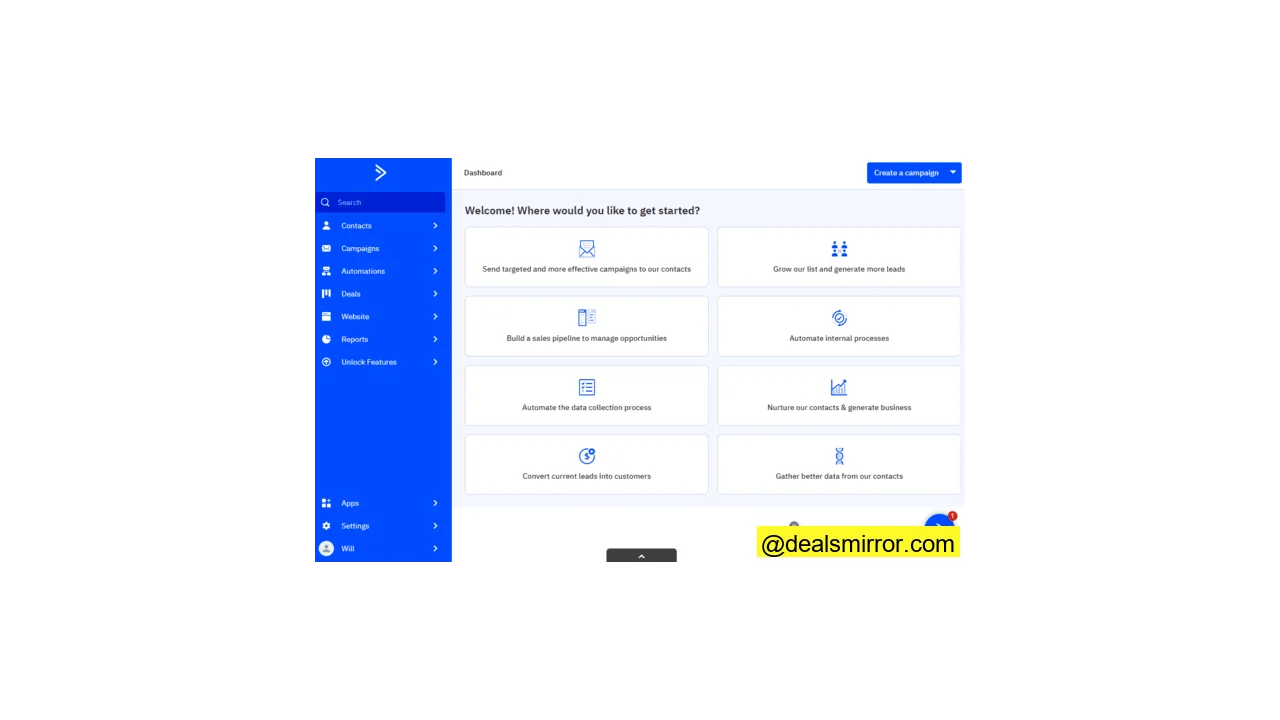
There are no silos between sales and marketing here, which extends to sales engagement and blended automations.
Let’s explore what ActiveCampaign Sales can do.
Creating Sales Deals and Sales Pipelines
ActiveCampaign refers to sales pipelines as the “building blocks” of its sales CRM. They visually represent your entire sales process, where a deal signifies a sales opportunity. Pipelines enable you to track the progress of each opportunity.
Never created a sales pipeline? No problem. The ease of setting up pipelines in ActiveCampaign is impressive. Give your sales pipeline a name, and ActiveCampaign handles the rest, providing a default three-stage pipeline like this:
Stages represent the steps to move deals towards conversion, often associated with specific tasks. You can customize your pipelines using the “Add a stage” button.
Stages can be tailored to your business needs, whether it’s product demonstrations, sending brochures, or other sales materials. You can add as many stages as required and rearrange their order with a simple click-and-drag.
A small but significant detail in the stage editing options is the ability to choose the order in which deals are displayed within each stage. You might prioritize by deal value, win probability, or focus on older leads first.
What about sales deals? Similar to sales pipelines, creating deals is straightforward. Simply fill in the details on a form. The default information you can add is shown below, but these fields are fully customizable, allowing you to include any necessary information for your team.
Automating Sales Workflows
Pipelines and deals form the core of an effective sales CRM, and ActiveCampaign makes creating and managing both incredibly easy. However, these are still basic CRM tools, found in many platforms.
What truly brings ActiveCampaign to life is its automation. Most actions you can perform with pipelines and deals can be automated, including:
- Creating and updating sales deals
- Moving deals through pipeline stages
- Creating and assigning tasks
- Updating contact data
- Lead scoring and nurturing
This is a significant advantage for ActiveCampaign’s sales CRM. Automation saves time and enhances accuracy. It’s easy for a sales team member to forget to update a deal or let a lead slip away, but not with automation.
Furthermore, ActiveCampaign provides extensive support for building sophisticated sales automations. Many marketing automation platforms offer pre-built workflows to save time, and ActiveCampaign is no exception, calling them “recipes.” It offers sales automation recipes alongside its marketing automation templates.
Over 900 automation recipes are available in the ActiveCampaign Marketplace. Here are a few examples:
Create a New Sales Deal
Sales deals can be created automatically in various ways. This recipe demonstrates creating a deal from a purchase request form. You can also generate opportunities from appointment bookings or when specific tags are added to contact data.
Note the conditional or “if/then” step. This handles cases where a customer with an open opportunity fills out the form. If this occurs, an email is sent to the opportunity owner’s representative for follow-up. Other recipes update contact and opportunity information based on form data.
Move Sales Deals Through Pipeline Stages
This is a simple automation template for moving a sales deal from one stage to another. In this example, an email is sent to a prospect. If they respond, the deal moves to the “Schedule a Demo” stage, and a task is created to facilitate this.
Task Management
Creating and assigning tasks is a crucial part of a sales CRM. ActiveCampaign excels by automating many aspects of task management. The recipe above creates a follow-up task when a new sales deal is created. The “yes/no” options address whether you have a phone number for the prospect’s contact.
Other task recipes include:
- Creating tasks when a deal’s win probability index becomes positive or negative. (More on win probability in the reporting section).
- Assigning a task when a new owner takes over a deal.
- Repeating a task until a sales opportunity moves to the next stage.
Sales Engagement
More advanced automation options are available in higher pricing tiers, including what ActiveCampaign calls “sales engagement” workflows. Sales engagement automations achieve two key things: they link sales and marketing, creating aligned automation processes from nurturing to conversion. Secondly, you can automate individual emails.
Especially in marketing automation, most automated emails are configured for multiple recipients. Individual email automation allows you to send personalized emails to a single prospect. Not having to manually draft each message saves significant time and ensures every email is sent at the right moment, every time.
The workflow above represents a classic sales engagement sequence. It involves sending a personalized trial offer. If the recipient clicks or responds, the goal is achieved – you’re one step closer to conversion. If there’s no response, a nurturing campaign is sent. Instead of abandoning a lead, it’s returned to the marketing phase of the funnel, and the process restarts.
These examples barely scratch the surface of the available sales automation options. Dozens of other recipes exist, some industry-specific or configured in different languages, including English, Spanish, French, Portuguese, German, and Italian.
Many recipes are platform-specific. If your e-commerce platform is connected to your CRM, ActiveCampaign offers automation recipes for Shopify, WooCommerce, and more. Further details on platforms that can connect to your ActiveCampaign Sales CRM will be discussed later.
Workflow Editor
All automation recipes are fully customizable, and you can also create your own from scratch. ActiveCampaign’s workflow editor is exceptional. It offers a wide variety of advanced automation options while remaining user-friendly, thanks to its well-designed interface.
There are two ways to add Actions to your workflow: drag and drop them from the right-hand menu, or click the “+” icon to bring up the list of options.
The number of Actions is vast. Here’s what you can do by category:
- Sending Options: Automatically send emails, SMS, and web push notifications. Emails can be marketing campaigns, transactional, or one-to-one.
- Conditions and Delays: Add if/then conditions, delays, and splits. You can end sequences, initiate new ones, and jump to different parts of a sequence.
- Contacts: Automatically update contact data and add or remove tags. You can also subscribe and unsubscribe contacts from lists, add notes, and adjust lead scores.
- CRM: All actions related to creating and editing sales deals, setting up tasks, and adjusting deal scores.
- Salesforce / CX Apps: Specific actions for popular third-party integrations.
An equally large selection of triggers is available to initiate a sequence:
Many triggers are linked to site tracking. You can connect your website and other online assets to your ActiveCampaign account. ActiveCampaign will track site visits, clicks, navigation paths, and other data, which you can use to activate behavior-based automations.
Contact Management
Tracking sales opportunities and automating the sales process is one side of the sales CRM coin. The other is contact management. After all, CRM is about managing customer relationships.
As discussed, ActiveCampaign places great importance on visibility for sales opportunities and tasks. The same applies to contact data. The platform ensures that customer information is always available across your teams, whenever and wherever needed.
A notable aspect is the continuity between marketing and sales in contact management. ActiveCampaign began as an email marketing platform, and it continues to organize contact management similarly to email marketing software. Thus, you create lists from subscription forms. Learn more about ActiveCampaign’s email marketing, marketing automation, and lead generation features.
You can segment lists to target specific individuals, including automatic segmentation. You can add tags and customize data fields to include any information you require.
Additionally, ActiveCampaign Sales adds a layer of CRM tools. Each contact list contains a record of all interactions you’ve had with that person, including site tracking data. In essence, you can observe the customer journey at an individual level and respond accordingly.
Each contact list also displays all pending tasks for that person. You can add notes or send emails directly from the listing. This is another small way ActiveCampaign simplifies your workflow.
Moreover, most contact management actions can be automated. Many automation workflows focus on contact-related tasks, such as adding tags or changing contact fields as they move through a sales pipeline, or assigning tasks for personal follow-up.
Lead Scoring in ActiveCampaign CRM
ActiveCampaign’s lead scoring options are unparalleled. You have significant flexibility and control over how scoring functions. A score can be assigned to any action a prospect takes, whether positive or negative. Sales data will reveal which steps, or combinations of steps, in the customer journey are most likely to lead to conversions.
For example, you might find that leads who visit a product page and then submit an inquiry form are more likely to buy. You would assign a high score to these actions. Then, when they occur, you’ll know you have a hot lead to act on.
Setting up lead scoring is similar to creating a segment. First, you create a scoring rule or condition. The list of available conditions is extensive, covering actions like submitting forms or responding to an email, as well as on-site activities gathered by tracking, or deal status and value.
Conditions can also be linked to contact data, allowing you to adjust scores based on a contact’s location, tags, and much more. You can also group conditions to create highly precise scoring rules.
Once your rules are established, you set your points, which can be added or removed. Any contact meeting these rules moving forward will be tagged with these points. You can also set a score for sales deals, following the same principle, to see which opportunities are most likely to convert as they progress.
As with everything in ActiveCampaign Sales, most of this can be automated. The example above is a very simple automated lead scoring workflow, but the principle is clear: any action that can trigger a workflow can also add or subtract points as a result.
Conversely, lead scoring is used as a trigger for automations or as a condition within workflows. The following example applies a “highly engaged” tag to anyone with a certain lead score, then uses that tag to solicit feedback from those customers.
Reporting
ActiveCampaign Sales is packed with analytics tools, once again emphasizing the free sharing of information between teams. Each section has its own Reporting area, breaking down and analyzing performance data in dozens of different ways.
On the Deals page, you can view reports by opportunity, opportunity owner, and pipeline. The main Opportunity Summary report allows you to compare won and lost opportunities, see the average value of your successful deals, and track how it changes over time. You can also view the same statistics by opportunity owner to monitor sales team performance.
Separate sections exist for sales pipeline reports. The sales funnel view shown above provides a graphical representation of the number of deals per stage. Sales Performance breaks down financial statistics by opportunity and stage.
At the end of the list, Deal Forecast compares the predicted value of opportunities with actual results.
There are four pages of Automation reports:
- All Automations: An overview of workflow details, including campaigns, opportunities, contacts, goals, and more.
- Automation Performance: Statistics for marketing automation, such as email open rates, clicks, bounces, and unsubscribes.
- Goal Summary: Goals act as a tag to indicate that an objective has been met. The Goal Summary reports on these objectives.
- Sales Engagement: Details and tags for 1:1 emails.
Some more advanced reporting options are available in higher tiers. One such feature is Win Probability, an AI-powered tool that elevates deal scoring. Instead of using your own scoring rules, it analyzes past deal performance and estimates the conversion chances of new deals based on known data.
ActiveCampaign CRM Integrations
As mentioned, ActiveCampaign Sales offers dedicated automation workflows for third-party platforms, which speaks volumes about ActiveCampaign’s positive relationship with other software tools.
You can connect over 900 different services to your ActiveCampaign Sales CRM. Popular examples include:
- eCommerce platforms, such as Shopify and WooCommerce
- Lead generation tools, such as OptinMonster and Zapier
- Landing pages, such as Leadpages and Unbounce
- Webinar platforms, such as GoToWebinar
- Email verification services, such as DeBounce and Clearout
- Accounting software, such as QuickBooks and Xero
- Support platforms, such as Zendesk and Intercom
ActiveCampaign CRM Customer Support
ActiveCampaign Sales CRM is packed with tools for sales managers and teams. However, if you’re new to sales CRM or ever get stuck, extensive help is readily available.
A live chat widget is present on every page. Initially, you’ll interact with a chatbot, which attempts to resolve your query by directing you to online resources. If you don’t find what you need, you can chat with a real person. Alternatively, you can submit a support ticket via email.
ActiveCampaign provides a wealth of self-help resources in its online knowledge base, including video tutorials and articles.
A particularly helpful aspect is the numerous prompts and guides integrated throughout the platform. Most of the time, you don’t need to search for help; ActiveCampaign anticipates user needs and provides guidance directly on each page.
ActiveCampaign CRM Pricing and Plans
ActiveCampaign Sales pricing starts from $23/month/user for the Plus plan. This tier provides all essential CRM tools: pipeline, deal, and account management, contact and task management, sales automation, lead scoring, and reporting.
The Professional tier costs $49/month per user. At this price point, you gain access to sales engagement and 1:1 email automation, along with win probability and sentiment analysis, Facebook Lead Ads, and the option for A/B testing automations.
All new users can try a 30-day free trial. This grants access to all features, including email marketing, sales CRM, and automation. For a complete pricing overview, read our ActiveCampaign pricing review.
Pros and Cons of ActiveCampaign
Pros:
- Fantastic automation tools, including hundreds of recipes
- Excellent on-page support to help you learn all features
- User-friendly interface
- Superb data sharing between teams
- Over 900 integrations
- Great value for money
What could be improved:
While the full-access free trial is beneficial, a free plan with basic CRM tools would offer an even better introduction.
ActiveCampaign CRM: Is it the Right Platform for You?
ActiveCampaign Sales is a strong choice for growing sales teams. It’s easy enough for small teams and CRM newcomers to use, yet its powerful automations also empower larger sales managers to boost efficiency, close more deals, and scale rapidly.
- Ease of Use: 4.5 / 5
- Value for Money: 5 / 5
- Editor & Templates: 4.5 / 5
- Features: 4.5 / 5
- Sales Automation: 5 / 5
- Customer Support: 4 / 5
Total Score: 4.5 / 5
Frequently Asked Questions (FAQ)
Can ActiveCampaign be used as a CRM?
Crucially, ActiveCampaign Sales enables you to automate virtually everything, increasing your speed and effectiveness. You can also link sales activity with email marketing. Throughout the customer journey, comprehensive data is available to help evaluate performance, including lead scoring and win probability, which help you focus on your best prospects.
What is the function of ActiveCampaign CRM?
ActiveCampaign also allows you to automate most sales and marketing processes, which boosts speed, efficiency, and leads to better results.
Is ActiveCampaign the same as Mailchimp?
Mailchimp does provide a light marketing CRM focused on contact management and data analysis. In contrast, ActiveCampaign Sales is a CRM tool designed to convert leads into customers. This includes visualizing your entire sales process in pipelines, identifying your best prospects, and creating tasks to convert them, all of which can be automated.
Is HubSpot better than ActiveCampaign?
However, HubSpot is more expensive than ActiveCampaign. For larger enterprises with higher budgets, HubSpot’s Sales Hub is often the preferred choice. But ActiveCampaign Sales is more affordable for smaller and growing teams, without sacrificing quality.
Alternatives to ActiveCampaign CRM
ActiveCampaign CRM vs. HubSpot CRM
The primary difference between ActiveCampaign CRM and HubSpot CRM is that HubSpot offers a free plan.
HubSpot CRM allows you to create sales pipelines and track deals with comprehensive analytics for free. The free plan also includes a meeting scheduler, live chat software, an email template builder, and an AI email writer.
ActiveCampaign offers a 30-day free trial with full access to its sales CRM. Its features are significantly more sophisticated than HubSpot’s free CRM, especially its automation and lead scoring tools.
HubSpot also offers a paid sales CRM, the Sales Hub, which costs considerably more than ActiveCampaign Sales and targets larger teams. HubSpot’s Professional and Enterprise plans start from $1,700/month, not including onboarding fees. A key difference is that Sales Hub includes call tracking and analytics tools.
Find out more about costs in HubSpot pricing or ActiveCampaign pricing.
ActiveCampaign CRM vs. Pipedrive
The main difference between ActiveCampaign CRM and Pipedrive is the level of automation available. Both platforms allow you to automate tasks around sales pipeline creation and feature user-friendly visual workflow builders.
However, ActiveCampaign comes with over 900 pre-built automation recipes. These include templates tailored to specific tasks, outcomes, and business types. There are also specific templates for popular third-party integrations. With sales engagement automation, you can link the sales funnel and marketing automation to nurture leads effectively.
ActiveCampaign CRM vs. Freshsales
The key differences between ActiveCampaign CRM and Freshsales are cost and target audience.
ActiveCampaign Sales starts at an affordable price for small businesses but charges extra for more advanced features, including powerful automation tools. It’s a platform designed to help sales teams scale rapidly and automate their sales process.
Freshsales is a CRM tool for simpler lead opportunities aimed at small and medium-sized businesses. It focuses on core CRM software tools like pipelines, deal tracking, and basic automation. It costs less to start and also offers a free plan, unlike ActiveCampaign.