

Mailchimp is a widely recognized name in email marketing, but popularity doesn’t always equate to being the best fit for everyone. The market offers a robust selection of alternative email marketing software, including platforms like MailerLite.
MailerLite might be less familiar to some, yet it stands as a strong contender. This article provides a comprehensive comparison between MailerLite and Mailchimp, evaluating them on key aspects such as email creation and delivery, automation capabilities, contact management, and crucially, cost-effectiveness.
By the end of this detailed analysis, you will have a clear understanding of which email marketing software is ideal for your needs. Let the battle between MailerLite and Mailchimp begin!
Summary: MailerLite vs Mailchimp Overview
For those short on time, here’s the concise version: both Mailchimp and MailerLite are user-friendly and easy to get started with.
The primary distinguishing factor is **value for money**, where MailerLite consistently comes out ahead. On comparable plans, the feature sets of Mailchimp and MailerLite are quite similar. However, MailerLite offers more contacts, unlimited email sends, and generally costs less, positioning it as one of the best value-for-money email marketing tools available.
| Mailchimp | MailerLite | |
| Ease of Use | 4/5 | 5/5 |
| Sending Emails | 3.5/5 | 4/5 |
| Automation | 4/5 | 3/5 |
| Lead Generation | 3/5 | 4/5 |
| Contact Management | 3.5/5 | 4/5 |
| Integrations | 4/5 | 3.5/5 |
| Support | 3.5/5 | 3.5/5 |
| Pricing | 3/5 | 5/5 |
MailerLite boasts a slick user interface. In contrast, Mailchimp is a more expansive marketing platform, attempting to provide a wide range of services beyond just email marketing, including social posting and ads. While this can be beneficial for some, the sheer volume of options can make certain features difficult to locate.
MailerLite, on the other hand, is streamlined and dedicated primarily to email marketing, making it ideal for beginners and those who prioritize speed and simplicity.
Both MailerLite and Mailchimp feature robust, user-friendly drag-and-drop email editors. While neither offers the most extensive selection of templates, MailerLite‘s templates are often preferred for their quality, and its editor facilitates easier layout adjustments.
The simplicity of MailerLite also gives it an edge in other areas. Mailchimp offers more automation options, but these can be quite complex. For users requiring highly advanced automated marketing journeys, tools like ActiveCampaign might be more suitable. However, for sending emails with straightforward automations, MailerLite is considerably more direct.
A similar situation applies to sign-up forms. Mailchimp‘s usability is hindered by the presence of three distinct form builders, none of which are particularly intuitive. MailerLite excels at this basic function, as it does with contact management, offering easy grouping and segmentation. MailerLite‘s master list model is generally preferred over Mailchimp‘s separate ‘audiences,’ which can lead to unnecessary data duplication.
Where Mailchimp truly shines is in its extensive number of integrations with other platforms. MailerLite cannot compete with Mailchimp‘s 300+ integrations. Regarding customer support, both platforms offer only email support for a limited period on their Free plans, which is less than ideal. While Mailchimp‘s support is available, expectations should be tempered.
Detailed MailerLite vs Mailchimp Comparison
Let’s dive into the specifics. Both Mailchimp and MailerLite provide free trials upon registration, allowing users to explore and compare their main email marketing features.
Sending Emails
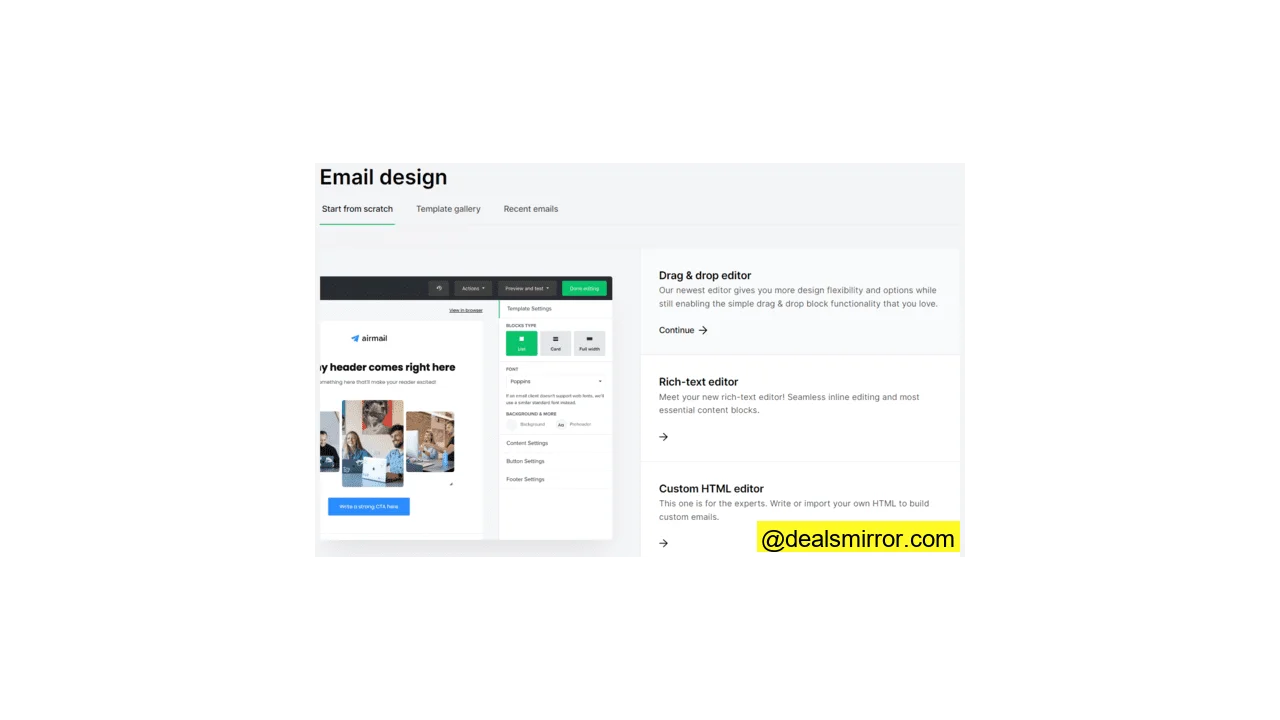
MailerLite provides all standard options for email creation and delivery. It includes a drag-and-drop editor for building no-code HTML emails, along with a basic text editor similar to those found in standard email platforms. For users familiar with coding, it supports importing custom HTML emails.
When setting up a campaign in MailerLite, users can choose between standard sending and A/B split testing. The platform also allows for setting up an RSS feed to automatically convert new blog content into emails and offers auto-resend functionality for emails not opened on the first attempt.
MailerLite features 90 pre-made email templates for its drag-and-drop editor, categorized into 12 groups. Note that templates are not available on the Free plan. The quality and variety of templates can differ by category; for instance, while there are four basic newsletter templates, the 18 e-commerce templates are often described as more vibrant and professional.
A standout feature of MailerLite‘s drag-and-drop editor is its pre-formatted content blocks, which can be easily added to any template, greatly simplifying layout customization. Another highlight is the AI writing assistant, which aids in crafting headlines, product descriptions, and even full newsletters. A limitation to note is the inability to change templates once a design process has begun.
Mailchimp offers two primary email creation options: a ‘Classic’ drag-and-drop editor and a new AI-powered builder that can import visuals from your website to ensure consistent branding.
Plain text email sending and custom code designs are also possible in Mailchimp, though these options are somewhat less prominent within the workflow. For instance, to use custom HTML, one must navigate through campaign setup and then locate the ‘Code Your Own’ tab within the Content options.
Mailchimp does not boast the largest template library, with 84 pre-designed ‘themed’ templates available in total, fewer of which are accessible on its Free plan.
If the pre-made designs don’t suit your needs, Mailchimp offers 14 basic templates to start from.
Mailchimp‘s email editor is functional and easy to use, though it offers limited flexibility for altering layouts once a template or outline has been selected, as designs tend to be quite fixed. A beneficial feature, however, is the ability to change templates mid-design.
The Verdict: MailerLite vs Mailchimp for Sending Emails
The choice between MailerLite and Mailchimp for sending emails is close, but MailerLite often edges out Mailchimp. MailerLite is typically preferred for its higher quality templates, despite both platforms having a limited overall selection. Additionally, MailerLite‘s editor, particularly its useful layout blocks, offers a slight advantage.
Automating Workflows
Every MailerLite user, including those on the Free plan, can construct automated workflows. The workflow editor is straightforward and user-friendly. On the highest tier, up to three triggers or starting points can be set for each workflow, while lower tiers are limited to one trigger per automation, keeping processes relatively simple. Available triggers include:
- Subscribers signing up via a form
- Subscribers clicking specific links
- Subscribers updating their information
- Specific dates
There are no pre-made workflow templates on MailerLite‘s Free tier, but the standard plan provides 15. These templates significantly simplify common tasks like sending welcome emails to new subscribers; users simply add a trigger and create their email. MailerLite offers further details on how automations function.
Mailchimp‘s automation capabilities represent a noticeable advancement compared to MailerLite. Mailchimp provides a greater number of pre-built workflow templates (referred to as ‘journeys’), totaling 77, with 39 specifically designed for lead nurturing. Many of Mailchimp‘s templates are linked to third-party applications and integrations, allowing for advanced automations, such as receiving alerts in Slack or Teams when new subscribers sign up.
Should a suitable Mailchimp workflow template not be found, users retain the option to build their own. However, it’s worth noting the vast array of choices available for creating custom workflows, with dozens of options just for setting the automation’s trigger point. This allows for the construction of more sophisticated automations than those possible in MailerLite, but it can also be overwhelming for non-expert marketers.
The Verdict: MailerLite vs Mailchimp Automations
Mailchimp‘s advanced automation features are undeniably more powerful than MailerLite‘s. However, MailerLite excels in simplicity for users whose primary need is basic automations, though the absence of workflow templates on its Free plan is a drawback.
Generating Leads with Landing Pages and Forms
In MailerLite, users can create both pop-up and embedded forms, and pop-ups can also be utilized for delivering promotional messages on websites.
MailerLite offers 24 pop-up form templates, primarily sign-up forms, including some countdown teasers for events. These come in various formats, such as full-page, half-page, sideboxes, and modal windows. Modal windows are designed to capture attention by making background content inaccessible, requiring visitor interaction. There is only one embedded form template, a relatively basic newsletter signup form.
MailerLite mandates the selection of a subscriber group before form creation, ensuring that all new sign-ups are automatically sorted. This feature is beneficial for preventing new subscribers from getting lost in unorganized contact lists.
Mailchimp‘s form-making capabilities are integrated with its audiences/contact management section. While this organizational choice has logical merit—forms are central to growing subscriber numbers—it can also make the form builder less immediately accessible. Users often need to actively search for where to create a form.
Mailchimp provides a broader range of form options than MailerLite, allowing for the creation of forms for subscriptions, unsubscriptions, profile updates, friend referrals, or contact inquiries. Each category offers numerous choices, and users can select between embedded and pop-up form types.
A notable point of confusion within Mailchimp is the presence of three distinct form builders: one for ‘Form Builder,’ one for ‘Embedded Forms,’ and one for ‘Subscriber Pop-Up.’ None of these are particularly intuitive. Only the pop-up builder utilizes a drag-and-drop interface, and even then, its options are limited, while the other two are often described as clunky.
The Verdict: MailerLite vs Mailchimp on Lead Generation
Mailchimp undeniably provides more options for forms than MailerLite. However, its usability is often criticized, particularly due to the confusing presence of three different form builders. Therefore, for a straightforward option that effectively handles basic lead generation tasks, MailerLite is often preferred.
Managing Contacts
MailerLite offers two primary methods for organizing contacts: groups and segments.
With groups, users have the flexibility to create custom categories and add contacts as desired. Segments, on the other hand, are dynamic filters based on known contact data or user activity. For instance, a segment could be created for subscribers in a specific country who use the same email service and have opened the last five emails. This segment automatically updates as contact data or activity changes. Additionally, automations can be configured to create segments and groups, as well as to add and remove contacts.
Mailchimp allows for tagging subscribers in addition to creating groups and segments. The distinction between groups and tags can sometimes be unclear, as they function quite similarly. Mailchimp describes tags as a way to “Easily organize your contacts using simple words or phrases that make the most sense to you,” which closely resembles the function of groups.
Segments in Mailchimp operate similarly to MailerLite, though Mailchimp offers more criteria for segmentation and includes a few basic pre-made segments.
A distinctive feature of Mailchimp is the ability to create separate lists or ‘audiences.’ In contrast, MailerLite operates on a single master list, utilizing groups and segments to refine selections as needed.
Mailchimp‘s approach has both advantages and disadvantages. It is useful for maintaining distinct activities separately—for example, having different audiences for newsletters and promotional campaigns. However, these audiences are entirely separate, meaning contacts from two different lists cannot be easily targeted with the same email. Despite this, users are not compelled to create multiple audiences and can opt for a single list if preferred.
The Verdict: MailerLite vs Mailchimp List Management
For contact management, MailerLite‘s simplicity often prevails. Mailchimp can sometimes feel as though it is attempting to offer an excessive number of options, potentially overcomplicating the process for some users.
Analytics
All of MailerLite‘s analytics are centralized on the main dashboard, presented in a functional but basic visual format. Users gain access to statistics covering contacts, email campaigns, forms, and automations.
Subscriber statistics provide insights into daily or monthly sign-ups. Form statistics reveal the origin of new subscribers and conversion rates, allowing for easy identification of top-performing forms. Automation workflow statistics detail the number of automatic emails sent, the number of subscribers reached, and the unsubscribe rates associated with these automations.
Email statistics are more granular, displaying opens, clicks, and emails sent per campaign and per month, alongside unsubscribe figures and spam complaints. This allows users to assess which emails are converting effectively and which are generating negative responses. For users with a Google Analytics account, MailerLite can also track conversions.
Mailchimp disperses its data and statistics across multiple sections. The Campaign Manager page, for instance, provides reports for all campaign types. It also includes a Send Day optimization tool, which advises on the best times to launch campaigns for optimal results.
The main Analytics section features a dedicated page for email statistics, covering core metrics like opens, clicks, bounces, and unsubscribes. Additionally, a Reports page offers access to data for various activities, enabling comparative reports across different campaigns.
Mailchimp has recently introduced a custom report builder, allowing users to select metrics and activities most relevant to their needs. Another recent addition includes customer journey reports, which, for online sellers, illustrate the revenue generated by email campaigns, regardless of the e-commerce platform utilized.
For even more in-depth reporting, Mailchimp offers integration with Google Analytics.
The Verdict: MailerLite vs Mailchimp Analytics
In the category of analytics, there is a clear winner. Mailchimp‘s advanced reporting capabilities, offering deeper insights and more sophisticated data presentation, are significantly superior to MailerLite‘s.
Integrations
MailerLite highlights a list of 9 ‘featured’ native integrations, though its knowledge base indicates connections to a greater, unspecified number of applications. The featured list includes prominent names such as Zapier, a third-party platform that facilitates connections to thousands of other apps. MailerLite also makes its API available for custom integrations.
Mailchimp provides a significantly larger number of direct integrations, exceeding 300. It offers an extensive list of categories, including integrations for Shopify, WordPress, Salesforce, X (Twitter), and WooCommerce. Furthermore, if a direct connection to another application is not available, Mailchimp also shares its API for custom development.
The Verdict: MailerLite vs Mailchimp Integrations
While more doesn’t always imply better, in the realm of integrations, Mailchimp is the superior choice for users who need to connect their email marketing platform with a vast array of other applications.
Customer Support
All MailerLite accounts include access to an online knowledge base and email ticket support. During the free trial period, users also benefit from live chat support, identifiable by an icon in the bottom right corner.
A “Need help?” option at the bottom of the main menu directs users to the knowledge base, which contains articles and videos organized by category.
Mailchimp‘s support is comprehensive for paid subscribers. All paid plans offer 24/7 email, live chat (with an agent), and Mailchimp Assistant (a bot) support. The assistant primarily functions as an enhanced search tool for the knowledge base.
For users on the Free plan, email support is available for the first 30 days. After this period, support is limited to the knowledge base.
The Verdict: MailerLite vs Mailchimp Customer Support
MailerLite holds an advantage in customer support, offering live chat even during the free trial. Paid plans typically receive more responsive and faster customer service.
MailerLite vs Mailchimp Price Comparison
MailerLite offers a Free plan and three paid plans: Growing Business, Advanced, and Enterprise.
The Growing Business plan, for instance, supports up to 500 subscribers, allows for unlimited email sends, and accommodates up to three account users, along with 24/7 email support. Pricing scales with subscriber count; for example, 5,000 subscribers would cost €36 per month.
Upgrading to the Advanced plan provides unlimited users and 24/7 live chat and email support. This plan becomes more cost-effective as subscriber numbers increase, costing €47 per month for 5,000 contacts.
MailerLite‘s Free plan allows up to 500 subscribers and a maximum of 12,000 emails per month. A notable omission on this plan is access to email templates, though it includes unlimited automations and A/B testing.
Mailchimp provides a Free plan and three paid plans.
Mailchimp‘s paid plans begin at €12.31 per month. Similar to MailerLite, this includes three users and 24/7 email support, plus live chat support. However, Mailchimp‘s free plan limits users to 500 contacts and a maximum of 5,000 emails. Increasing to 5,000 contacts on the Essentials plan raises the cost to €65.34 per month.
Access to many of Mailchimp‘s advanced features, such as Campaign Manager and Send Time Optimization, requires a Standard plan subscription. It is noteworthy that Mailchimp caps email sends even on its Standard and Premium plans, whereas MailerLite offers unlimited sends across all its paid plans.
Compared to MailerLite, Mailchimp‘s Free plan offers some benefits, including access to email templates, all 300+ integrations, and the Creative Assistant. However, it restricts users to 500 contacts and 1,000 emails per month, with email support only for the first 30 days.
Overall, MailerLite generally presents better value. While Mailchimp offers a few advantages on its Free and Essentials plans, it provides fewer contacts, fewer emails, and comes at a higher cost. For those seeking a cost-effective email marketing service that delivers on core functionalities, MailerLite proves to be significantly more economical.
Conclusion: MailerLite vs Mailchimp
So, who emerges victorious in the MailerLite vs Mailchimp contest?
Mailchimp is a widely used digital marketing platform, renowned for its email marketing capabilities. However, not all of its extensive features are equally user-friendly, and its pricing can be quite high for the services rendered.
If email marketing is your primary focus, MailerLite stands out as an excellent Mailchimp alternative. It is remarkably user-friendly, features superior email templates, and simplifies all essential email marketing tasks. Crucially, it is significantly more cost-effective.
Frequently Asked Questions (FAQ)
What is the difference between MailerLite and Mailchimp?
Is there a better system than Mailchimp?
Why is Mailchimp the best?
However, many Mailchimp alternatives offer similar, and often better, features at a lower cost. MailerLite is considered one of the best Mailchimp alternatives. It provides a simpler and more affordable solution with email marketing, automation, landing pages, websites, forms, and analytics.