
Email marketing is an incredibly powerful channel, but its effectiveness hinges on one critical factor: your emails reaching the inbox. This is precisely what email deliverability is all about. High deliverability isn’t just a desirable outcome; it’s the foundation upon which successful email marketing campaigns are built. Without it, your carefully crafted messages risk being blocked, bouncing, vanishing, or landing straight into the spam folder.
This comprehensive guide dives deep into email deliverability, exploring what sabotages your efforts and outlining the essential tools and strategies you can implement to dramatically improve your inbox placement.
What is Email Deliverability?
Email deliverability refers to the successful placement of your emails into your subscribers’ primary inboxes. Achieving good deliverability means your emails stand a real chance of being seen and read. Conversely, poor deliverability indicates that your messages are failing to reach their intended destination, often ending up in spam filters or being rejected entirely.
Email Deliverability vs. Email Delivery
For email marketers, it’s crucial to understand the distinction between email deliverability and email delivery, as they represent different metrics when evaluating email performance.
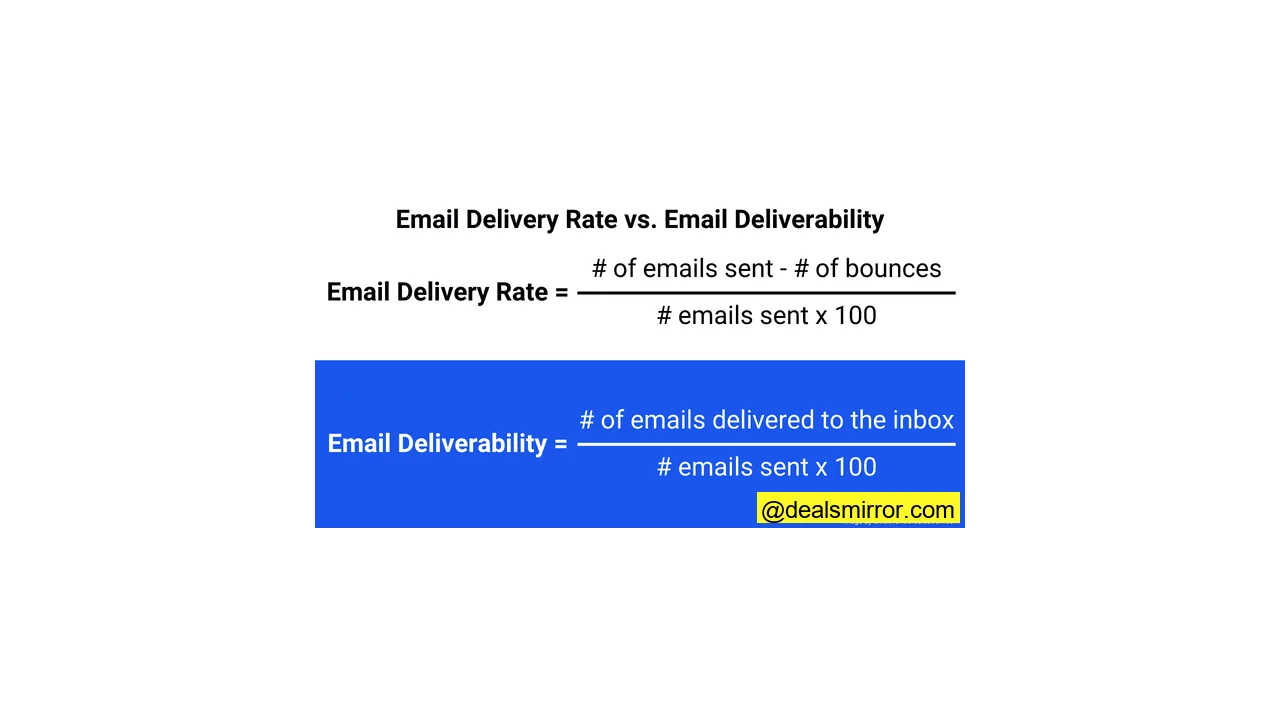
Email delivery simply confirms that the recipient’s mail server has accepted your email. However, it doesn’t specify *where* the email landed within that server. It could be in the main inbox, promotions tab, updates folder, spam folder, or any other directory. The email delivery rate is calculated as follows:
Email Delivery Rate = (Number of Emails Sent – Number of Bounces) / Number of Emails Sent x 100
Email deliverability, on the other hand, focuses on *inbox placement*. It asks: did your email land in the primary inbox or the spam folder? This metric is far more valuable for email marketers. Even with a 100% delivery rate, a significant portion of your emails could still be routed to spam, a problem that the delivery rate alone won’t reveal. Here’s how to calculate email deliverability:
Email Deliverability = Number of Emails Delivered to the Inbox / Number of Emails Sent x 100
Why is Great Email Deliverability Important?
Email deliverability is a cornerstone of email marketing success. Imagine dedicating hours to crafting the perfect email campaign, only for it to be relegated to the spam folder – a substantial waste of effort and resources.
The reality is that most subscribers rarely check their spam folders. Therefore, deliverability directly influences your open, click, and conversion rates, all of which ultimately impact your business’s bottom line. Here are several key ways robust deliverability benefits not only your email marketing performance but also the overall health of your business:
- Keeps Important Processes Running Smoothly: Critical transactional emails, such as password resets, new feature alerts, account notifications, sales receipts, and shipping confirmations, depend on high deliverability. If these don’t reach your customers, it can lead to frustration or even lost business.
- Builds Trust and Loyalty: Email remains the most preferred communication channel, significantly outpacing SMS and social media. People expect to receive updates, offers, and reminders via email. When these messages fail to arrive, it erodes trust, which is notoriously difficult to regain.
- Avoids Losing Revenue: Email boasts one of the highest ROIs among marketing channels, but only if your messages reach the intended inbox. Estimates suggest that US businesses lose over $4.9 billion monthly due to undelivered emails, according to Mailtrap. Each unseen or unopened email represents a missed sales opportunity.
- Improves Brand Visibility: In a crowded inbox where approximately three out of four emails go unopened, visibility is paramount. Your emails landing in the spam folder prevent brand exposure and can negatively reflect on your brand image.
- Triggers More Customer Engagement: Email marketing is an excellent channel for nurturing customer engagement. Opened and clicked emails send positive engagement signals, which you can leverage to trigger follow-up actions and learn about subscriber interests. However, if emails bounce or go to spam, genuine engagement becomes impossible.
What is a Good Email Deliverability Rate?
Figures for email deliverability rates often vary because there isn’t a universally agreed-upon method for precise measurement. Unlike delivery rates, you cannot directly see how many emails land in a subscriber’s inbox. Instead, deliverability is estimated using other known metrics like bounce and spam rates, and the calculation methodology influences the reported figures.
Deliverability rate is also commonly referred to as inbox placement rate. Here are some recent comparison figures:
- The average global inbox placement rate varies significantly.
- Inbox placement rates differ by country; for instance, 97.8% of emails land in the inbox in Germany, whereas in India, the figure was only 69.8%.
- Deliverability also varies across mailbox providers. Across Microsoft, AOL, Gmail, and Yahoo!, the average deliverability rate was 86%, but it was just 66% for emails sent to Apple Mail.
What is a Healthy Bounce Rate?
An email bounce indicates a delivery failure, which can be either temporary or permanent. Your email bounce rate is the percentage of your total sent emails that could not be delivered. There are two primary types of bounces:
- Soft Bounce: A soft bounce signifies a temporary issue preventing your email from being delivered. Common causes include a full inbox, temporary mail server downtime, or a sudden surge in your sending volume, which can trigger temporary blocks from mailbox filters. Most Email Service Providers (ESPs) will eventually filter out email addresses that experience multiple soft bounces.
- Hard Bounce: A hard bounce represents a permanent delivery problem. These are typically caused by invalid or incorrect email addresses, as well as unused or fake accounts. Any email address resulting in a hard bounce should be immediately removed from your list. A high number of hard bounces will severely damage your sender reputation and can lead to IP or domain blacklisting.
A healthy email bounce rate is ideally below 2%. A rate between 2-5% suggests that action is needed. If your bounce rate exceeds 2%, it indicates an excessive number of incorrect or inactive email addresses on your lists, or potential technical issues.
In any scenario, high bounce rates are a clear signal that you need to enhance your list hygiene. Utilizing an email verification service like Bouncer can help you remove unused, fake, and incorrect emails, along with spam traps, thereby keeping your bounce rate low and your sender reputation robust.
What Affects Email Deliverability?
Email deliverability is influenced by a combination of technical factors and your email sending practices. Technical elements include server performance, the type of IP address you use (shared or dedicated), and your choice of email marketing software. Your sending practices encompass the content of your campaigns, how effectively you target your audience, and the quality of your list management.
Major free email inbox providers publish their sender requirements, such as those from Google and Yahoo!. These guidelines are invaluable for understanding what they consider good deliverability practices. Maintaining high deliverability requires managing multiple aspects. Here are the key areas to focus on:
Sender Reputation
Sender reputation is a “score” that Internet Service Providers (ISPs) assign to determine where your emails should land – whether it’s the main inbox, spam, or another folder. It’s primarily based on your sending practices and technical factors like your IP address reputation and authentication.
Sender reputation is the single biggest influence on email deliverability. If your reputation drops too low, ISPs will start to block or heavily filter your emails. The most significant damage to sender reputation comes from high spam complaint rates and high bounce rates.
Spam Complaint Rates: Yahoo! recommends a spam complaint rate of 0.3%. This means no more than 3 spam complaints for every 1000 emails sent. Exceeding this threshold will negatively impact your deliverability.
Dedicated or Shared IP: Sending practices that harm your reputation are associated with your domain and IP addresses. Most small business email marketing tools send from shared IP addresses. If another account on the same platform sends a lot of spam, your reputation could suffer. For larger senders, a dedicated IP address is often preferred, as it gives you direct control over your sender reputation.
Authentication
Email authentication validates to mailbox providers that your emails are legitimate, acting as an identity check for senders. This process guards against fake and forged emails, which are common sources of phishing attacks and nuisance spam. If you don’t correctly authenticate your emails, many ISPs will automatically block them.
The main types of email authentication are:
- SPF (Sender Policy Framework): SPF verifies that an IP address is authorized to send emails from your domain.
- DKIM (DomainKeys Identified Mail): DKIM adds an encrypted signature to your email header, proving to inbox providers that the email has not been tampered with during transit.
- DMARC (Domain-based Message Authentication, Reporting, and Conformance): DMARC provides an additional layer of protection against phishing and spoofing. For a DMARC pass, it requires either an SPF or DKIM pass, and the domain must align with the domain in the “From” header. DMARC also allows domain owners to specify actions for emails that fail authentication (e.g., reject, quarantine) and provides reports on these failures.
Gmail and Yahoo! now require authentication for all senders. Both also mandate DMARC for bulk senders, with Google defining bulk sending as over 5000 emails a day.
Additionally, both services require valid reverse and forward DNS records. The Domain Name System (DNS) is the registry linking web and email domains to IP addresses. Valid DNS records confirm that your domain names and IP addresses match, further validating your email domain’s authenticity.
ESPs and Email Servers
Your choice of Email Service Provider (ESP) directly influences your deliverability. The quality of their servers, relays, and underlying infrastructure is critical. It’s also important to select an ESP whose infrastructure aligns with your sending needs. For high-volume sending, dedicated IP addresses may be necessary. Consider using Postmark and SendGrid for transactional emails, as these tools often provide more control over performance than managing your own server.
Low Open Rates
Consistently low open rates can cause a decline in your sender reputation. If subscribers frequently ignore your messages, it signals to ISPs that your content is not engaging or relevant. This, in turn, leads to more emails being filtered into spam folders and fewer reaching primary inboxes.
A good open rate is generally above 20%. If your rate dips below 15%, your deliverability can start to suffer. Below 10%, providers may begin to view your emails as irrelevant or spammy, potentially leading to blocks.
Poor engagement, characterized by unopened emails or frequent spam reports, reinforces this negative perception, telling ISPs you are not adhering to best practices. Regularly clean your email lists and ensure your content resonates deeply with your audience to maintain strong engagement and protect your sender reputation. It’s worth noting that some inbox providers, like Apple Mail, pre-load email data, which can artificially inflate reported open rates. While this doesn’t reflect actual engagement, it’s a factor to be aware of when analyzing your metrics.
16 Steps to Maximize Your Email Deliverability
Understanding the importance of email deliverability and its influencing factors is one thing; actively improving inbox placement is another. Here are 16 practical steps you can implement to significantly enhance your email deliverability.
1. Test Your Email Deliverability and Sender Reputation
There isn’t a single, definitive way to track where every email lands after you click send, as inboxes only report acceptance, not placement. However, several tools allow you to test crucial indicators:
- Sender Reputation: Your domain’s reputation provides a strong indication of your deliverability. A poor sender reputation almost always translates to poor inbox placement. Tools like Sender Score can test your reputation and highlight areas for improvement.
- Spam Filters: Spam filters are programmed to identify specific cues in your email content. Spam testing services enable you to run a check before sending your campaign.
- Authentication: Many sender reputation and spam testing tools will also verify your authentication credentials. Some email marketing services, such as ActiveCampaign, offer built-in authentication checkers.
The primary goal of these checks is to identify areas where you need to improve your deliverability. If you’re not achieving your desired inbox placement rates, these tests can pinpoint the underlying causes.
2. Keep Your Email List Clean
A “clean” email list consists solely of active, engaged subscribers who have explicitly confirmed their desire to receive your emails. Excellent list hygiene is fundamental to strong deliverability. Contacts who don’t want your emails are more likely to leave them unopened or, worse, report them as spam. Both actions harm your sender reputation. Similarly, inactive, fake, and “spam trap” email addresses lead to hard bounces, further damaging your reputation.
The process of verifying email addresses on your list is known as email validation or verification. Services like Bouncer make it quick and simple to check and clean entire lists.
3. Never Buy or Rent Lists
While building a large list of engaged contacts takes time, buying or renting email lists is a shortcut to disaster. These contacts don’t know you and haven’t opted in to receive your campaigns. This significantly increases the likelihood of them marking your emails as spam, and you could also be violating privacy laws by sending unsolicited emails.
You need explicit consent from all your subscribers, which should be obtained at the lead capture stage with clear opt-in options on your sign-up forms. There are two common methods to secure subscriber consent:
- Single Opt-In: The subscriber confirms their consent, often via a checkbox on your digital forms. This meets the minimum legal requirements under regulations like GDPR.
- Double Opt-In: Subscribers sign up, then receive a confirmation email they must click to verify their interest. This extra step ensures genuine interest, reduces mistyped email addresses, and prevents fraudulent sign-ups.
4. Send Engaging Emails
Great email content isn’t just about aesthetics or compelling copy; it also plays a direct role in deliverability. Poorly written, irrelevant, or spammy emails can harm your sender reputation. Unimpressed recipients will either stop opening your emails or unsubscribe. Spam filters also look for red flags such as spammy language, excessive links, and poor formatting.
Even well-designed emails can fail if they don’t resonate with your audience. Relevance is paramount. Subscribers expect content aligned with what they signed up for, and not every contact on your list will be interested in the same topics. This is where audience segmentation becomes invaluable. Grouping your list into subsets based on preferences or behaviors allows you to tailor content, ensuring the right message reaches the right person.
Personalization is another effective way to boost engagement, from simply including a subscriber’s name to dynamically changing entire sections of content. Personalization makes recipients feel valued. Pay particular attention to your subject line, as it’s often the first thing people see and heavily influences their decision to open an email.
5. Authenticate Your Emails
Yahoo! and Google now mandate authentication for all incoming emails. All three primary authentication types utilize DNS records to validate domains and IP addresses:
- For SPF, you must generate an SPF record for all IP addresses you send from and add this record to your domain’s DNS. When a receiving server gets your email, it checks the SPF record for your domain. If the sending IP matches, the email passes authentication.
- For DKIM, an encryption key is stored in your DNS records. When DKIM is enabled, an encrypted signature is automatically added to every outgoing email. Receiving servers use the key in your DNS to decrypt and validate this signature. If the key and signature do not match, the signature cannot be authorized.
- A DMARC record is also published within your DNS. With a DMARC record, you can instruct receiving servers on how to handle emails that fail authentication (e.g., reject, quarantine, or allow). The record can also receive reports on failed or spoofed messages.
Ensure you set up SPF and DKIM according to your email marketing tool’s specifications before you begin sending campaigns.
6. Make It Easy to Unsubscribe
As an email marketer, making it *easy* for people to unsubscribe might seem counter-intuitive after all the effort you put into acquiring them. However, this practice is crucial for protecting your sender reputation. Forcing disinterested subscribers to remain on your list won’t make them engage. Worse, hiding or obfuscating unsubscribe links frustrates recipients. If they continue to receive unwanted emails, they are far more likely to report your email as spam.
An unsubscribe has less negative impact than a damaged sender reputation. Therefore, if people wish to leave, don’t make it difficult. Consider it an essential component of good list hygiene – you only want engaged subscribers who genuinely read your emails.
Google and Yahoo! now explicitly include clear, visible unsubscribe links in their sender requirements.
7. Reengage Inactive Subscribers
Monitoring for inactive subscribers is an important aspect of good list hygiene. By filtering out contacts who haven’t opened your emails over a defined period, you can automate a re-engagement campaign to reach out before they become completely disengaged.
Don’t immediately remove inactive contacts. They might simply be busy or have forgotten about your brand. A re-engagement email can be a polite message asking if they wish to continue receiving communications from you. This can be easily automated and should include both a reconfirmation link and an unsubscribe link. If contacts do not open any re-engagement emails, it’s advisable to remove them from your active list.
8. Ask Subscribers to Add You to Their Contact List
Encourage your subscribers to add your email address to their contact list. When a subscriber adds you as a contact, it explicitly confirms their desire to receive your emails. Spam filters automatically classify emails from known contacts as “safe,” significantly increasing the likelihood of your messages landing in the primary inbox.
9. Use a Familiar Sender Name
Recipients typically glance at the sender name and subject line before deciding whether to open an email. If they don’t recognize the sender’s name, they might automatically assume it’s junk mail.
This makes it critical to carefully consider the name and address you use for sending emails. Generic addresses like “admin@” or “marketing@” are unlikely to achieve high recognition. People are often in a hurry and quickly scan their inboxes, where they encounter dozens of similar generic addresses. Even if they know your business, they might not look closely enough to connect a generic address to your brand.
Using a personal name, like “Mor from Email Vendor Selection,” will generally achieve much better recognition and, consequently, higher open rates. Additionally, strive for consistency in your sender name and address across all campaigns.
10. Don’t Use Huge Pictures or Tons of Images
Overloading your emails with images can actually harm deliverability. Images are often used in spoofing attacks to mimic genuine emails, making spam filters wary. Filters can also struggle to “read” the content within images. Some ISPs even block images by default, requiring the user to manually click to display them.
If a recipient’s inbox settings prevent image rendering, they will see blank spaces, disrupting the message’s clarity. Images also contribute to the email’s file size. Larger emails take longer to load, increasing the risk of bounces if a download times out, and frustrating recipients. It’s best practice to use images judiciously, compress them to reduce file size, and use text as proper text rather than embedding text within images.
Similar advice applies to other media: completely avoid JavaScript, forms, and direct video embeds, as they rarely function in most email clients. Instead, use a thumbnail or GIF with a play button that links to your video on a webpage or directly to the media.
11. Add Alt Text to Your Images
While you can’t control whether your subscribers have image rendering switched off, you can implement a valuable backup: alt text. Alt text provides a textual description of your image. So, even if the visuals don’t load, recipients can read what should be there, maintaining the clarity and meaning of your message.
Alt text also significantly improves accessibility for visually impaired users. Screen readers will vocalize the alt text, ensuring these users can understand the image content. Adding alt text is straightforward using your email tool’s editor or by directly adding it in the HTML. It’s a simple step with a substantial impact on user engagement and message clarity.
12. Keep Your Email Templates Responsive and Consistent
Responsive email templates automatically adjust layouts and content sizing to fit different screens and email clients. This is highly beneficial for deliverability, as recipients tend to view layout distortions as a sign of a low-quality, spammy email. They are more likely to mark emails as spam if the design appears broken on mobile devices. The better your email looks across various devices and clients, the less likely it is to be blocked.
Responsive design also fosters consistency for your readers. Emails that load quickly and look good consistently build trust over time, leading to higher open rates. For this reason, maintaining consistent branding across all your campaigns is equally important.
13. Use a Reliable Email Platform
Few smaller businesses want to manage the technical complexities of email servers, relays, and protocols. Most simply want their emails to function seamlessly, which means placing significant trust in their chosen ESP. Selecting a reliable email service provider is critical to achieving good deliverability.
Most emails are sent from shared servers and IP addresses, except for high-volume senders who might opt for a dedicated IP. In most cases, you’re relying on your ESP’s sender reputation. Some email services are more diligent than others in maintaining a strong reputation for their shared IPs. Researching and choosing an ESP that prioritizes deliverability is essential.
14. Don’t Send Campaigns from Free, Personal Email Addresses
Free, personal email addresses (e.g., @gmail.com, @yahoo.com) are intended for exchanging emails with friends or businesses, not for email marketing campaigns. Inbox providers are far more likely to flag high-volume campaigns sent from personal email addresses as spam.
Gmail, for example, updated its policy a few years ago to penalize emails sent from Gmail addresses outside of the Gmail platform. Email inbox providers generally adopt such measures as an additional safety precaution against spam and phishing.
15. Warm Up Your Sender Domain and IP
A sure-fire way to trigger spam filters is to send a large volume of emails from a brand new domain or IP address. Inbox providers need to recognize and trust a high-volume sender to accept their emails, and that trust is built gradually over time, not by rushing to send too many emails too quickly.
“Warming up” your sender reputation involves gradually increasing your email sending volume, a process also known as throttling. You start with a low volume of engaged subscribers and incrementally increase that volume over time. This signals to Gmail, Yahoo, Outlook, and other inbox providers that you are a legitimate sender.
Domain warmup is especially crucial if you have a very large contact list (typically 50,000 subscribers and above). It’s also a good practice when switching email marketing services, as your domain will be associated with a new IP address, requiring you to rebuild its reputation. Similarly, if you are new to email marketing, warming up your domain is essential.
Most small business email marketing tools use shared IPs that are already warmed up, so you generally don’t need to worry about warming them up yourself.
16. Follow a Consistent Sending Schedule
Adhering to a regular email sending schedule builds trust with both your subscribers and mail servers. Subscribers are more likely to engage with emails when they arrive predictably, leading to better open rates and an improved sender reputation. Establish a weekly, biweekly, or monthly schedule for your email campaigns.
Irregular sending patterns can be detrimental. For example, if you take three months off and then suddenly start sending 10 emails daily, your initial campaigns are likely to experience a high bounce rate. Inbox providers will also be more inclined to view your emails as spam. Email marketing platforms make it easy to schedule campaigns. Research often shows that Tuesday, Wednesday, and Thursday typically achieve the highest open rates. Some platforms even offer send-time optimization features that analyze the best time to send for each individual recipient.
The Best Email Deliverability Tools
A variety of tools are available to help you enhance email deliverability. These range from robust email marketing and bulk sending services with excellent server infrastructure to specialized platforms that perform reputation and spam tests, and email verification services designed to reduce bounces.
Here are some of the best tools for improving email deliverability:
Bouncer – Email Verification Tool

Bouncer is a comprehensive email verification service that covers everything you need to improve your list hygiene. You can run checks on entire contact lists or configure it to verify every new email address at the point of sign-up. It integrates seamlessly with most major email marketing platforms.
Bouncer improves deliverability by identifying problematic email addresses, including those that lead to bounces, fake addresses, temporary emails, and spam traps. Its tests include domain checks, syntax checks, SMTP sender checks, and disposable email detection. Their Deliverability Kit helps you manage authentication, test emails against spam filters, and alerts you if your domain is ever blacklisted. It also features a tool that forecasts bounce rates.
Bouncer offers 1000 credits for a starting price, with one credit validating one email address. You can make savings by purchasing credits in bulk. A trial of 100 free credits is also available. The Deliverability Kit starts at $25 a month, and Bouncer Shield, their automated sign-up checker, starts at $49 a month.
Postmastery EmailAudit – Deliverability Test

Postmastery is an email delivery and analytics platform that offers a free tool called EmailAudit for deliverability testing. EmailAudit inspects various aspects of your email setup, including server configuration, SPF and DKIM authentication, DMARC compliance, sender reputation, header fields, links, and images.
After providing your email and name, EmailAudit generates a unique email address to which you send a test email. Within minutes, you receive a report link, revealing a surprisingly detailed analysis. The report uses a clear color-coded system: green indicates optimal status, orange suggests areas for improvement, and red flags errors.

Postmastery EmailAudit is completely free to use.
Sender Score – IP Reputation Checker

Sender Score is an IP reputation checker, aptly named for its function. You input your email domain or IP address and provide details about your sending activities. The tool then performs a series of checks and assigns your sender reputation a score out of 100.
Sender Score offers valuable insights into your sender reputation and its impact on deliverability. A score above 70 generally indicates a good sender reputation. The tool provides a breakdown of how your score is calculated, allowing you to identify if spam complaints, sending to spam traps, or being blocklisted are negatively affecting your reputation. Sender Score also includes additional tools for analyzing bounce reasons and offers address validation.
Sender Score is free to use.
MxToolbox – Email Authentication and Deliverability Tool

MxToolbox provides a suite of reputation, authentication, and deliverability tools. Its name refers to “Mail Exchange,” and one of its core functionalities is the Mail Exchange (MX) Lookup, which identifies the servers and IP addresses associated with an email domain – a crucial first step for IP reputation checks.
From there, you can conduct numerous technical tests on any domain and IP address, including DNS lookup, SPF, DKIM, and DMARC checks. You can determine if your IP address is listed on over 100 blacklists and run diagnostic performance tests for your mail servers. All 37 available tests can be run individually from the “SuperTool,” or you can get an “Email Health” overview that combines all of them.
MxToolbox is free for running basic checks. They also offer more advanced services, including inbox placement analysis, detailed delivery performance reports, spam complaint tracking, and active protection against blacklists and domain impersonation.
Why Do Emails Land in the Spam Folder?
Junk folders are a constant challenge for email marketers. While a bounce provides clear notification of non-delivery, allowing you to take action, emails routed to spam are logged as “delivered” and often go unseen by the recipient. The key is to proactively avoid the common pitfalls that lead to emails being filtered as spam. Beyond the best practices discussed so far, two other primary reasons your emails might end up in spam are:
Spam Complaints
An email being flagged as spam by a recipient is a strong signal that you are not sending engaging, relevant content that your contacts want. Furthermore, it suggests a lapse in list hygiene. While a single spam complaint might not severely damage your sender reputation, it does carry consequences, as future emails to that individual will likely land in their spam folder.
Two critical actions are key to preventing spam complaints from becoming a significant problem:
- Focus intently on delivering high-quality content and implementing effective segmentation. This ensures your subscribers have no reason to complain.
- Proactively manage your list by regularly removing inactive or disengaged subscribers. If you notice someone hasn’t opened an email in a while, send a re-engagement email.
Spam Traps
Spam traps are a sophisticated method used by email inbox services to catch spammers. They are essentially fake email addresses. If you send an email to a spam trap, it’s a clear indication that you’re not properly confirming or verifying your contacts, or that you’re sending unsolicited emails. ISPs will heavily penalize your sender reputation as a result, leading to more of your legitimate emails ending up in junk folders in the future.
The most effective way to avoid spam traps is to enforce strict opt-in confirmations for every subscriber. While bots can sometimes bypass simple form confirmations, double opt-in and CAPTCHAs offer much greater security. Since you cannot get confirmation from a fake email address, these methods help filter them out. Additionally, consistently verifying your list helps catch any fake emails that might have slipped through.
What Happens If My Email Is Blacklisted? And How to Avoid It?
Blacklists are online databases that list domains or IP addresses flagged for sending spam. Think of them as “naughty lists” for problematic senders. If your sender reputation drops below a certain threshold, you risk being blacklisted. High bounce rates, excessive spam complaints, or sending to spam traps will also land you in trouble.
Getting blacklisted severely damages your email deliverability. Mail servers consult these lists as part of their reputation checks, and emails originating from blacklisted domains are often blocked completely. To stay off blacklists, only send emails to opt-in subscribers, practice excellent list hygiene, and consistently send engaging, relevant content. Utilize tools like MxToolbox’s blacklist checker to monitor your status. If you find yourself on a blacklist, it’s a clear sign that your sending practices require immediate improvement.
How to Get the Best Email Deliverability
Achieving excellent email deliverability is fundamentally built on trust – the trust of your subscribers and the trust of mailbox providers. In both cases, your sender reputation is paramount, and your reputation is shaped by your actions as an email sender and the tools you choose.
Ensure your domain is properly authenticated with SPF, DKIM, and DMARC records. Select an email marketing service provider with a strong reputation and robust infrastructure.
Your sending practices are equally important. Implement good list hygiene and use double opt-ins to ensure every recipient genuinely wants your emails. Regularly verifying your list helps avoid sending to fake addresses and spam traps. Finally, adhere to a consistent sending schedule.
Are you ready to take the next step in improving your email deliverability? We’ve compiled this email deliverability checklist to guide you:
- Choose an ESP that suits my sending needs.
- Set up and tested SPF, DKIM, and DMARC authentication.
- Set up double opt-in or CAPTCHAs on all email sign-up forms.
- Ran my list through an email verification tool and removed all risky emails.
- Checked my domain and IP address using blacklist checkers.
- Warmed up my IP to the required sending volume.
- Included clear unsubscribe links.
FAQs about Email Deliverability
How to Fix Email Deliverability?
MxToolbox offers comprehensive reputation, authentication, and deliverability tools. You can run technical tests on any domain and IP address, including DNS lookup, SPF, DKIM, and DMARC checks. It also allows you to see if your IP address is listed on over 100 blacklists and perform diagnostic performance tests for your mail servers.
Once you’ve identified the specific problems, focus on improving your sender reputation. This is how mailbox providers judge your trustworthiness. Begin by consistently sending relevant, high-quality content on a regular schedule to boost your open rates, which signals trustworthiness to ISPs. Avoid spammy subject lines or excessive images, as these can trigger spam filters. Crucially, authenticate your domain with SPF, DKIM, and DMARC records, and regularly check to ensure your domain hasn’t been blacklisted.
You should also practice rigorous list hygiene, meaning maintaining a clean email list by removing invalid or inactive addresses. Employ double opt-in to ensure all subscribers genuinely want your emails.
How to Check the Deliverability of Email?
What Hurts Email Deliverability?
Failing to set up SPF, DKIM, and DMARC authentication also harms deliverability. Similarly, suddenly increasing sending volumes or sending too many emails from a new account without a proper warmup period makes spam filters suspicious and can lead to blocks.