
ActiveCampaign Pages introduces the capability to create and host landing pages directly within the platform. This review assesses whether this new addition meets expectations for marketers.
About ActiveCampaign
ActiveCampaign positions itself as a “Customer Experience Automation” solution, offering a comprehensive suite that includes email automation, forms, lead scoring, and essential CRM functionalities. Serving over 90,000 clients globally as of early 2024, its popularity stems from a robust feature set offered at a competitive price. Historically, one missing element from this extensive package was the native ability to create landing pages – a gap now filled.
The Critical Role of Landing Pages
Landing pages are an indispensable tool in any marketer’s arsenal. A landing page is specifically designed for a visitor to “land” on after clicking an ad, an email link, or a social media post. Unlike standard web pages, a landing page has a singular, focused objective: to prompt a visitor to take a specific action.
This singular focus dictates a simple layout, typically devoid of site navigation or other outgoing links, with clear and concise copy. Marketers often require the agility to create and deploy these pages rapidly. Other platforms, such as ClickFunnels and Leadpages, have successfully capitalized on this need by offering intuitive drag-and-drop editors, enabling marketers to build sophisticated landing pages without writing any code. Understanding how the ActiveCampaign landing page builder compares to established solutions like ClickFunnels can provide valuable insights.
ActiveCampaign Landing Pages: An In-Depth Look
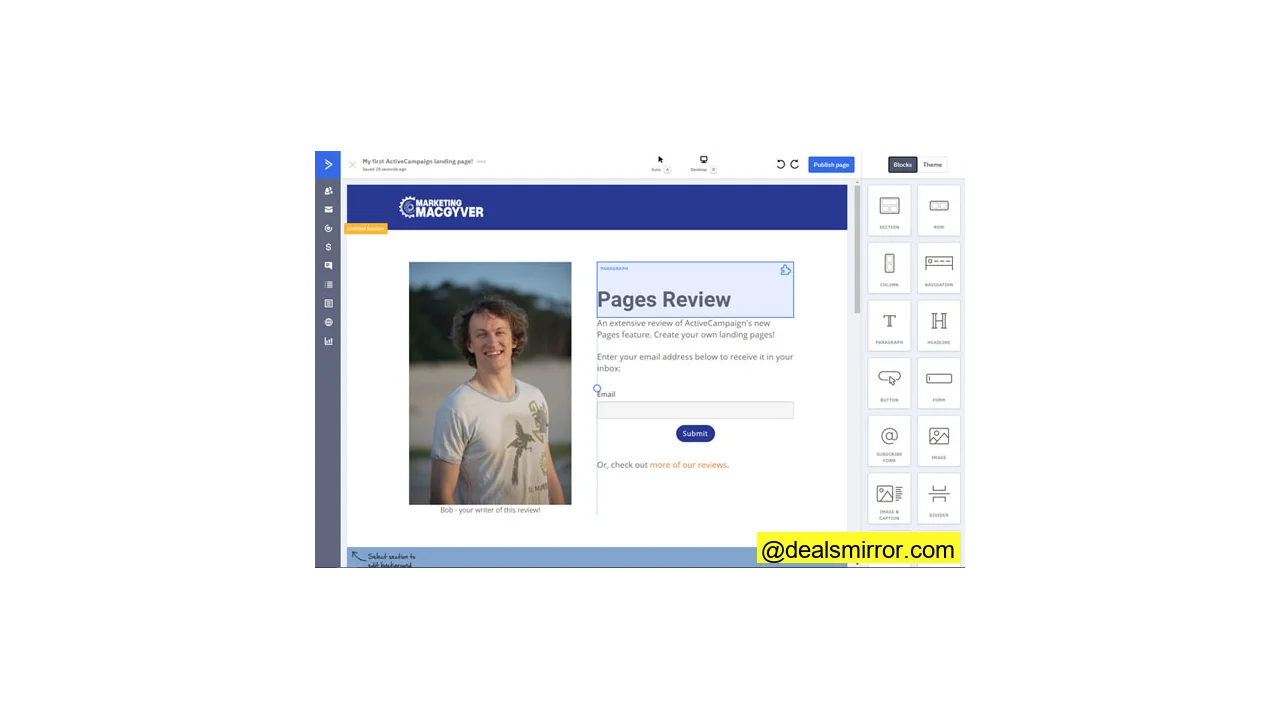
ActiveCampaign has now integrated its own landing page tool, available to all users on the Plus subscription tier and above. The platform imposes no limits on the number of pages users can create, and its editor utilizes the familiar drag-and-drop paradigm common in contemporary landing page builders.
The overall experience of using the builder is solid and refreshing. While creating various landing pages, most desired functionalities were readily available. However, some users have noted initial challenges in getting forms to work seamlessly, a critical function given that lead capture is often the primary goal of a landing page. These issues are likely to be addressed in future updates, enhancing the overall functionality.
How to Create Landing Pages in ActiveCampaign
The process for building a landing page using ActiveCampaign Pages is streamlined:
- Navigate to the new ‘Site’ section in the left-hand menu and initiate the creation of a new page.
- Choose from an extensive library of over 40 landing page templates or opt to start from a blank canvas.
- Customize your page by adding, editing, and removing sections, rows, columns, and elements. The controls are intuitive and responsive, ensuring full adaptability across devices.
- Assign a title, meta description, social sharing image, and favicon to your page for optimal discoverability and branding.
- Integrate any necessary analytics code, such as Google Analytics or Facebook Pixel. The platform conveniently reminds users to perform this step.
- Publish your page on the default domain (e.g., <accountname>.ac-page.com) or configure a custom domain, such as marketing.mywebsite.com.
Page construction involves placing sections that contain rows, which in turn hold columns. These columns can be populated with various elements, including text areas, headings, and images. The editor also provides a useful selection of widgets like forms, buttons, countdown timers, and social follow links. Each element offers easy customization options for spacing and visibility toggles for desktop and mobile views.
In contrast to some landing page builders that can be complex or buggy, working with Pages in ActiveCampaign is generally a pleasant and fluid experience.
Creating a Blog with ActiveCampaign Pages
While theoretically possible to construct a full blog using ActiveCampaign Pages, this builder is primarily optimized for landing pages, not extensive blogging functionality. For a dedicated blog, alternative solutions are recommended. WordPress remains a robust companion for blogging, and specialized platforms like Dropinblog also offer features specifically designed for integrating blogs with ActiveCampaign.
Advantages of ActiveCampaign Pages
Users will find several compelling reasons to utilize ActiveCampaign‘s landing page builder:
- Intuitive Editor: The editor is user-friendly and operates smoothly, providing ample customization options for every page element without overwhelming the user.
- Helpful Hotkeys: The editor supports easy-to-learn hotkeys, such as Ctrl-Z for Undo, and S, R, C, and E to filter mouse selections to specific elements (Sections, Rows, Columns, or Elements), significantly speeding up the design process.
- Efficient Color Palette Feature: The color palette, accessible in the ‘Theme’ section, acts as a centralized repository for brand colors. Once understood, it streamlines brand consistency by limiting color choices and automatically updates all elements on a page if a palette color is modified.
- Microsite and Website Building Capabilities: The inclusion of navigation options allows for the creation of microsites or even simple business websites, expanding the builder’s utility beyond single landing pages.
- Diverse Element Selection: A good range of elements is available for page enhancement, including countdown timers, buttons, and social follow links, catering to various marketing objectives.
Notably, landing pages are included in the Plus subscription tier of the Marketing plan, which starts at $49/month. This plan also encompasses features like marketing automation, lead scoring, and custom reporting, offering competitive value compared to similar landing page software solutions.
Areas for Improvement
While robust, ActiveCampaign Pages could enhance its functionality in several key areas:
- Enhanced Integration with ActiveCampaign Ecosystem: There appears to be a limited connection between Pages and other ActiveCampaign functionalities. While forms can be built on a landing page, the handling of submitted data is not immediately clear, nor can form submissions directly trigger automations. This integration is crucial for maximizing the builder’s potential and is expected to be improved by ActiveCampaign.
- Improved Color Palette Communication: The initial learning curve for the color palette feature could be smoother. Clearer instructions on how to add custom colors to the palette, rather than being limited to default shades, would improve user experience.
- Lack of Reusable Blocks: Unlike ActiveCampaign’s email editor, the landing page builder currently lacks the ability to save custom sections, rows, columns, or elements as reusable blocks. While content can be copied and pasted between pages, a dedicated saving feature would enhance efficiency.
- Streamlined Form Creation: The process for creating forms feels somewhat separate from the main ActiveCampaign Forms section. Users must build forms from scratch within the landing page editor rather than inserting pre-existing forms, which can feel counter-intuitive.
- Absence of A/B Testing: Most dedicated landing page builders offer integrated A/B testing. While users can devise workarounds by creating separate pages and using ActiveCampaign’s Campaign builder for email-based A/B tests, a native solution within Pages would be a significant enhancement.
- Limited eCommerce Widgets: Direct widgets for eCommerce integration are not yet available. Although possible through custom code, and ActiveCampaign generally integrates with providers like Stripe and Shopify, native eCommerce elements would be a valuable addition.
9 Tips for Creating Stellar Landing Pages
The ability to rapidly create and launch landing pages is fundamental for any marketing team. Effective marketing thrives on execution; rather than endless strategizing, focusing on building and deploying offers—whether informational, time-based, or educational—provides invaluable learning opportunities about your target audience. Ultimately, a higher volume of well-crafted offers often translates to increased sales.
It’s crucial for marketing teams to have full ownership over their landing page builder, avoiding bottlenecks common in processes requiring web developer intervention for every minor change. Creating high-converting landing pages can be challenging, so here are 9 tips to optimize your next page:
- Prioritize Function Over Meticulous Design: Leveraging quick-build tools means you can swiftly create and modify pages. Don’t get bogged down by minor design details like exact logo placement or pixel-perfect margins. Build, launch, and let performance data guide subsequent iterations.
- Master Your Copy: The most critical element is your copy. Dedicate the majority of your time to crafting a compelling headline and body text that clearly communicates the offer’s purpose, target audience, and benefits. Be concise and direct.
- Embrace the Power of One: A landing page should have a single, primary goal: to drive one specific action (e.g., webinar signup, guide download, strategy session booking). Any element not directly contributing to this goal can detract from your conversion rate by minimizing distractions.
- Eliminate Leaky Links: Extend the “power of one” to your links. Any link that leads visitors away from the page before conversion is a potential missed opportunity. Remove site navigation, links to blog posts, further reading, or social media. If information is essential to the offer, incorporate it directly onto the page.
- Ensure Scannability: Break up large blocks of text using bullet points and subheadings to improve readability. For extensive information, divide the page into distinct sections using varying background colors. Integrate engaging visuals like images and icons, and experiment with different layouts to maintain reader interest—a task made easy with builders like ActiveCampaign‘s Pages.
- Experiment with Page Length: Some offers perform well with concise, above-the-fold content, while others benefit from long-form landing pages that comprehensively address every potential question and concern a reader might have. Test different lengths to find what resonates best with your audience.
- Integrate Video Content: Break up text and enhance engagement by embedding videos, whether it’s a customer testimonial, an animated explainer, or a brief expert sharing their insights.
- Introduce Your Business for Paid Traffic: If your visitors arrive via paid advertising, they may be unfamiliar with your brand. Allocate space to introduce your business, its values, and perhaps your process to build trust and familiarity.
- Optimize Your Confirmation Page: The confirmation page, shown after a conversion, is an opportunity to expand engagement. Here, you can strategically introduce links to related blog posts, resources, or suggest the next step in their customer journey, such as booking a call. A short, personalized thank-you video can also significantly enhance the post-conversion experience.
ActiveCampaign Landing Pages: The Verdict
ActiveCampaign Pages represents a significant and valuable addition to the platform, with its full potential unlocked once integration with other software components is fully realized. The landing page builder is commendably user-friendly, intuitive, and robust, offering an optimal balance of essential features.
The swift creation and publishing process, combined with existing features, significantly enhances ActiveCampaign‘s overall value proposition. This makes it an even more compelling solution for businesses looking to streamline their customer experience automation and marketing efforts.