

Transactional emails are arguably the most critical messages your business sends. Ensuring they land in the inbox—not the spam folder—and achieve a near 100% delivery rate is paramount. While deliverability is a top priority, the customer’s inbox experience once that email arrives is equally crucial. This article delves into how to achieve precisely that.
Transactional Emails: Your Most Valuable Communication
Transactional emails are undeniably your most important type of email. Triggered by a customer or user interaction (like a password reset or order confirmation) or a process (such as a monthly invoice), they are often referred to as “triggered” emails.
While this list isn’t exhaustive, it highlights common and valuable transactional email types for your business:
- Welcome emails
- Order requests / Order confirmations
- Contract signing via email
- Invoices
- Digital access tickets
- Usage overviews (e.g., from utility companies)
- Updates (e.g., social media likes or auction bids)
- Reminders and announcements (e.g., for software updates)
- Password resets
- Refunds/payments
Year after year, benchmarks from industry experts like Team ITG consistently show that engagement with transactional emails is significantly higher than with traditional newsletters.
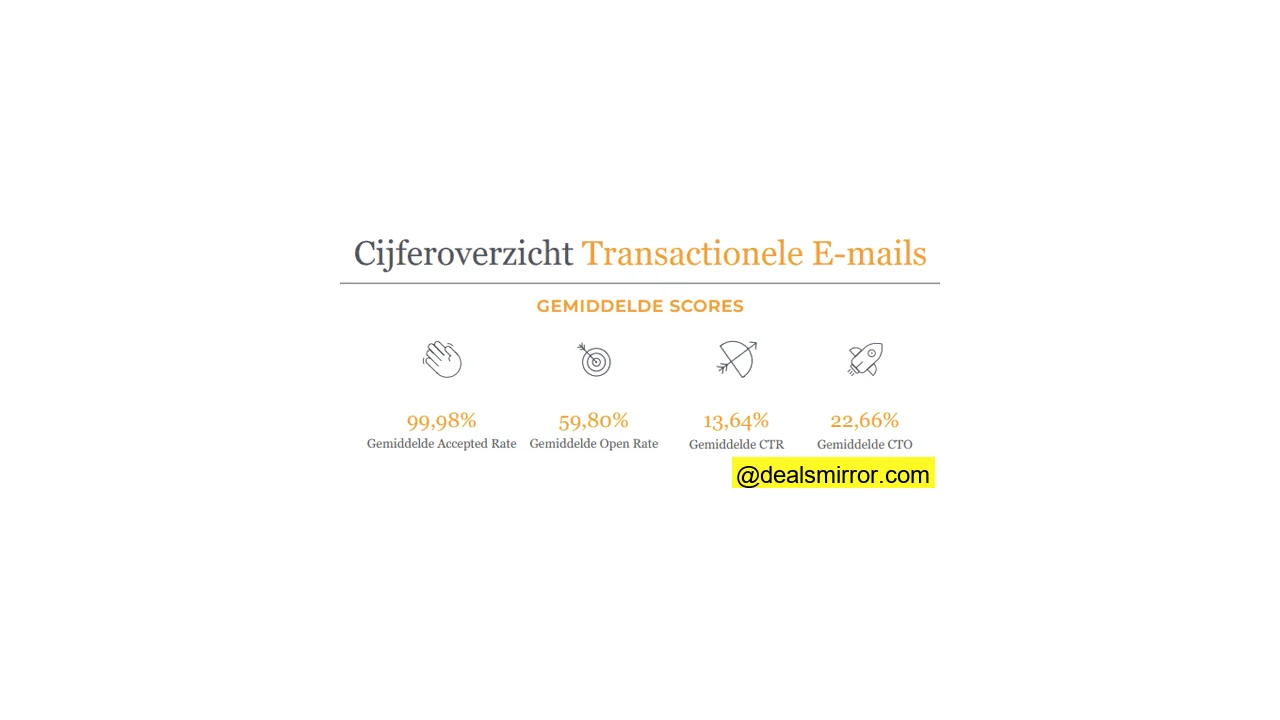
Considering the effort many companies pour into their newsletters, this insight provides a compelling reason to invest more time and resources into optimizing your transactional emails.
Essential Features for Transactional Email Success
It’s clear that your business benefits immensely from the successful delivery and perfection of transactional emails. But how do you achieve this? What are the indispensable elements for sending transactional emails effectively? We’ll explore the following six key features:
- Quality Assurance
- PDF Attachments
- Archiving
- Proof of Delivery
- Responsiveness
- Deliverability & Reliability
1. Implementing Quality Assurance for Transactional Emails
In email marketing, a test email is commonly sent to review a campaign before it goes live. This allows for improvements and error correction before thousands of people receive the message.
But how do you test and control transactional messages? These are embedded in automated flows that run year-round, sending emails one by one. The inherent risk of automated flows is that the sender often never sees the output.
To gain better control over the quality of your transactional emails, consider using software that enables comprehensive email monitoring, going beyond a simple SMTP server:
- Source System Notifications: If no input is received from a source system, the administrator gets an immediate notification. This prevents a large number of emails from being blocked if a system in your infrastructure fails.
- Input Validation: Set up a system to check the data within the email before it leaves your business. This prevents critical data from being missing or emails from being sent to non-existent addresses due to invalid characters.
- Outage Reporting: For critical emails that must be correct and timely, generate a notification if a message is “pending” or “bounced.” This ensures you always know the status of an email when customer service receives calls about a missing order confirmation.
- Carbon-copy QA: An additional quality control measure involves sending example emails as blind carbon copies (BCC) to an internal email address. This allows you to see exactly what is being sent live and verify that everything is as expected.
2. Including PDF Attachments
While many email marketing platforms don’t offer the option to add attachments, automated email attachments are often a requirement for transactional emails. Consider invoices, sending tickets, calendar items, or an XML file attached to an email.
PDF attachments should be well-designed and easy to understand. A clear, branded PDF that aligns with your corporate identity will resonate better than an Excel sheet saved as a PDF.
There are two primary ways to include a PDF:
- Attach an External PDF: Send an external PDF with the triggered email, or let your transactional email provider fetch and attach the PDF externally. For example, you can add a product sheet in PDF format to your automated quote email. The content of this PDF can vary (based on product ID, location, currency, etc.), allowing you to configure logic that determines which PDF is sent with the email.
- Generate PDF via Provider: Allow the transactional email provider to generate the PDF itself. Similar to your transactional email, you create a piece of code (XHTML) that is converted into a PDF. You feed the template with the necessary data, apply your brand’s styling, and voilà – you have fully personalized, perfectly formatted PDF attachments sent from the same software. This reduces the need for multiple integrations and data synchronization.
Some email tools natively allow you to add PDFs to an email. If your current tool doesn’t, you can use a standalone PDF editor. Either way, you have the freedom to fully customize the attachments you send.
3. Archiving Your Transactional Emails
Certain transactional emails warrant archiving. Storing the data of the emails you’ve sent offers several advantages:
- The ability to resend an identical email if needed.
- Proof that the email was sent and contained the correct information.
- Control material for various situations (e.g., what happens when someone’s name is longer than average – does the line break correctly?).
When you archive a message, you save the exact email and its associated data sent at that specific moment.
Sometimes, tools might rebuild an archived email with current data. This can lead to discrepancies, where the email no longer matches the one you originally sent (e.g., a customer moved or changed their surname after marriage). Ensure you understand the archiving method used by your software, such as your CRM system, to avoid unpleasant surprises.
4. Establishing Proof of Email Delivery
It might sound unusual, but sometimes it can be crucial to have proof that an email has been delivered. There are several instances, particularly in legal procedures, where one must demonstrate that emails were indeed sent:
- A university facing annual lawsuits from students claiming they never received an essential email.
- An online auction site dealing with legal disputes over “you’ve been outbid” notifications.
In such cases, proof of delivery is a log or timestamp of the delivery moment. Assuming the email was never opened or clicked (which would make proof even easier), a 250OK response from a mailbox indicates that an email has been delivered. By logging this response, you know precisely when each email was delivered.
5. Ensuring Responsiveness for Transactional Emails
Today, the question of whether emails should be responsive is no longer debatable. Especially considering that, on average, over 54% of recipients first read emails on their mobile devices (smartphones, tablets, etc.).
Responsive email, which adapts to the screen’s dimensions, is already the standard for marketing emails. However, we still observe that this isn’t always the case for transactional emails.
A significant portion of transactional emails are generated in applications that use only ‘simple’ HTML template editors, if they generate HTML mail at all. Plain text, for example, is also very common in this email segment. The technology many parties use to send transactional emails often lags behind current standards.
All transactional emails should be responsive – there is no excuse not to make them so.
6. Prioritizing Deliverability and Reliability
For your most important messages, choosing the right channel—digital or physical—is essential. But what if this channel isn’t available? For transactional emails, if an email address is incorrect or bounces, you should still be able to communicate with your customer through alternative means, such as print, SMS, push notifications, or a call center.
Consider, for example, an online store that uses various channels to send invoices. The first attempt is to send invoices via email. If this fails because an email address bounces, the system switches to a “bounce-then-call” strategy. Customer service contacts the customer to inquire about the invoice and request payment. If the phone also goes unanswered, a last resort might be a physical letter.
While these are exceptional situations, they are scenarios you can map out and prepare for in advance. Set up a drip campaign in your transactional email software to follow up on bounces with push or SMS. This way, you always know how the customer was reminded of their payment obligation and avoid unpleasant surprises.
Transactional Email: An Art of Precision
Transactional email is the most important and valuable type of email you can send. Yet, many businesses lose sight of the emails themselves, focusing solely on getting them into the inbox (if at all). Now is truly the time to dedicate more attention to your customer’s inbox experience. By implementing the features outlined in this article, you’ll gain greater control and provide your customers with more refined and effective email communications.