
For creators seeking to build a thriving online business, a robust newsletter and an engaged audience are paramount. Kit, formerly ConvertKit, stands out as an email marketing service designed specifically for this unique audience. It empowers creators to send emails, cultivate their community, and effectively monetize their content.
This comprehensive review delves into Kit’s functionalities, exploring its strengths and limitations to help you determine if it’s the right platform for your creator business. We’ve examined the platform thoroughly, from account setup to advanced features, to provide an unbiased perspective.
Kit Review Overview
Kit, which rebranded from ConvertKit in 2024, is an email marketing platform exclusively for creators. Its design prioritizes newsletter growth and monetization, integrating these capabilities directly into the platform. Launched in 2013 by Nathan Barry, Kit has grown to serve over 63,000 customers, establishing itself as a leading choice for the creator economy.
Key highlights of Kit include robust monetization options, such as running paid newsletters, selling digital products, and integrating ads into newsletters. Audience growth is also well-supported with features like landing pages, signup forms, and a powerful Creator Network. The platform’s marketing automation, email editing, and segmentation tools are tailored for creators, offering ease of use without unnecessary complexity, making them ideal for typical creator needs.
Kit also offers a generous free plan, enabling users to get started and send emails without upfront costs. This makes Kit an accessible option for new and emerging creators.
Kit’s Core Features
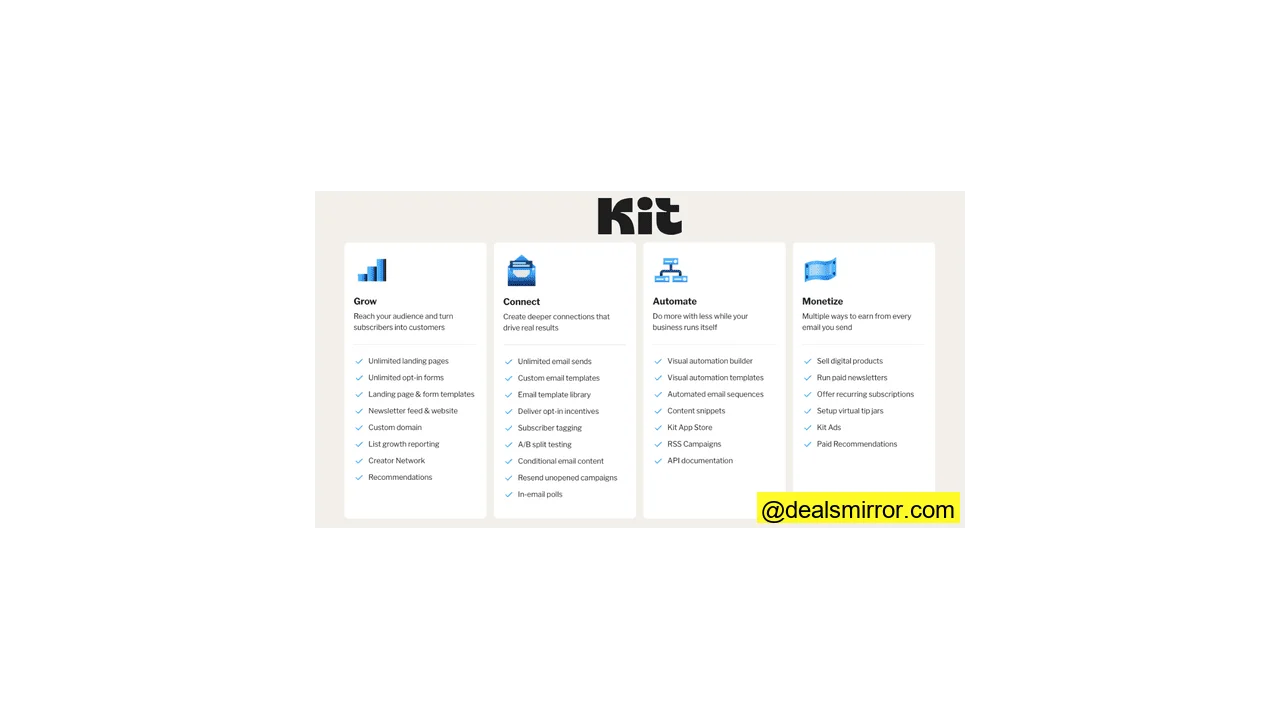
Kit’s features are categorized into four main areas: audience growth, content creation and sending, automation, and monetization tools. Here are the highlights:
- List Growth: Kit provides intuitive landing pages and signup forms, offering over 50 professionally designed templates. Audience expansion is further facilitated by the Creator Network, which enables creators to refer and receive referrals from peers.
- Email Editor and Sending: The platform features a WYSIWYG (What You See Is What You Get) text-based email editor rather than a traditional drag-and-drop builder. It’s user-friendly, well-designed, and offers sufficient design customization to meet the needs of most newsletter publishers.
- Templates: Kit includes 23 built-in newsletter templates to kickstart your campaigns. Additionally, a comprehensive marketplace allows users to purchase more diverse email templates from other creators.
-
Automation: Kit offers three distinct types of automation:
- Rules: For simple, single-step mini-automations.
- Drip Email Sequences: For timed email series.
- Visual Automation Builder: For constructing complex workflows.
Many creators report that Kit’s automations are so effective they rarely need to manually intervene to send emails.
- Monetization: Kit significantly aids in monetization efforts. Creators can easily sell digital products, courses, and downloads. Options also include offering paid newsletter subscriptions or community access. Additional revenue streams are available through recommending other newsletters and participating in Kit’s sponsor network for ads.
- Segmentation: Contacts are organized using segments and tags, a flexible approach compared to list-based systems. Tags are open-ended, enabling highly granular segmentation and dynamic automation capabilities.
For creators serious about building a business around a newsletter, Kit provides a robust and creator-centric platform worth exploring.
Kit Pros and Cons
Kit Pros:
- Easy Digital Product Sales: Kit streamlines the process of selling digital products, including newsletter subscriptions, courses, ebooks, music, and graphics, directly from the platform. Payments are securely processed via Stripe integration.
- Flexible Segmentation & Automation: The platform boasts highly flexible tagging, segmentation, and automation tools that offer CRM-like capabilities. These features enable targeted campaigns and significantly drive revenue for creators.
- Creator Network for List Growth: Kit’s Creator Network facilitates free recommendation exchanges with other creators, fostering mutual audience growth. Users can also pay for recommendations to accelerate list building or sell recommendations to generate additional income.
- Generous Free Plan: Kit’s free plan is exceptionally robust, allowing unlimited emails to up to 10,000 subscribers. Crucially, it also includes the ability to sell subscriptions and digital products from the outset.
Kit Cons:
- Advanced Analytics Restricted to Pro Plan: Kit’s standard email analytics are basic compared to many other email marketing tools. Detailed analytics, including comprehensive revenue insights, are exclusively available in the Creator Pro plan.
- Limited Free Email Template Library: Kit offers 23 decent free email templates. While users can create custom templates, a wider variety of pre-designed options is found in the Template Library marketplace, where most templates typically cost between $19 and $39.
Is Kit for You?
Recommended if:
- You are a creator with digital products. Kit is specifically designed to help creators sell digital products through email campaigns. It eliminates the need for separate e-commerce stores or landing page builders, making audience growth, promotions, and sales straightforward.
- You want to grow your list rapidly. While signup forms and landing pages are foundational, Kit’s recommendation network is a key accelerator for audience growth, enabling quick referrals from other creators.
- You are launching your first newsletter. Kit offers an excellent entry point into the world of monetized newsletters. Its free plan is a significant draw for newcomers, providing unlimited emails for up to 10,000 subscribers and the ability to sell products from day one.
Not recommended if:
- You only need to send simple newsletters on a tight budget without monetization goals. While Kit excels at growth and monetization, if your primary need is basic email sending without focusing on revenue, numerous more affordable free email marketing software options are available.
- You are a large sender with a popular newsletter (50K+ subscribers) and a limited budget. Kit can become more expensive than direct competitors like beehiiv for very large audiences. However, its lucrative monetization features, including advertising, sponsorships, and paid recommendations, can offset these costs for some.
- You primarily run an e-commerce store. Kit’s automation tools and email editor are tailored for creators, which may be limiting for typical e-commerce workflows. While it integrates with Shopify, specialized email marketing platforms like Mailchimp and ActiveCampaign are generally more suitable for e-commerce businesses.
Kit Review Rating Details
| Ease of Use | Kit is well-designed and intuitive, facilitating easy navigation for new users. Even advanced features like segmentation and automation are presented in a beginner-friendly manner. |
| Email Editor | Kit’s WYSIWYG editor offers more flexibility than many alternatives. While not a full drag-and-drop builder, it excels in ease of use, making it ideal for content-focused creators. |
| Email Templates | The selection of 27 free email templates is smaller compared to many competitors. A wider, higher-quality variety is available in the third-party template library, though most require a purchase. |
| Email Types | Kit supports four email types: newsletters, automated emails, RSS campaigns, and A/B testing. |
| Marketing Automation | Kit’s diverse automation features are a strong point, including simple timed sequences, advanced workflows with multiple triggers and conditional logic, and straightforward one-step ‘rules’ for mini-automations. |
| Newsletter Monetization | Kit places a significant emphasis on monetization. Users can sell digital products, newsletter subscriptions, run ads, and generate income by recommending other creators to their subscribers. |
| List Management | Kit effectively utilizes tags for tracking and managing contact relationships. This flexible tagging system enables precise segmentation and is central to Kit’s automation tools. |
| Personalization | Kit offers comprehensive personalization across all email elements. Tags and conditions allow for dynamic content to be displayed to different subscribers. |
| Landing Pages & Forms | Kit provides a good selection of form types and over 50 landing page templates. Both forms and landing pages utilize the same intuitive editor, simplifying the design process. |
| Reporting & Analytics | Standard analytics in Kit are basic and represent a key limitation. Unless subscribing to the Creator Pro tier, reporting tools offer minimal detail. |
| Customer Service | Kit offers 24/7 live chat and email ticketing for all paid plans. However, some users have noted slow response times. |
| Deliverability | Kit employs standard authentication protocols like SPF, DKIM, and DMARC to verify sending domains and automatically removes bounced email addresses. However, it lacks built-in advanced deliverability or list cleaning tools, requiring external solutions for comprehensive list hygiene. |
| Spam and Design Check ❌ | Kit does not include specific spam testing tools. |
| AI Writing ❌ | Kit is surprisingly behind on AI writing capabilities, with only an AI subject line generator available. |
| Integrations & API ✔️ | Kit offers just over 50 native integrations with third-party apps, including major platforms like Shopify, WordPress, and Stripe. A developer platform with an API allows for custom app connections. |
| User Permissions ✔️ | Kit offers two user roles: an account admin with full access and an editor who can manage emails, landing pages, and automations. |
| GDPR & Legal Compliance ✔️ | Kit is GDPR compliant, featuring checkboxes, preference management for subscribers, and default double opt-in for all forms, aligning with legal best practices. |
| Interface Languages | Kit is currently only available in English. |
| Customer Satisfaction | Kit maintains high user satisfaction, with an average rating of 4.6 on Capterra and 4.3 on G2. |
Overall Score
Kit is a robust choice for creators committed to growing and monetizing their newsletters. The platform is notably creator-friendly, offering a generous free plan that supports up to 10,000 subscribers, unlimited broadcasts, basic automation, and the ability to sell digital products. With its clean, text-based editor and tag-based segmentation, Kit maintains simplicity and effectiveness. For creators building a business around their newsletter, Kit offers a comprehensive and worthwhile solution.
Getting Started with Kit
Kit’s sign-up process is streamlined, guiding new users through a four-step wizard to set up their account.
During the setup, Kit inquires if an existing email marketing tool is in use, offering free migration services. For fewer than 5,000 subscribers, migration includes list-only transfers. For over 5,000 subscribers, Kit imports templates, signup forms, and automation workflows.
Account setup includes a free subdomain hosted on kit.com for publishing newsletters, with options to use a custom domain or purchase one directly through Kit, which assists with DNS setup and authentication.
Upon completion, users can share their goals, which Kit uses to customize a helpful user guide. This tailored approach significantly reduces the learning curve for new users.
The welcome dashboard is clearly laid out, presenting recommended actions in an easily digestible format, which greatly aids in familiarizing users with the application.
Kit Review: Newsletter Platform
Kit organizes its functionalities into four primary sections:
- Grow: Dedicated to lead generation, encompassing signup forms and landing pages.
- Send: For crafting and distributing emails and newsletters.
- Automate: Featuring the visual workflow builder and a tool for creating conditional rules.
- Earn: Designed for monetizing your newsletter.
This review will first explore Kit’s capabilities for newsletter creation and sending, followed by an examination of its monetization strategies and subscriber list management tools.
Creating and sending newsletters with Kit
Kit’s email building features are accessible under the Send > Broadcasts section.
The initial step for creating a new broadcast involves selecting a template. The immediate choice is somewhat limited, with one basic outline and 15 newsletter designs, though more templates are available elsewhere within the platform.
Kit’s editor is a WYSIWYG editor, rather than a drag-and-drop HTML builder. This design prioritizes ease of use and is ideal for creators focused on content. While some WYSIWYG editors can be restrictive, Kit’s editor offers a good degree of customization, especially for adding and modifying content elements.
The interface is intuitive. Clicking any element reveals an editing menu on the right. Even without drag-and-drop functionality, adding elements is straightforward: hovering in the main window displays a blue square around nearby content, and clicking the blue ‘+’ icon provides a placeholder for various content elements.
The selection of elements is comprehensive, including what Kit terms Action elements like newsletter recommendations, product listings, and polls. Content can also be directly pulled from X, TikTok, and Spotify, with music promoters able to link gig listings via Bandintown.
Kit effectively addresses common layout limitations often found in WYSIWYG editors, which typically restrict content to a single column. Kit offers 19 different layouts for each element placeholder, providing ample flexibility for diverse newsletter designs.
Kit’s personalization tools are highly effective, allowing for custom greetings with subscriber names or emails and extending to dynamic content. Users can set conditions for specific content to appear to different subscribers, a process that is notably simple to implement. Similar dynamic content capabilities are available with snippets, which are reusable content blocks.
Kit enables A/B testing for up to five subject lines across all plans. The top paid tier further expands this capability to include A/B testing of email content.
Newsletter Templates in Kit
Kit’s template management can initially seem somewhat confusing.
Templates can be chosen when creating a new broadcast, with a limited initial selection.
An additional selection of templates is available under Send > Email Templates > New Email Template, bringing the total built-in options to 23.
For a much broader and higher-quality selection, Kit’s Template Library serves as a marketplace for user-created templates. While most of these templates require payment (typically $19 to $39), they offer significant value.
Users also have the option to import their own templates by pasting HTML code, allowing for integration with external template builders.
Monetizing your newsletter with Kit
Kit empowers creators to sell digital products through their newsletter and other channels. This includes ebooks, courses, consultations, webinars, music, and photos. Creators can also offer paid newsletter subscriptions or community access.
All monetization features are managed under Earn > Products, allowing users to set up a product for sale (1) or a recurring subscription (2).
Kit processes payments via Stripe, supporting various payment options. For products, payment plans or even “pay-as-you-feel” (PAYF) models can be configured. Subscriptions can feature different pricing tiers. A Tips feature is also available. Kit accepts payments in six currencies: USD, CAD, AUD, NZD, GBP, and EUR, charging a 3.5% + $0.30 transaction fee.
Another monetization avenue is Paid Recommendations, enabling creators to earn by promoting other newsletters. SparkLoop, a newsletter referral system, is integrated into Kit for this purpose.
Kit also features a Sponsor Network, available for newsletters with over 10,000 subscribers that publish at least weekly. Upon joining, Kit assists in finding and managing relationships with advertisers. Creators continue their regular content creation, earning income from sponsorships placed within their newsletters. Kit retains a 20% cut of sponsorships secured through this network, in addition to the transaction fee.
Growing your list with Kit
Earning potential is directly tied to audience size and quality, making audience growth a critical component. Kit’s Growth tools include:
- Signup Forms: For capturing new subscribers.
- Landing Pages: For dedicated conversion experiences.
- Recommendations: From other publishers to expand reach.
Kit offers four types of forms and nine templates for inline, modal, and slide-in/pop-up forms. The sticky bar form provides a simple name/email field at the top of a page. Kit’s visual previews for form types simplify understanding terms like “inline” or “modal.” The ability to add images to form templates is also a notable feature.
Kit’s form builder is user-friendly, allowing for quick form creation despite limited template customization. Users can switch templates at any time. Forms can be embedded on a web page via JavaScript or HTML, or shared directly via a link on social media.
For creators without an existing website, Kit provides over 50 landing page templates. These are versatile, supporting not only sign-ups but also product sales and event promotions.
Kit’s landing page templates are well-designed and customizable. The landing page builder shares the same intuitive interface as the form builder, ensuring a consistent user experience.
Recommendations for list growth differ from paid recommendations. They operate as a mutual promotion system, where creators promote each other without requiring SparkLoop integration or payment. To utilize this feature, users must set up a profile in the Creator Network.
The Creator Profile also functions as a personal homepage, where creators can showcase all their newsletters, products, and recommendations.
Marketing Automation in Kit
Kit incorporates several automation features. Under Send, there is a tool for simple email Sequences. Under Automate, users will find Visual Automations and Rules.
In Sequences, users construct a series of emails and set delays for their delivery. Kit does not provide templates for sequences, and for such basic automations, the setup may not be immediately intuitive.
Kit’s visual automations offer significantly more flexibility and power. The platform includes 27 pre-built workflow templates tailored to specific creator goals, such as “Pitch your book with a free chapter” or “Promote a free 3-day course.”
Templates are available for commonly used workflows, including welcome series.
The example template above uses tags to determine if a subscriber has already received a welcome email, employing a yes/no condition to send an alternative email if applicable.
Kit’s workflow editor is well-designed and straightforward, simplifying automation building to its core essentials. This design makes it highly user-friendly while still allowing for the creation of quite advanced workflows.
Workflows begin with an entry point. To construct a workflow, users add three types of steps:
- Events: These pause the automation for a subscriber until a specific event occurs, such as a particular date or a product purchase.
- Actions: These include sending an email, assigning a tag, updating custom fields, or moving subscribers between workflows.
- Conditions: These use yes/no logic to split the workflow path based on whether different criteria are met.
Unlimited steps and workflows can be linked together. Kit uses tags to track subscriber movement through workflows, providing clear visibility into their journey, even within complex automation structures.
Rules are used to create one-step automations. For instance, a rule can be set to tag a subscriber with ‘Y’ if they fill in ‘Form X’. These mini-automations do not require the full workflow builder.
Managing contacts in Kit
In Kit, all subscribers reside in a single list, organized using tags and segments. Users can create segments based on any tag or custom field, employing AND/OR operators. Kit also includes a default segment for cold subscribers, facilitating re-engagement campaigns.
Kit’s implementation of tags for contact management is highly effective. Tags enable the capture and storage of customer data, facilitating precise segmentation and playing a crucial role in driving engagement and sales.
There are several methods for adding tags to subscriber records:
- Up to 10 topics of interest can be set per subscriber.
- Kit automatically tracks which form a contact used to sign up.
- Every product a subscriber purchases is automatically tagged.
- Tags can be manually created and assigned.
Tags are also integral to automations, used to move contacts between workflows and track their progress, offering extensive control over message targeting.
For example, the workflow above demonstrates how tags create segments. Subscribers complete a survey and are tagged based on their responses, then automatically targeted with different content.
Analytics in Kit
Kit’s reporting tools are limited, which is often cited as a drawback of the platform.
Particularly on lower-tier plans, a dedicated reports page is absent. The dashboard displays a chart showing 90-day subscriber engagement, tracking interaction volume but not specific user data. This primarily shows trends over time.
Under Grow > Subscribers, users can view open and click rates, purchases, and unsubscribes.
The Pro plan’s Insights feature offers more advanced reporting, including tracking for landing pages and websites. This provides a breakdown of opens, clicks, and conversions by individual subscriber, along with subscriber scoring based on engagement. While an improvement, these analytics are still comparable to the basic levels offered by many other email marketing platforms.
Kit Integrations and API
Kit’s App Store lists 54 third-party integrations, a smaller selection than many competitors, with fewer major brand names. However, it includes essential platforms like Canva, Shopify, WooCommerce, Squarespace, WordPress, Stripe, and membership/online course platforms such as Thinkific. Users can also leverage Zapier to connect Kit with thousands more applications.
Certain integrations, such as Facebook Custom Audiences (which syncs Kit segments with Facebook for ad targeting), are exclusive to the top-tier plan.
Developers can utilize Kit’s API to connect custom applications, with comprehensive documentation available in a dedicated developer space.
Kit Pricing and Plans: How Much Does It Cost?
Kit offers two paid plans and a free plan:
- Newsletter (Free)
- Creator
- Creator Pro
The free plan is exceptional, allowing unlimited emails, landing pages, and forms, and supporting up to 10,000 subscribers. Crucially, it also enables monetization through digital product sales. Its primary limitation is allowing only one visual automation and one sending sequence, but it remains an ideal free tool for launching a newsletter.
The Creator plan starts at $39 per month for 1,000 subscribers, unlocking unlimited automations, free and paid recommendations for list growth, and access for one additional team member.
The Creator Pro plan begins at $79 per month for 1,000 contacts, providing advanced features like enhanced analytics, unlimited users, and email content A/B testing. Both paid plans allow subscriber limits to increase up to 500,000, and Kit is transparent with no hidden fees or add-ons.
| Free plan | Creator | Pro |
| – 10K subscribers – Unlimited broadcasts – Unlimited landing pages – Unlimited forms – 1 visual automation – 1 sequence – 1 user – Segmentation – Sell digital products & subscriptions – Community support |
Everything in free, plus: – Unlimited visual automations – Unlimited sequences – 2 users – Free & paid Recommendations – Integrations – Polls – No Kit branding on emails – 24/7 chat & email support – Free migration |
Everything in Creator, plus: – Unlimited users – Insights – Email content A/B testing – Newsletter referrals – Priority support |
| Subscribers | Creator | Pro |
| 1K Subscribers | $39 | $79 |
| 3K Subscribers | $59 | $99 |
| 5K Subscribers | $89 | $139 |
| 8K Subscribers | $119 | $169 |
| 10K Subscribers | $139 | $189 |
| 25K Subscribers | $199 | $279 |
| 55K Subscribers | $379 | $519 |
Signing up for a yearly plan provides a 20% discount, equivalent to two free months annually.
Kit Customer Support
Kit’s customer support options include an online knowledge base, email tickets, and live chat. Free plan users have access to email tickets and the help center. The Creator plan adds 24/7 live chat, while the Pro plan offers ‘priority’ chat support.
Locating Kit’s support might not be immediately obvious, as the “Help” button is located within the account tab rather than being prominently displayed on every page. Clicking “Help” opens a chat-style box, providing access to help center guides and live chat.
Final Conclusion: Is Kit the right email tool for you?
The Kit platform is highly user-friendly, offering a straightforward onboarding process and intuitive navigation. Users can quickly begin creating newsletters and selling digital products.
Kit presents an excellent newsletter platform for small creators, with its free plan being a significant advantage. The ability to sell digital products for free is a standout feature. While Kit becomes more expensive for large audiences exceeding 50,000 subscribers, its effective use of tagging, targeting, and automation makes it a strong choice for driving conversions.
The Creator Network parallels the beehiiv newsletter referral system. However, Kit offers different advertising and sponsorship tools for monetization. Overall, Kit is certainly worth exploring for creators focused on building and monetizing their audience.
Kit Frequently Asked Questions (FAQ)
Is Kit free forever?
Is Kit better than Mailchimp?
Is Kit the same as ConvertKit?
Is Kit reliable?
Kit Alternatives
Kit vs. beehiiv
Both Kit and beehiiv target the creator market, but their monetization strategies differ significantly. beehiiv integrates built-in ad tools and a sponsor marketplace, making it a strong alternative for larger, established publications. Kit focuses on enabling creators to sell digital products, offering greater accessibility for smaller or solo creators with its generous free plan. However, beehiiv typically offers more cost-effective pricing for larger senders (over 50,000 subscribers).
For a detailed comparison, explore our full beehiiv review.
Kit vs. Mailchimp
The fundamental distinction between Kit and Mailchimp lies in their target audiences. Mailchimp functions as a general marketing tool for SMBs and newsletter senders.
Kit is specifically tailored for online creators aiming to monetize their content, offering direct sales for subscriptions and digital products. Its intuitive automation and tagging tools are designed to convert email subscribers into paying customers.
Many SMB senders recognize that Mailchimp may not be the optimal choice for their marketing needs. For alternatives, consider checking out Mailchimp alternatives.
Kit vs. Clickfunnels
Clickfunnels is primarily a funnel builder, engineered to convert leads into customers through targeted lead capture and upsells, with its main strength being a wide selection of ready-made funnel templates. Kit offers similar tools like forms, landing pages, automations, and sales features, but adopts a simpler, email-centric approach. It is generally more affordable and easier to learn for creators.
Kit vs. MailerLite
The core difference between Kit and MailerLite is their functionality and focus. MailerLite is a general-purpose email service provider offering more features, superior email design tools, and lower pricing. It suits users focused on broader email marketing campaigns, including e-commerce functionalities and paid newsletter subscriptions. Kit distinguishes itself with a strong monetization focus, simplifying direct sales of products and subscriptions. Its Creator Network provides a unique audience growth tool not offered by MailerLite.