
Customer Relationship Management (CRM) is a vital strategy for managing interactions with current and potential customers. Its popularity is undeniable, with two-thirds of sales organizations actively utilizing CRM software.
CRM software, true to its name, is designed to manage your customer relationships. Over the past decade, CRM has grown into the world’s largest software market, now valued at over $50 billion.
Top CRM Providers for Your Business
monday.com
A versatile Work OS with integrated CRM. Manage everything from sales and marketing to IT and software development.
Pipedrive
An intuitive and easy-to-configure sales CRM. Features powerful sales automation, task management, lead qualification, and tracking.
EngageBay
An all-in-one CRM platform offering marketing, sales, and service tools, including automation at affordable prices. Free for up to 15 users.
BenchmarkONE
A practical all-in-one sales CRM and marketing software. Provides excellent value for money with an impressive “free-forever” plan.
Salesforce
A leading sales CRM platform for small to medium-sized businesses, featuring robust pipelines and automation. Start your 30-day free trial today.
CRM software delivers invaluable data about your customers. A deeper understanding of your clients translates into better service and happier customers. Happier customers, in turn, lead to increased sales.
Today’s top CRM tools are vastly superior to older technology platforms. Modern CRMs are sleek, cloud-based applications, boasting excellent presentation and user-friendliness.
CRM systems pull customer data from all your company’s digital channels, providing a comprehensive 360-degree view of your customers, all in one centralized location.
The best CRM systems leverage reports on your sales and marketing campaigns. They guide sales teams on when to present the right offer to the right people at the optimal moment. They help customer support services deliver more efficient and adaptable service. CRMs automate workflows, enabling teams to achieve more with less effort.
The 7 Key Benefits of a CRM System
1. More Efficient Customer Service
Every customer expects prompt assistance. It’s frustrating to be transferred across multiple departments or to repeatedly explain an issue. This wastes everyone’s time.
CRMs log every customer interaction. When a customer reconnects, an agent can quickly access all relevant information within the CRM. This allows customer service agents to resolve issues faster and ultimately dedicate more time to truly assisting the customer, rather than gathering basic information.
2. Increased Sales
Each customer interaction leaves clues about their identity and preferences. Every action, from browsing your website to making an inquiry, generates data. A CRM platform aggregates all this information.
From this data, a CRM system can reveal insights, such as a customer’s readiness or likelihood to purchase. It helps you tailor your sales processes to different individuals and channels, indicating what works for customers at various stages of their journey. The result is a higher number of closed sales.
3. Improved Customer Retention
Retaining existing customers is less costly and time-consuming than acquiring new ones.
A CRM system informs you about what your customers like and dislike. Every abandoned cart, every unfavorable review, provides clues about sources of dissatisfaction. With this information, you can eliminate factors that drive customers away.
Satisfied customers remain loyal longer. This is why 82% of users consider “active customer retention” to be one of the greatest advantages of using CRM software.
4. Personalization
75% of customers report that personalized content makes them more likely to repurchase. Today, 71% of people expect personalized interactions, and 76% become frustrated when they don’t receive them.
Personalization significantly impacts business performance. High-growth companies generate 40% more revenue through personalization.
To personalize marketing, sales, or service, you need to understand your customers. CRM is the engine of personalization in the modern enterprise.
5. Accurate Analytics
Data is rarely one-dimensional, and it can be utilized in numerous ways. A CRM platform collects data about your customers, but this doesn’t mean it can only be used to understand them.
The vast amount of data your CRM collects and stores is ready to be used for broader business intelligence. As mentioned, you can use it to analyze and improve your sales processes. You can track the performance of marketing campaigns. You can measure service against agreed metrics.
The best CRM systems come equipped with analytical tools, transforming data into valuable business insights.
6. Better Knowledge Sharing
Sales, marketing, and customer service teams often share common goals: achieving high sales and maintaining happy, loyal customers. Sharing information is crucial for reaching these objectives.
CRM software facilitates company-wide information exchange. It breaks down silos and helps align everyone towards a shared direction.
7. Greater Transparency
Improved knowledge sharing leads to better collaboration. In turn, this fosters a spirit of unity and shared purpose.
With a CRM, information is automatically available and transparent. Different teams can better understand each other’s work and how they contribute to mutual success.
How a CRM System Works
At the core of a CRM system is a customer database. However, CRM extends far beyond storing basic personal data.
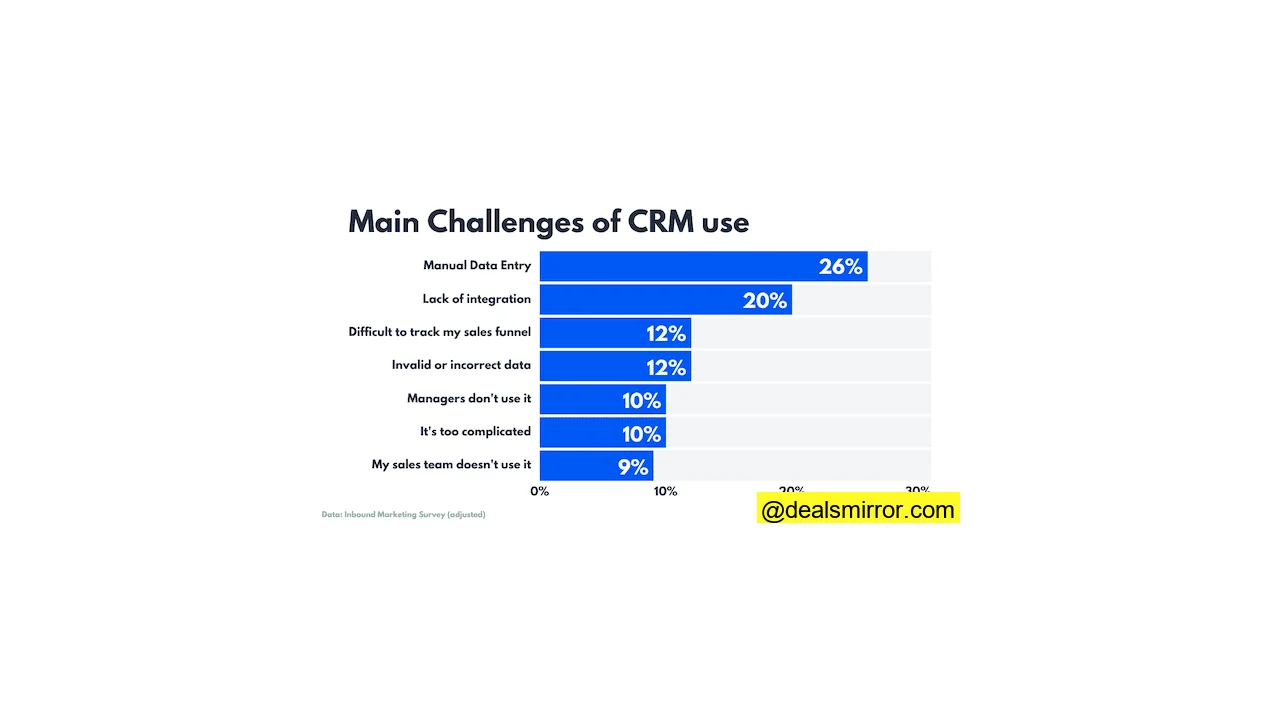
CRM software records details of all customer interactions: phone calls, emails, live chat, social media, and even website visits. This includes signing up for loyalty programs or newsletters, clicking on ads, and making a purchase. Historically, the primary challenge in CRM usage has been manual data entry.
A CRM platform captures data from all these sources, making it available across your entire organization. It provides a single point of visibility, helping make operations more agile and integrated. Most importantly, it places customer knowledge at the center of everything you do.
Core CRM Functionality
While all CRM providers strive to make their platforms unique, there’s a set of essential features that every respectable modern CRM system must possess. These core CRM tools deliver the greatest benefits.
1. Omnichannel Integration
Early CRM systems were heavily phone-centric. When sales and service teams operated from call centers, a primary goal of CRM was to record and track call data.
Phone/voice remains a key component of CRM. However, customers today use many more channels. Email, live chat, SMS, web push notifications, social media—all must be included.
This is crucial for gaining a complete view of the customer experience. It also makes customer relationship management simpler and more efficient. For example, the best modern CRMs allow you to manage email marketing directly from the platform. These integrated tools often rival independent email marketing platforms.
The same applies to making a voice call, initiating a live chat session, or posting on social media. The more you can accomplish within the CRM, the more information you can share, and the more consistent your approach can be across all channels.
2. Cloud-based CRM
Like much business software, early CRM platforms were large, heavy programs that had to run from a specific machine or server cluster. You had to be on that machine or in that office to use them.
Today, agility and accessibility are paramount in CRM. Cloud-based CRM systems allow you to use them from any web browser. Mobile CRMs enable you to manage customer relationships on the go.
3. Analytics
A customer database is one thing; using customer data to deliver a better experience is another.
Analytics makes personalization possible. It helps focus attention on the largest and most valuable prospects and allows you to track sales, marketing, and customer service performance in real-time.
This means you can adjust activity on the fly to increase chances of success or identify what works and replicate it in the future.
4. Automation
Data also drives automation. CRM automation primarily comes in three variants: marketing automation, sales force automation, and customer service automation.
Automation makes workflows more efficient and adaptable. It lightens staff workload and eliminates human error. When data-driven automation is used, you should never miss a lead or opportunity.
5. CRM Innovations
As technology continues to evolve, we are witnessing increasing innovations in CRM. In particular, CRM systems are leveraging AI to elevate analytics and automation.
With machine learning, CRM is becoming more effective and powerful. Over time, systems “learn” the best ways to optimize workflows. They improve at predicting customer behavior, making recommendations that drive more conversions, and controlling more decisions, thereby boosting automation.
CRMs are also utilizing AI to access an increasing number of data sources. For example, Natural Language Processing technology can now analyze spoken and written words. Information from phone calls and emails no longer needs to be manually added to the customer database; AI can extract relevant data and save it automatically.
A Brief History of CRM
Some trace the history of CRM back to the invention of the Rolodex in the 1950s. A Rolodex, a rotary card file, became popular among salespeople for recording customer data. While a far cry from today’s advanced CRM programs, the general principle of recording customer information to aid sales processes remains the same.
Others argue that the origins of “true” CRM date back to the 1980s and the emergence of database marketing, which used analytics to predict how customers would respond to marketing campaigns.
The first specifically designed contact management software appeared in the late 1980s. By the early 1990s, software combining database marketing and contact management arrived. We would recognize these products today as a basic form of CRM, but at the time, they were called sales force automation.
The term “customer relationship management” was reportedly coined in 1995. Gradually, sales force automation products evolved into customer relationship management systems. The market leader at that time was Siebel Systems Inc., with the first edition of Siebel CRM hitting the market in 1995.
Subsequently, demand for CRM software soared. By the late 1990s and early 2000s, some of the major CRM names we still recognize today were established. Oracle CRM launched in 1998, SAP CRM in 2000. Microsoft began marketing CRM platforms in the early 2000s, with Microsoft Dynamics launching in 2006.
Perhaps the most significant moment was when Salesforce launched its first CRM edition in 1999. Salesforce was an early pioneer of “Software as a Service” (SaaS) in the cloud, introducing a web-based interface decades before it became the CRM standard.
Another milestone occurred in 2004 with the arrival of SugarCRM, the first open-source CRM. Open-source allows other developers to use a program’s code under license. Alongside cloud technology, this paved the way for the enormous explosion of CRM providers in the 2010s.
Instead of building a CRM platform from scratch, developers can now use open-source code as a starting point. This has accelerated innovation, enabling developers to quickly respond to trends like social media and mobile. The SaaS model has also made CRM systems more agile, easier to run, and simpler to use, as well as much more affordable than previous platforms.
The result is the boom of the specialized, cloud-based CRM market we see today. Whatever your market, company size, and budget, there’s a CRM for you. You can also choose from CRM systems designed for specific tasks.
Types of CRM
Sales CRM
Sales is a complex yet vital area for any business. Whether you’re B2C or B2B, your objectives are generally the same: growth depends on increasing sales and maximizing revenue per sale.
Sales CRMs are designed to streamline complex sales processes. They focus on improving visibility and data sharing between teams, with analytics that help prioritize activity. They also use automation to make workflows efficient and sales activities better targeted.
Key features to look for in a sales CRM include:
- Lead Tracking & Scoring: Lead tracking involves recording data about your contacts’ behavior across all channels. Analytics then use this data to “score” which leads are promising and which are not. The idea is to focus your efforts on the strongest leads, often called opportunity management. This helps achieve more conversions and higher revenue per sale.
- Sales Pipelines: Sales pipelines visualize your sales processes, showing all the stages customers go through on their path to purchase. Visualization aids understanding, giving you more power to influence the sales process. The best tools also allow you to automate sales pipelines.
- Proposal & Quote Management: Proposal management features offer pipeline-like visualizations for charting timelines and financial tools for calculating costs. Bid management tools help prepare offers based on desired margins. Some automate the process by using previous quotes to quickly calculate new bids.
- Account Management: B2B sales teams often manage customer accounts. CRM account management tools gather all account data in one place and include specific B2B features like invoice tracking, credits, and contracts.
monday.com
monday.com is much more than a CRM; it describes itself as a Work Operating System or Work OS. It allows users to create their own personalized workspaces with dozens of different features.
What makes monday.com unique is its hundreds of templates for creating “boards.” A board is a digital workspace. Templates are visual, easy to navigate, and fully customizable via a drag-and-drop interface.
This provides sales teams the flexibility to adapt their CRM to their workflow. Specific CRM templates and boards include sales pipelines, marketing activity tracking, client onboarding, and sales enablement. Additionally, there are customizable analytics dashboards and automation workflows. Another standout feature is the customer timeline view, which lets you track all customer interactions over time.
monday.com offers integrations with over 50 popular business applications, including direct integrations with email providers like Gmail and Outlook. You can connect to Zapier, opening the door to 4000+ more applications. You can even connect to other CRMs like Salesforce.
The free-forever plan supports up to two users, allowing unlimited boards with a selection of over 200 templates.
In terms of pricing, monday.com is very affordable. Paid plans start at $8 per user per month, with a minimum of three users ($24 per month). This gives you access to unlimited sales channels and contacts, along with lead, contact, and deal management. You also get a complete mobile CRM through dedicated iOS and Android apps.
For sales analytics and advanced integrations, you’ll need to upgrade to a more advanced version. The Standard plan costs $10 per user per month for three users.
Pipedrive
Pipedrive is an excellent choice for smaller sales teams. It’s user-friendly, offers good value, and scales with your operations.
One of its standout features is the ability to create many sales pipelines across all plans. Many competing services restrict users to one or two pipelines at cheaper tiers. Plus, it’s easy to customize these pipelines to fit your own sales journeys.
Pipedrive has over 400 third-party integrations, some free, others paid. 73 are classified as “app extensions,” meaning connected apps work within the Pipedrive platform. These include Zapier, Microsoft Teams, Zendesk, and the project management platform Trello.
Pipedrive offers a mobile app for iOS and Android, perfect for remote teams and sales representatives on the go. You can also connect to Gmail to access Pipedrive’s CRM tools directly from your inbox.
Pricing starts from $14 per month for basic lead, deal, and sales pipeline management. You’ll need to double that amount for email features and marketing automation, and double it again for integrated calling and sales forecasting. There is no free plan, but you can try Pipedrive for 14 days at no cost with full feature access.
BenchmarkONE
Formerly known as Hatchback, BenchmarkONE is a powerful all-in-one CRM with an excellent set of sales-focused features.
Key features include high-quality contact scoring and deal pipelines. Contact scoring uses data to qualify leads and customers as “hot” or not. Deal pipelines use data to suggest the best way to convert leads. The result is a smarter sales strategy, higher conversion rates, and increased revenue.
BenchmarkONE offers marketing tools alongside its sales CRM functions. These include email campaign creation and sending, marketing automation, and lead generation options. There are integrations with Gmail and Outlook to manage customer relationships from your inbox. You can connect to thousands of other applications via Zapier.
The free version offers unlimited users, 250 contacts, and 500 emails per month. In terms of features, it includes landing pages, contact management tools, email marketing, and marketing automation.
Paid plans start from €27 with a limit of 500 contacts and 2,500 emails per month. However, that plan only offers marketing automation, email marketing, and contact management tools. For the full CRM experience, pricing starts at €169.
Close
Close is an excellent CRM for telesales teams, excelling in calling features. All subscriptions include outbound global calling, automatic call logging, pre-recorded voicemails, and predictive dialing. Higher-tier plans also include call recordings.
These are tools familiar to all telesales teams, but in most cases, you would expect a dedicated call center system connected to a CRM. The fact that Close offers both together simplifies things, making it ideal for small to medium-sized sales teams seeking greater convenience.
Pricing starts at $29 per month, or $25 if paid annually. For that price, you get 3 users, 2500 leads, and 4000 contacts with email and marketing automation.
There is no free plan, but you can try the service for 14 days free. Close does not have a full mobile application, only a call tracker that transfers mobile call data to the main system. You can connect third-party services via Zapier.
Dialpad
Dialpad isn’t a CRM in the traditional sense; it’s a business communication platform that combines voice, messaging, and meetings. It’s the type of platform you might want to connect to your existing CRM to maximize all your contact data.
However, Dialpad also offers what it calls customer engagement tools, with products for customer service, omnichannel interaction, and sales.
Again, Dialpad Sell isn’t exactly a complete sales CRM. In fact, it encourages you to connect it with your current CRM. It offers integrations for Salesforce, Hubspot, Kustomer, Zoho CRM, and others.
Dialpad provides a suite of AI-powered tools designed to add value to your CRM processes. This includes specific requests, scripts, sentiment analysis, and objection handling. So, while a sales agent is speaking with a customer, Dialpad tracks customer satisfaction levels, making real-time recommendations on what to say next to increase conversion chances, and suggesting upsells and cross-sells.
It automatically produces call transcripts and summaries. Follow-up action items are sent directly to the relevant agent’s inbox. It offers specialized support for building remote agent teams.
Dialpad‘s pricing starts from $15 per month if paid annually or $20 if paid monthly. This includes Google Workspace and Microsoft 365 integrations. However, you need to upgrade to a higher tier for CRM integrations, starting at $25 per month. A 14-day free trial is available, but there is no free plan.
Marketing CRM
Marketing and sales can be viewed as two halves of the same process. Sales focuses on converting leads into paying customers, but marketing is about generating those leads in the first place.
Marketing CRMs aim to identify the right marketing activity for the right person at the right time. Key features to look for in marketing CRMs include:
- Data Analytics: Marketing CRM begins with understanding your audiences. Analytics achieves this by tracking behavior across all channels, monitoring responses to marketing campaigns, and building on sales data. This information helps you distinguish successful marketing strategies from ineffective ones.
- Segmentation: Segmentation involves grouping your audiences based on their demographics and behavior. This transforms information about prospects and customers into personalized content and campaigns. Better segmentation also means more efficient use of marketing resources.
- Email Marketing: Digital marketing encompasses many different areas. All-in-one marketing CRMs support advertising campaigns, SEO, social media, content marketing, and more. Email remains a core component. Email addresses are the default contact information and are easy to gather. Email outreach campaigns allow you to reach large groups at once. With automation tools, you can set up automated workflows to send one-on-one messages based on contact actions. Email editors let you quickly create attractive, personalized messages for your business.
- Marketing Automation: Sending personalized campaigns to thousands of contacts is a heavy task. Marketing automation does the heavy lifting for you. Automation tools within a marketing CRM allow you to set rules based on what your contacts do. Using tracking data, you can trigger specific and timely messages.
- Lead Generation: Growing your audience is a crucial part of marketing. More leads mean more opportunities to convert them into customers. Lead generation revolves around asking people to sign up for something. In exchange for their email address, you offer contacts something valuable, such as a newsletter, a free ebook, a webinar, a special offer, or a t-shirt.
- Landing Pages: You don’t always want prospects to click to your homepage from a campaign. It’s much better to create dedicated pages for specific special offers, shortening the path to purchase. That’s why marketing CRMs should offer landing page builders. As with email design, most will offer easy-to-use drag-and-drop editors, meaning anyone can create a page without needing to request or hire developers each time.
- A/B Testing: Finally, the best marketing CRMs also allow you to test your campaigns. You can see how small samples of your contacts respond to refine your approach, preventing you from wasting time and money on ineffective campaigns. A/B testing works by comparing the performance of different versions of the same campaign.
Keap (formerly Infusionsoft)
Keap was founded in 2001 as Infusionsoft. It was part of the original wave of SaaS sales automation platforms. Known as Keap since 2019, the service continues to offer sales tools but now leans more towards marketing functionality.
Keap features excellent marketing automation tools. Its automation workflow builder is very user-friendly and accessible for beginner users, easily automating lead capture and triggering follow-ups the moment someone signs up. You can also use CRM tracking data to score leads and personalize responses.
Keap also includes comprehensive email marketing and SMS options, with templates and an easy drag-and-drop editor. Emails and text messages can be scheduled in advanced, multichannel, automated campaigns. Behavior-based tagging and segmentation further enhance personalization.
You can get even more out of Keap by connecting to hundreds of third-party platforms, though some integrations are paid. There’s also a mobile app that provides a business phone line, SMS, and an email account from your smartphone.
Keap‘s pricing starts from $169 per month for the Pro plan, which includes 2 users and 1500 contacts. This plan offers CRM, email marketing, payments, invoicing, landing pages, automatic sales lead capture, the mobile app, and much more.
ActiveCampaign
ActiveCampaign is best known as an email marketing automation software, but it describes itself as a “customer experience automation” platform. Like Keap, it offers tools for sales and service, but its marketing features truly stand out.
ActiveCampaign is an excellent platform for advanced marketers. Its automation tools are superior, offering sophisticated automations for sales, marketing, and CRM functions. There’s a powerful visual editor that lets you create these advanced workflows, hundreds of automation “recipes” for easy starts, and the ability to visually map how all your automations fit together.
It connects to over 100 external platforms, notably e-commerce platforms like Shopify and BigCommerce. This allows you to pull customer data from your store into your CRM, create promotional emails and landing pages with product listings, and track sales data to assess campaign results.
ActiveCampaign offers scalable pricing. The Starter plan begins at $15 per month if paid annually, providing marketing and email automation, site tracking, 10,000 email sends, and campaign reporting for 1 user. CRM and sales engagement automation are available in the Plus plan, starting from $49 per month. This plan includes a mobile CRM app. A 14-day free trial is available.
EngageBay
EngageBay is another all-in-one CRM platform strong in marketing. EngageBay stands out for the simplicity and ease of use of its marketing tools.
EngageBay‘s ‘Marketing Bay’ product prepares you for any situation. It offers email marketing and drip campaigns with ready-to-use templates. You can create landing pages and registration forms for lead capture. Easy-to-use drag-and-drop editors make it simple to get started.
EngageBay also provides features not always found in competing marketing platforms. There are dedicated tools for managing and tracking inbound and content marketing campaigns. You can create on-site messages to welcome website visitors or send mobile push notifications. High-volume SMS campaigns are also possible.
In short, EngageBay puts an impressive range of marketing tools at your fingertips. You can also add sales and service CRM features with automation, making it an ideal package for small businesses. You can further enhance EngageBay‘s capabilities with third-party integrations. There are 15 integrations available, including Zapier, which opens the door to over 4000 platforms.
EngageBay offers a free-forever plan with 500 contacts, email marketing, autoresponders, landing pages, CRM, and live chat. Paid plans for Marketing Bay as a standalone product start from $12.99 per user per month. However, you can get the full EngageBay suite for just $14.99 per month. There’s a 20% discount for paying two years in advance.
Brevo
Brevo is another comprehensive marketing and sales software, strong in email marketing and marketing automation. But it offers much more, including high-volume automated transactional emails and social media advertising campaigns.
And yes, CRM is part of the suite. Brevo‘s CRM features lean towards the marketing side, covering the full range of tools from lead generation to sales.
Brevo has broad appeal for everyone, from small businesses to large enterprises. It’s built with ease of use in mind, even for new users. Loading, creating, and editing contact lists is easy. Segmentation options are powerful yet simple, linking directly with marketing automation. There’s a drag-and-drop visual automation workflow builder that takes no time to master.
Brevo offers around 60 third-party integrations, leaning towards e-commerce platforms and content management systems. But you can also connect to other CRMs, which is great if you want more sales and service tools for a more complete experience.
Another thing Brevo is known for is its forever-free plan. It allows you to create and send 300 emails per day and store up to 100,000 contacts, including list segmentation tools and CRM. Marketing automation is limited to 2000 contacts until you upgrade to the Business plan, starting from $18 per month.
HubSpot
Since its launch in 2006, HubSpot has become a major name in digital marketing, considered a pioneer in inbound marketing.
Inbound marketing involves encouraging customers to come to you with educational content. If customers take the first step, they are much more likely to convert into paying customers. To do this well, you need to know your customers thoroughly to understand what to offer them, hence the connection between inbound marketing and CRM.
HubSpot offers a complete business platform with marketing, sales, service, content management, and operations tools. However, it is best known for its marketing CRM, providing a larger set of marketing tools than most competing services. You get all standard features like email marketing, marketing automation, and lead generation. In addition, you have tools for blogging and content creation, SEO, social media marketing, and more.
Furthermore, it uses data from across your entire company to give you a comprehensive view, covering sales, customer service, and your website, as well as marketing. It breaks everything down into detailed conversion analytics.
There’s a free version with email marketing, ad management, forms, live chat, and reporting. Both the Free and Starter plans focus on lead generation, contact management, and basic content creation.
HubSpot pricing for the full suite starts from $45 per month billed annually for up to 1000 contacts. This offers what is described as a “beginner” CRM package. For more advanced marketing tools, you need to subscribe to the Professional plan, starting from $1600 per month. This is where HubSpot becomes a CRM platform for larger enterprises.
Freshmarketer
Freshworks is another all-in-one business software suite, offering tools for marketing, sales, service, IT service management, and human resources. Freshmarketer is its marketing CRM product.
Freshworks specializes in providing a wealth of features at affordable prices. Like the rest of its product suite, Freshmarketer is easy to use. The tools are designed to help growing businesses get the most out of their CRM. This includes pre-built, industry-specific “playbooks” for creating marketing campaigns and a drag-and-drop Journey Builder for customizing them.
Freshmarketer is ideal for engaging with customers across different channels, integrating email marketing, chatbots, SMS, and WhatsApp messages in one place. In higher-tier plans, you can also add webhooks and event marketing.
There is a Shopify integration that unlocks additional features for digital stores, including 10,000 additional contacts across all plans, customer segmentation, and personalized guides.
The free version offers email marketing tools and management for up to 100 contacts. Pricing starts from $19 per month if paid annually. There’s a 21-day full-featured free trial. The number of contacts and chatbot sessions allowed is limited in each plan, but you can purchase add-ons at any time.
Customer Service CRM
All successful businesses understand that customer relationship management doesn’t end at the point of sale. If your goal is to build a strong base of loyal customers, you could say that’s just the beginning.
Retaining customers makes good business sense. You have between 60% and 70% chance of selling to an existing customer, compared to 5% to 20% chance with a new prospect. Furthermore, existing customers are 31% more likely to have a higher average order value.
How do you get customers to return for more? Quality customer service makes all the difference. While marketing and sales CRMs focus on generating and nurturing leads, customer service CRMs focus on customer satisfaction.
Customer service CRMs provide tools to make service and support fast and effective, helping deliver consistent service across all touchpoints.
Key features to look for in a customer service CRM system include:
- Omnichannel Communications: Modern customers use many different communication methods: phone, email, SMS/messaging apps, live chat, social media, and video. Great service offers customers support on their preferred channels, making it important for customer service CRMs to manage multiple channels.
- Ticket Management: Integrated ticket management means all support requests are processed in the same place. Regardless of the contact point used, all inquiries are handled equally, improving consistency and making workflows more efficient.
- Real-time Data Sharing: Modern customers dislike being put on hold while an agent figures out their inquiry, or having to repeat themselves repeatedly. Real-time data sharing means agents have all relevant information available. When a customer contacts, the agent can immediately see the ticket or customer history. This speeds up service even when inquiries are passed between teams.
- Workflow Automation: Customers complain when they are shuffled between agents and teams. Not knowing the right person to handle an inquiry reflects poorly on any business. Customer service CRM workflow automation sends inquiries to the correct place at the first point of contact.
Freshdesk
Freshdesk is the service CRM from the Freshworks SaaS software suite. It’s designed to simplify customer service for growing businesses and small support teams.
Collaboration and automation tools facilitate ticket and task management. This includes “collision detection,” a tool that alerts when another agent is already handling a ticket. You can set and manage your own service level agreements (SLAs) with time tracking and completion. There’s also a suite for creating your own self-service knowledge base.
Freshworks has an app marketplace with over 1000 integrations, including workflow automation tools, social ticketing, e-commerce platforms, survey tools, video add-ons, and more.
There’s a free version for up to 10 agents, offering email and social media ticket management, a knowledge base, and reports. Freshdesk has two paid plans: Support Desk and Omnichannel.
Support Desk costs from $15 per agent per month if paid annually. It includes everything in the free plan, plus automation, collision detection, integration, SLAs, and more.
Omnichannel starts from $29 per agent per month, billed annually. It’s for businesses that want to give customers more options to contact support. At the cheapest tier, it includes live chat and phone. WhatsApp Business and Apple Business Chat are available at higher tiers. Performance analytics pull real-time data from all channels. In higher plans, you can also automate workloads across all channels.
Agile CRM
Agile CRM is a comprehensive CRM software platform that includes customer service tools across all its plans. It’s affordably priced, and its customer service tools are among the best available.
The core of the system is Agile‘s excellent help desk software. Automated workflows help assign tickets to the right people initially. You can group tickets into categories to forward them to the most qualified person, speeding up first response and resolution times.
Default responses send automatic replies so customers don’t feel like they’re waiting. Smart recommendations also guide agents on the best course of action.
Agile CRM allows you to manage your customer support via email, live chat, or phone. Over 50 integrations are available, including e-commerce platforms, social media, and email marketing.
It offers a free-forever plan, giving you access to all basic customer support, sales, and marketing tools. Since this allows up to 10 users, you can start managing customer service for your micro-business at no cost. With prices starting from $8.99 per month, Agile CRM is a cost-effective option for small businesses.
Zendesk
Zendesk is a true customer service specialist. For other providers, service CRM is part of a larger offering, but Zendesk‘s flagship software is a customer service platform.
Zendesk features many functions and offers flexible plans suitable for both large and small businesses. Its core tools include a multichannel ticketing system, where tickets can be created and responded to via email, phone, SMS, and live chat. Automated workflows assign and manage tickets, while AI tools provide instant answers to customers. Zendesk even scans social media to create tickets from customer posts.
Zendesk manages everything in a single workspace, with visible progress and results analytics. In higher-tier plans, you can customize your own metrics.
Zendesk allows you to create a knowledge base across all plans. AI bots use these resources to guide agents handling customer inquiries. In higher plans, you can create branded help portals. Multiple customer support services can be created in the same account with multilingual support.
If you’re a new company, you can apply for Zendesk free for six months. The Zendesk customer service package starts from $49 per agent per month, billed annually. There’s also a more basic support package starting at $19, which includes basic ticket management with pre-set rule-based workflows and a customer history database.
SugarCRM
SugarCRM is the original open-source CRM, and Sugar Serve is its service CRM. It’s aimed at growing businesses that want to make customer service more efficient.
At SugarCRM, customer service focuses on creating and managing high-quality self-service resources. It includes tools that automatically divert customer inquiries to the knowledge base. The more customers help themselves, the more efficiently your customer service teams can operate.
If an inquiry cannot be resolved through the knowledge base, Sugar Serve uses smart routing tools to direct it to the right person. Sentiment analysis “takes the customer’s temperature” to judge when to prioritize or escalate issues.
All customer information is available to agents through visual dashboards. Real-time performance updates ensure you can always see if you are meeting your SLAs (Service Level Agreements). SugarCRM will also identify and track common issues to aid early intervention.
Pricing for Sugar Serve starts at $80 per user per month. You must have at least three users, meaning the minimum you can pay is $240. There is no trial or free version, but you can request a demo.
CRM for Small Businesses
The customer relationship management software market was once dominated by large enterprises. This was partly due to the size and complexity of many CRM platforms, which were expensive to build, costly to buy, and required a skilled IT team to operate.
The explosion of cloud-based CRM has changed everything. The SaaS model has steadily driven down CRM prices over the years, and remote hosting eliminates technical complexities.
This has opened the door for dozens of small business CRMs to enter the market.
If you’re an SME owner, you need a reliable, all-in-one platform that covers everything you need. You want a CRM that is affordable and easy to use.
Key aspects that define the best CRMs for SMEs are:
- Easy-to-use Interface: Small business owners must be adept at managing time and resources. Can they afford to spend hours training staff to use new business software? Small business CRMs pay close attention to design and navigation, using visual interfaces created to help even beginners get up to speed quickly.
- Robust Customer Service: When you don’t have your own IT team, you rely on the quality of the provider’s support. Most small business CRMs have well-stocked knowledge bases with articles and videos that are easy to search and digest. Many back this up with well-trained support teams focused on providing quick responses to inquiries via phone, email, or live chat.
- Integrations: Small businesses benefit most from app integration marketplaces. Large companies can afford extensive, feature-packed software. Small, agile, cloud-based platforms better suit small business budgets. But the true value comes when all these different services work together. The best small business CRMs offer simple integrations with the applications you already use.
BenchmarkONE
BenchmarkONE is one of the top CRM platforms for small businesses. It’s an all-in-one solution, super easy to use, and features tools for every stage of the customer journey.
BenchmarkONE is a great platform if you want to convert more website visitors into paying customers. It combines marketing and sales automation into a single, user-friendly platform. You can convert web visitors into leads with forms and landing pages, segment your contacts to send targeted email campaigns, and use sales pipelines to track sales performance.
Everything is as straightforward as you could wish and easy to learn.
BenchmarkONE has a free version with 250 contacts and 500 emails per month, including contact management, email marketing, landing pages, marketing automation, and a full CRM. Pricing starts from $29 per month for 500 contacts and 2500 emails for the Lite plan. This plan includes contact management, email marketing, automation, and landing pages. The Pro package with the full CRM starts from $179 per month.
EngageBay
The great appeal of EngageBay as a complete CRM platform for small businesses is its wide range of features. With a wealth of marketing, sales, and service tools, it’s an ideal all-in-one solution.
You get a full suite of marketing features, including lead generation, email outreach, and automated campaigns. Connect marketing with your sales channels for advanced automation. Its contact and lead management tools provide easily digestible data on contacts and contact groups. Lead scoring allows you to focus on your best prospects.
For customer support teams, you can automate ticket management and get detailed reports on customer service performance. EngageBay also offers live chat, which is great for customer support and sales teams. You can connect EngageBay with 30 applications, including Shopify, Thinkific, and Zapier.
There’s a free plan that gives you access to basic marketing, sales, and customer service tools for 500 contacts. Pricing starts from $11.99 per month if you pay for 2 years. And it’s still only $14.99 per month if you want to pay monthly, which is a great offer for marketing, sales, and customer service tools.
Pipedrive
Pipedrive meets all the requirements for a small business CRM. It’s quick and simple to set up and use, yet has great potential. It’s affordable, scalable, and while primarily positioned as a sales CRM, it has everything you need for an all-in-one platform.
It features the essential elements of lead management, deals, calendars, and projects. As your needs evolve, Pipedrive adapts, offering a scalable and powerful solution for your growing business.