

In today’s fast-paced business world, technology is no longer an optional extra for sales teams; it’s a core component driving success. Sales Force Automation (SFA) is revolutionizing how sales professionals operate, enabling organizations to secure more deals and significantly boost profits.
By automating routine and time-consuming administrative tasks, SFA tools empower sales teams with valuable customer insights, streamline deal closures, and enhance overall efficiency. This shift allows salespeople to dedicate more time to building meaningful relationships and strategic selling, rather than getting bogged down in paperwork.
What is Sales Force Automation (SFA)?
Sales Force Automation (SFA) refers to the use of software to streamline and enhance the entire sales process. Think of SFA as a sophisticated digital assistant that automatically handles repetitive sales tasks, freeing up salespeople to concentrate on their primary objective: closing deals and nurturing customer relationships.
Typically, SFA systems manage customer contacts, meticulously track interactions, generate accurate sales forecasts, and schedule timely follow-ups. They can even automate the sending of follow-up messages, ensuring no lead falls through the cracks.
Unlike traditional sales methods that often scatter information across various spreadsheets and disparate software, SFA centralizes all crucial sales data onto a single, unified platform. This integrated approach drastically improves efficiency throughout the sales pipeline, ensuring every team member is aligned on deal progress. Many SFA tools seamlessly integrate with Customer Relationship Management (CRM) software, offering a comprehensive 360-degree view of the entire customer journey and sales pipeline.
Ultimately, Sales Force Automation transforms the sales process from a manual, often fragmented effort into a data-driven, strategic powerhouse. SFA enables sales teams to work smarter, not just harder, leading to remarkable increases in productivity and sales performance.
What Kind of Sales Teams Should Adopt Sales Force Automation?
Sales Force Automation (SFA) offers significant advantages for sales teams operating in industries characterized by complex, high-volume, or extended sales cycles. Businesses with large sales forces that need to efficiently manage vast amounts of customer data, track numerous leads, and ensure timely follow-ups will find SFA incredibly beneficial. Industries such as technology, pharmaceutical, and financial services are prime candidates for SFA adoption.
Furthermore, businesses that heavily rely on data and analytics to inform and drive their sales strategies are also exceptionally well-suited for SFA. This includes sectors like retail, real estate, and manufacturing, where understanding customer behavior and market trends is critical for success.
However, SFA may not be the ideal fit for all businesses. Industries or niches where sales processes are profoundly personalized and relationship-driven—relying heavily on deep personal connections and tailored, hands-on approaches—might find less benefit from automation. Similarly, small businesses with straightforward sales processes and limited customer interactions sometimes perceive SFA as an unnecessary expense, as their needs can often be managed effectively with simpler, manual tools.
The 5 Main Benefits of Sales Force Automation
Sales Force Automation (SFA) empowers sales teams to operate with unparalleled efficiency, allowing them to excel at what they do best: sell!
1. Increase Close Rates with Highly Qualified Leads
SFA intelligently guides sales teams toward the leads most likely to convert. Utilizing advanced analytics, Sales Force Automation tools score and prioritize leads based on their buying potential and engagement signals. This crucial process helps sales teams quickly identify and focus their efforts on the most promising prospects, significantly increasing their chances of closing deals.
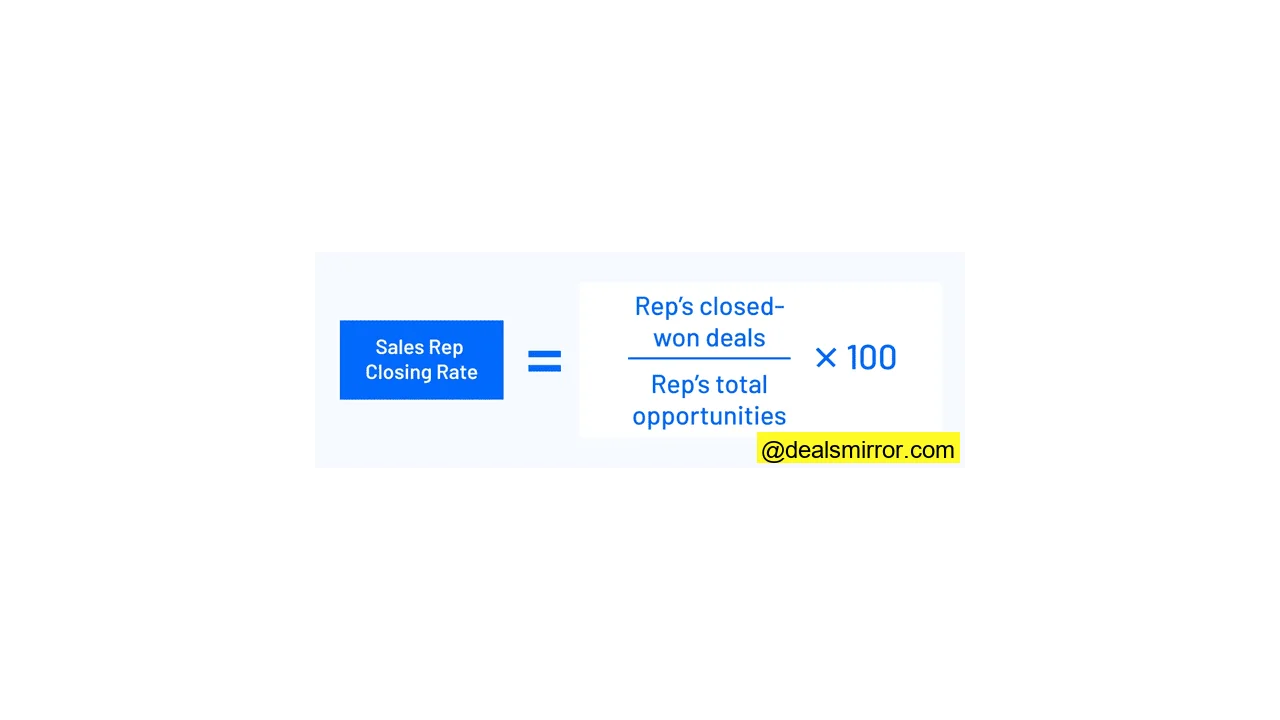
SFA tools often integrate seamlessly with other software, providing a complete view of each lead’s interactions and engagement history. Sales representatives can then personalize their approach and communication to precisely meet each lead’s specific needs and preferences, further enhancing conversion rates.
2. Improve Sales Team Productivity with Task Automation
Administrative tasks consume a significant portion of a salesperson’s day, detracting from core selling activities. Sales Force Automation tools are designed to automate these tedious administrative duties, such as data entry, scheduling follow-ups, and generating reports. This automation liberates sales reps, allowing them to spend more valuable time engaging with leads, nurturing relationships, and ultimately, closing more deals.
By dramatically reducing the manual workload, SFA software not only saves time but also minimizes the potential for human error. Automated systems ensure that no important tasks are overlooked and that all customer interactions are accurately and consistently recorded.
3. Enhance Customer Relationships with Personalized Interactions
Sales Force Automation tools enable sales teams to deliver more personalized and timely interactions with customers. By providing a comprehensive view of each customer’s history, preferences, and past engagements, SFA allows sales representatives to tailor their communications and offers to perfectly align with individual customer needs. This elevated level of personalization is instrumental in building stronger, more trusting, and long-lasting relationships with clients.
Furthermore, SFA tools automate follow-ups and reminders, ensuring leads receive consistent and timely communication. This not only significantly improves the lead experience but also keeps the sales process moving forward smoothly and efficiently.
4. Gain Valuable Insights with Advanced Reporting and Analytics
Sales Force Automation software comes equipped with robust reporting and analytics tools that provide profound insights into the sales process and overall performance. Sales teams can access critical insights on various metrics, including lead conversion rates, sales cycle length, and accurate revenue forecasts. These insights empower sales managers to quickly identify sales trends, precisely track progress toward goals, and make informed, data-driven decisions that propel the business forward.
SFA analytics also help in pinpointing bottlenecks within the sales process and identifying specific areas ripe for improvement. By continuously refining sales strategies and tactics based on this valuable information, teams can achieve superior performance and significantly higher sales volumes.
5. Create Consistency and Compliance with Sales Team Processes
Sales automation software plays a critical role in establishing consistent and compliant sales activities across the entire organization. By standardizing processes and automating crucial compliance checks, Sales Force Automation substantially reduces the risk of sales professionals deviating from established protocols. This is particularly vital in highly regulated industries such as healthcare and finance, where adherence to standard processes is not just beneficial, but absolutely crucial.
Standardized processes also simplify and accelerate the onboarding of new sales professionals, getting them up to speed quickly and effectively. With clear guidelines and automated workflows, new team members can easily follow established protocols and begin contributing meaningfully in a shorter timeframe. This consistency and compliance lead to a more professional, reliable sales operation, which in turn enhances the company’s reputation and trustworthiness in the market.
How to Adopt Sales Force Automation
To successfully integrate Sales Force Automation into your operations and reap its full benefits, companies should follow this strategic 5-step process:
1. Identify Your Sales Process Needs
Begin by thoroughly assessing your current sales processes to pinpoint areas that require improvement. Look for repetitive tasks ripe for automation, and identify any data management challenges such as accuracy or timely entry. Conduct interviews with your sales team to understand their pain points and gather feedback on which features they would find most beneficial.
Clearly define your specific goals for adopting SFA. These might include increasing lead conversion rates, improving customer relationships, or boosting overall sales productivity. Defining precise goals will be instrumental in selecting the most appropriate Sales Force Automation software.
2. Choose the Right Sales Force Automation Software
Research and evaluate various sales automation software options to find the one that best addresses your identified sales process pain points. Look for software that is intuitive and easy to use, integrates seamlessly with your existing systems (like your CRM), and offers the specific features essential for your team.
Take advantage of free trials or demos to experience how the software performs in a real-world scenario. Involve your sales team in the selection process to ensure the chosen software meets their operational needs and is user-friendly, fostering higher adoption rates.
3. Train Your Sales Team
Once you’ve selected your SFA software, comprehensive training for your sales team is crucial. Ensure they understand how to use the software effectively and are fully aware of its numerous benefits. Training should cover all essential functions relevant to each individual’s role, such as managing leads, automating tasks, and generating insightful reports.
Implement regular training sessions to keep your team updated on new features, best practices, and any system updates. A well-trained team is far more likely to embrace the new software and leverage its full potential to drive sales success.
4. Integrate Sales Force Automation with Other Systems
To maximize the utility of Sales Force Automation, it’s essential to integrate your new tool with your existing business software. This includes vital platforms such as your CRM, email marketing platforms, and customer support tools. These existing systems are often excellent starting points for a robust Sales Force Automation ecosystem.
Collaborate closely with your IT team or engage external consultants to ensure a smooth and effective integration process. Promptly address any technical issues to prevent disruptions to your sales workflow and ensure seamless data flow across your organization.
5. Monitor Your Sales Force Automation Implementation
After successfully setting up your Sales Force Automation system, continuously monitor its impact on your sales process. Utilize the software’s built-in reporting and analytics features to track key metrics like lead conversion rates, sales cycle length, and overall team productivity.
Regularly gather feedback from your team and be prepared to make adjustments as needed. Staying informed about how the system is performing allows you to implement necessary improvements and ensure it continues to deliver optimal benefits to your sales process.
What is the Difference Between Sales Force Automation and CRM?
Sales Force Automation (SFA) and Customer Relationship Management (CRM) systems share a fundamental objective: to enhance the efficiency of sales and customer service processes. Both SFA and CRM aim to streamline workflows, manage data effectively, and facilitate superior customer interactions. They often exhibit overlapping functionalities, as many robust CRM systems now incorporate integral SFA features like lead management, opportunity tracking, and sales forecasting.
However, there are distinct differences between the two:
- SFA is specifically focused on automating and optimizing the sales process itself. Its core tools are designed to handle routine sales tasks, manage intricate sales pipelines, and generate comprehensive sales reports. SFA software is meticulously crafted to help sales teams boost productivity, close a higher volume of deals, and dramatically improve overall sales performance.
- CRM encompasses a much broader range of functions. It is designed to manage all aspects of a company’s interactions with both current and prospective customers. This includes not only sales but also marketing, customer service, and support functions. CRM systems provide a complete, holistic view of customer interactions across various touchpoints, empowering businesses to build stronger, enduring customer relationships.
Check out our sales funnel guide to learn what it is, the stages of a funnel, and how to create one.
5 Recommended Sales Force Automation Software
The market offers numerous Sales Force Automation software options, with many being part of larger software suites that combine robust CRM and sales automation tools. Each solution presents its own set of pros and cons, alongside different pricing models designed to suit diverse business types and sizes.
1. ActiveCampaign

ActiveCampaign helps sales and marketing teams grow by expertly managing sales processes and significantly improving customer relationships. It boasts over 900 pre-made automation templates, enabling quick setup, and seamlessly connects with more than 900 other software platforms.

Pros
- Sales automation “recipes” help businesses quickly automate repetitive tasks without requiring expert knowledge.
- Improves contact management across all plans with tools that sync emails directly from your inbox to ActiveCampaign.
- Offers the flexibility to bundle sales force automation tools with comprehensive marketing tools.
Cons
- Custom pipeline management reporting is exclusively available on the Enterprise plan, which is the most premium option.
ActiveCampaign Starter plan includes a marketing CRM, email marketing automation, a drag-and-drop email editor, basic forms, robust reporting and analytics, and site tracking. On Plus, Pro, and Enterprise plans, you can also purchase CRM add-ons. The Sales Automation Add-on includes sales automation triggers and actions to automate your pipeline and provides sales reports, including deal forecasts.
2. Hubspot Sales Hub
Hubspot Sales Hub is HubSpot’s dedicated sales force automation software. Sales Hub integrates seamlessly with other HubSpot products, such as Marketing Hub and Service Hub, to provide a unified platform for managing customer relationships and diverse business processes.
Sales Hub is highly user-friendly for beginners and simultaneously offers advanced features for experienced users, supported by free, comprehensive courses on HubSpot Academy.
Pros
- Easy onboarding process allows anyone to get started on HubSpot quickly.
- Excellent education and customer support resources are included in every plan at no additional cost.
- Includes a sandbox environment, enabling your team to test changes before deploying them to all users.
- Task management process is simplified and easy to assign tasks to sales users.
Cons
- Once upgrading to a paid plan, all plans are billed annually (no month-to-month contracts).
- There’s a steep learning curve once you progress beyond the basic functionalities of sales force automation.
Best of all, you can start for free! Paid plans include advanced features like goal tracking, forecasting, custom objects for sales data, sophisticated automation tools, and predictive lead scoring.
3. Pipedrive
Pipedrive is an exceptionally easy-to-use yet powerful Sales Force Automation tool. It helps businesses effectively plan sales campaigns, meticulously monitor sales performance, accurately predict sales outcomes, and generate comprehensive reports. Its intuitive design makes it very easy to learn and pick up, making it particularly suitable for small businesses.
Pros
- Pipedrive is highly customizable to fit a wide array of sales processes.
- Its user-friendly interface ensures a quick and easy learning curve.
- Reporting features include versatile custom fields and insightful dashboards.
Cons
- You would incur extra costs for lead generation, email marketing, and web tracking functionalities.
- The startup plan offers limited features compared to higher tiers.
Pipedrive offers a 14-day free trial, with pricing starting at $14 per user per month. Paid plans unlock advanced reporting capabilities, more sophisticated sales automation, and extensive customization options for managing sales pipelines.
4. Keap
Keap is a comprehensive automation platform designed to empower businesses not only in their sales efforts but also in their marketing strategies. It features robust sales pipelines to organize deals, diligently track progress, and significantly enhance sales efficiency. With Keap, you can automate critical tasks such as sending follow-up emails or assigning new tasks. Keap also provides an array of tools for effective lead capture, creating compelling landing pages, tracking pipelines, generating professional quotes, and processing payments seamlessly.

Pros
- Specifically built for small businesses to automate both sales and marketing workflows.
- Drag-and-drop functionality helps sales reps quickly and intuitively manage sales opportunities.
- Includes powerful tools for lead generation, landing page creation, and multi-channel communication.
- Offers automated quotes and invoicing capabilities.
Cons
- Keap may present too much complexity for some smaller businesses.
- Reporting features are more limited than expected, considering the substantial amount of data generated within the sales pipeline process.
Keap Pro starts at $199 per month for 2 users, making it a more significant investment among the options reviewed. Higher-tier plans include additional users and advanced features like detailed reporting, lead optimization, and expanded marketing tools such as eCommerce integration, landing pages, and affiliate management. A 14-day free trial is available.
5. Salesforce Sales Cloud
The Salesforce Sales Cloud has been a leader in helping businesses of all sizes effectively manage their sales processes for over 20 years.
While Sales Cloud might not be as immediately user-friendly as some other options, its unparalleled customizability allows it to be tailored to the precise needs of almost any organization. Trailhead, Salesforce’s extensive learning community, provides abundant educational resources to help businesses maximize their utilization of Sales Cloud.

Pros
- Extremely customizable to cater to small businesses, large enterprises, and everything in between.
- Comprehensive training community available through Trailhead and the Salesforce help center.
Cons
- Out-of-the-box functionality can be overwhelming and complex for smaller businesses.
- Requires advanced training to fully customize Sales Cloud to precisely fit your organization’s unique needs.
Salesforce Sales Cloud offers a 30-day free trial and then starts at $25 per user per month. Pricier plans include advanced analytics and sophisticated automation tools designed to help businesses gain deeper insights into their sales pipeline and deals, driving superior performance.
Check out this article for more details about sales force automation tools.
Sales Force Automation: Conclusion
Sales Force Automation (SFA) is a transformative technology that centralizes vital sales data on a single platform, dramatically improves sales productivity, and ensures all team members are consistently aligned. By seamlessly integrating with CRM systems, SFA transforms the traditional sales process into a dynamic, data-driven strategy, leading to boosted productivity and a significant increase in sales.
To successfully adopt and leverage Sales Force Automation, companies should systematically follow a proven 5-step process:
- Identify your specific sales process needs.
- Choose the right Sales Force Automation software tailored to your requirements.
- Provide thorough training for your sales team.
- Integrate Sales Force Automation with your existing business tools for seamless operation.
- Continuously monitor and evaluate your Sales Force Automation approach to ensure ongoing optimization.
Frequently Asked Questions about Sales Force Automation
Does sales force automation replace sales reps?
SFA empowers sales reps to cultivate stronger customer relationships through personalized interactions. By offering a comprehensive view of each customer’s history, preferences, and previous engagements, sales automation tools allow reps to tailor their communications and offers to precisely match individual customer needs. Additionally, sales force automation handles repetitive sales tasks automatically, freeing up valuable time for more strategic selling.
How can sales automation improve sales productivity?
By automating these time-consuming tasks, SFA software not only saves precious time but also significantly reduces the risk of human error. These sophisticated systems ensure that no important tasks are overlooked and that all customer interactions are accurately and consistently recorded, leading to a more efficient and error-free sales process.
What are common mistakes when adopting sales force automation?
- Implementing sales automation programs without clearly defined goals or measurable metrics.
- Failing to provide sufficient and ongoing training for sales teams on how to effectively use the new system.
- Choosing a system with an excessive number of unnecessary features that overwhelm users instead of simplifying their tasks.
- Failing to budget comprehensively for all associated costs, including initial implementation, necessary training, and ongoing maintenance.
- Migrating inaccurate or incomplete data into the new sales automation tool, which can lead to flawed insights.
- Not tailoring the sales force automation tool to precisely fit the specific needs and unique processes of the business.
What are the downsides of sales automation?
Another potential downside is the increased dependency on technology, which can lead to significant problems if automated systems fail or encounter technical issues. Over-reliance on automation can also result in a skills gap within teams, as sales professionals might become less proficient in performing manual tasks and engaging in traditional, interpersonal sales activities.
What can sales force automation tools help teams accomplish?
- Increase close rates by focusing on highly qualified leads.
- Improve sales team productivity through efficient task automation.
- Strengthen customer relationships with deeply personalized interactions.
- Gain valuable insights with detailed reporting and advanced analytics.
- Create consistency and ensure compliance with established sales processes.