
Seasoned marketers know that deliverability is important in email marketing. Building an email list is hard work – and good engagement is crucial. This means avoiding sending to inactive subscribers and undeliverable email addresses. That’s why marketers use email verification tools to ensure emails consistently reach customers’ inboxes.
This article reviews and tests over 30 email checkers, presenting the best email verification tools available. It includes a full explanation of what email verification is, what to look for in email validation software, and detailed features, prices, pros, and cons for each tool.
Best Email Verification Tools – Top Picks
While 10 email verification services are listed in total, some clear favorites emerged from this review. Here’s a quick overview of the best tools in 5 categories:
- Best for accuracy – Many services proved accurate, but Bouncer consistently demonstrated high reliability. This is mainly because it employs numerous validation steps. It’s also proven to be dependable and suitable for very high-volume bulk verification.
- Best speed – During testing, Emailable delivered verification results quickly due to its user-friendly interface and rapid processing. Its Monitor feature also allows for scheduled list validation.
- Best price – With per-email prices ranging from $0.002 to $0.007, Emailable is among the cheapest services tested, becoming even more affordable for larger volumes. EmailListVerify is also a good deal, with prices starting at $0.004 per email.
- Best customer support – Bouncer stands out for its customer support, offering new customers a dedicated support person accessible via email, live chat, and phone. It also provides person-to-person technical support for API integrations.
- Most Integrations – ZeroBounce has 45 direct integrations with platforms like ActiveCampaign, GetResponse, Hubspot, Brevo, and Shopify. Many email verification services often rely on integration tools like Zapier and Make.
Scoring Table
| Verification Tool | Accuracy* | Free Verifications | Price for 10K Verifications | Speed* (emails/hour) |
Integrations |
| Bouncer | 99.5%+ | 100 | $45 (Bouncer) | 200K | 20+ |
| ZeroBounce | 98%+ | 100 | $64 | 100K | 49 |
| Emailable | 99%** | 250 | $50 | 250K | 80+ |
| Kickbox | 99%+** | 100 | $80 | N/A | 100+ |
| NeverBounce | 97%* | 10 | $50 | 100K | 22 |
| Hunter | N/A | 50 | $149 | N/A | 9 |
| Clearout | 99% | 100 | $58 | 160K | 38 |
| Snov.io | 98% | 50 | $189 | N/A | 45+ |
| EmailListVerify | 97% | 100 | $24 | N/A | 11 |
| Alfred | 98%+ | 250 | $80 | N/A | API |
* Self-reported accuracy and speed
**Delivery Guarantee
What to Look for in an Email Verification Tool
Selecting the right email verification software is crucial as your email list evolves. Your validation needs will change, so ensure the tool you choose can grow with you. You’ll need an email checker that supports bulk data upload and offers cost-effective solutions for large email lists.
Some email scrubbing tools offer free versions or free trials, allowing you to test them for necessary integrations and accuracy before committing.
Here are 6 essential features to consider in email verification software:
- Accuracy. A good email verification service should validate emails accurately, with an expected accuracy rate of at least 95%. Anything less risks sending to an unacceptably large number of suspect emails initially thought to be valid.
- Speed. Verification speed is important, especially for businesses verifying large email lists or running real-time verification. A reliable service should process thousands of emails within minutes without compromising accuracy. Real-time verification via an API helps validate email addresses at sign-up.
- Reporting. Email verification involves more than just determining if an email is valid. Look for services that report on the reasons why emails fail verification. This helps identify patterns of where risky emails might be collected. Additional insights into bounce risks also contribute to improved deliverability.
- Price. Look for pricing that matches your email verification volume and frequency. Many services offer discounts for bulk volumes. Pay-as-you-go options keep costs low for ad hoc use, while subscription plans can be more economical for regular email verification.
- Support. Seek services with 24/7 support via live chat, email, or phone. Additional resources like knowledge bases, API documentation, and developer assistance are also valuable for quick setup and troubleshooting.
- Integrations. Integrations allow for quick transfer and cleaning of emails from your existing tools. Look for compatibility with your CRM, email marketing software, marketing automation platform, and landing page builder.
10 Best Email Verification Tools – Detailed Reviews
Email verification software checks if an email address is deliverable, helping you avoid sending emails to inactive accounts. Marketers and salespeople use it to reduce bounces and increase campaign performance.
Below are detailed reviews of the 10 email verification tools examined, offering insights to help you determine which tool best suits your business.
1. Bouncer – Best for accuracy and reliability
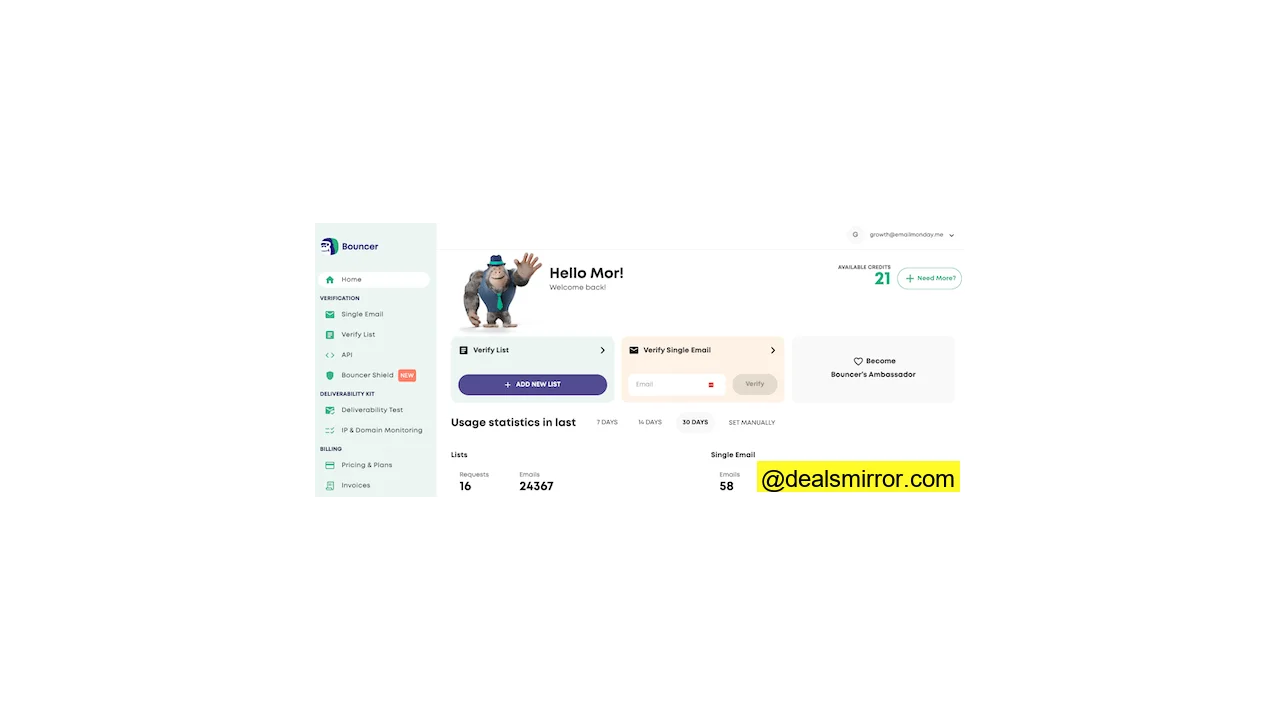
Bouncer is an intuitive email verification software known for its high accuracy. The tool is SOC2 and GDPR compliant, and when an email is submitted, it’s immediately anonymized. With a zero downtime policy, Bouncer ensures proper and safe functionality.
Its features include domain check, syntax check, catch-all server detection, disposable email detection, and bulk verification. You can bulk upload lists of up to 250,000 emails at once.
Beyond basic features, Bouncer offers a deliverability kit that verifies your mail server setup and authentication, notifying you when internet service providers blacklist you. The tool also estimates the bounce rate of your future campaigns.
Bouncer integrates with Moosend, Mailchimp, Hubspot, Kit, GetResponse, and many other marketing tools.
Pros
- 99.5%+ accurate email verification
- Flexible pay-as-you-go pricing
- Data automatically gets deleted after 60 days
- Development support for advanced email verification
Cons
- Free email verification doesn’t show detailed information
Rating
Capterra: 4.9 (233 reviews)
G2: 4.8 (232 reviews)
Bouncer offers 100 free verifications for trial access to its main features. The pay-as-you-go plan costs $0.008/email for checking 4,000 emails, with prices decreasing for larger volumes. The basic monthly Apprentice package offers 10,000 verifications at $50/month.
2. ZeroBounce – Most integrations
ZeroBounce is an email verification tool offering real-time validation and top-level security with GDPR, SOC 2, and PCI compliance.
The ZeroBounce Score feature helps identify the most active emails, allowing users to target high-quality leads.
A standout feature is Email List Enhancement, which can provide an email contact’s name, geolocation, and gender, and sometimes even social media and IP addresses based on an email address. This data is valuable for sending more personalized and segmented email campaigns.
Demographic data assists in audience segmentation, and the social media append feature facilitates effective cross-channel campaigns.
ZeroBounce integrates with 45 platforms like ActiveCampaign, GetResponse, Hubspot, Brevo, and Shopify. The ZeroBounce team also offers 24/7 support.
Pros
- Spam trap detection to avoid blacklists
- Detailed reports with email quality, domain status, and reasons for failure
- 49 integrations to connect with your CRM or email tool
Rating
Capterra: 4.7 (458 reviews)
G2: 4.7 (519 reviews)
ZeroBounce offers 100 free credits for testing and does not charge for unidentifiable email addresses. The pay-as-you-go plan starts at $16 for 2000 credits, with the price dropping to $0.003/email for 250,000 emails. The monthly starter package includes 2000 emails at $15.
3. Emailable – Best usability
Emailable is a bulk email verification service claiming a 99% accuracy rate.
Users can upload email lists from their computer or import them from email and marketing platforms. The tool’s design is simple and user-friendly.
One of Emailable’s best features is its Monitor module, which allows users to set how often email lists should be verified. Users can customize settings for weekly checks on specific lists within their email and marketing platforms.
The tool offers name and gender detection for list enrichment. Its role detection feature also identifies role-based professional email addresses. All this information is useful for creating targeted campaigns.
Users can monitor key deliverability metrics using inbox reports. Emailable integrates with Mailchimp, Hubspot, MailUp, ActiveCampaign, Brevo, GetResponse, and over 80 other tools.
Pros
- Automated verification with integrations
- Accuracy backed by a 99% delivery guarantee
- Intuitive design for easy navigation
- 250 free email credits
Cons
- Some users would prefer a better mobile version
Rating
Capterra: 4.7 (334 reviews)
G2: 4.8 (273 reviews)
Emailable offers 250 free credits. The pay-as-you-go pricing starts at $30 for 5000 credits, with the lowest rate at $0.00135 per email for 2.5M credits. Monthly plans offer 5000 credits at $25.5/month, saving 15% compared to the pay-as-you-go price.
4. Kickbox
Kickbox is an email verification tool with bulk email verification and real-time email cleaning. It cleans email lists by flagging invalid email addresses, accept-alls, role emails, and low-quality emails. Kickbox categorizes emails into 3 groups: risky, undeliverable, and deliverable. It can also be used to verify emails in sign-up forms.
Kickbox also offers advanced deliverability tools, including blocklist monitoring, inbox placement checker, email testing, and DMARC monitoring. It is known for fast signup and high verification speed, supporting CSV and XLSX file uploads.
Users can connect Kickbox directly to email marketing and marketing automation tools, such as MailerLite, iContact, Benchmark Email, AWeber, Klaviyo, Mailchimp, Campaign Monitor, Constant Contact, and GetResponse. A Zapier integration further expands connectivity to over 5000+ apps.
Pros
- Easy-to-use and simple to integrate
- Quick to get started and run verification
- Excellent support including articles, email, and a developer Slack
- GDPR compliant with US and EU servers
Cons
- Pricey compared to other tools on this list
Rating
Capterra: 4.4 (70 reviews)
G2: 4.5 (374 reviews)
Kickbox offers 100 free verifications for testing. Pay-as-you-go credits start at $5 for 500 verifications. They do not charge for unknown emails.
5. NeverBounce
NeverBounce is a trusted bulk email verifier offering real-time and automated email verification. It provides excellent support across multiple channels.
For lists with a high number of unknowns, the NeverBounce team personally reviews them, backed by a refund policy: if more than 3% of emails bounce after using NeverBounce, they refund the difference.
NeverBounce also facilitates data sharing across teams, allowing members to access each other’s stored lists and account apps.
NeverBounce integrates with over 80 tools including Moosend, Pipedrive, Hubspot, Constant Contact, and AWeber.
Pros
- Team accounts and collaboration features
- Praised accuracy in detecting catch-alls and disposables
- Native integrations are very easy to set up
Cons
- Some customers report slow support and higher pricing
- UI can sometimes be confusing
Rating
Capterra: 4.5 (46 reviews)
G2: 1.3 (4 reviews)
The pay-as-you-go option costs $0.008 per email for 10,000 credits, decreasing to $0.003 per email for 1M credits. The smallest monthly plan includes 1,000 credits and costs $10. Annual subscriptions offer a 20% saving across all tiers. For over 1M credits, users need to contact the team for a custom offer.
6. Hunter
Hunter is an email outreach platform that includes email finder and email verification tools. It checks the format, domain, and server response. Users can upload an email list for bulk verification and integrate the email verifier API into their site or app.
The Hunter Google Sheets add-on verifies email addresses directly within spreadsheets, a convenient feature for sales and service teams working with contact list tables.
The Hunter browser extension allows users to find contacts by listing all emails from the Hunter database associated with the domain of the site being visited, also indicating if an email is verified.
Hunter has 9 native integrations, including HubSpot, Pipedrive, Salesforce, Zoho CRM, Gmail, Outlook, Google Sheets, Zapier, and Make. The latter two enable connection with over 5000 other apps.
Pros
- Browser extension to find company emails on visited sites
- Google Sheets add-on for in-sheet verification
- Integrated email finder and outreach capabilities
Cons
- Only 9 native integrations
- More expensive compared to other dedicated verification tools
Rating
Capterra: 4.6 (678 reviews)
G2: 4.4 (561 reviews)
Hunter offers 50 free verifications. Pricing starts at $49/month for 1000 email verifications. Extra credits cost $5 for 100 credits on the Starter plan. The Growth plan costs $149/month for 10,000 verifications. While Hunter is more expensive than other email verification services, it includes an email finder and an email outreach tool in all its plans.
7. Clearout
Clearout is a powerful email verification tool recognized for its high accuracy. It checks for syntax errors, domain validity, and removes spam traps. Leveraging AI, it provides a deliverability verdict for all email addresses.
Clearout’s AI Verdict functions as a scoring system, offering not just flags for fake, dormant, or spam trap emails, but also a detailed breakdown of predicted deliverability and an at-a-glance score. Clearout asserts its deliverability scoring achieves 99% accuracy, proving highly effective in enhancing deliverability rates and protecting sender reputation.
Users can check emails individually or upload lists for bulk verification. Clearout also integrates with 38 CRM and email marketing platforms, including HubSpot, Mailchimp, ActiveCampaign, Pipedrive, and Zapier. An email verification API can be added to forms for real-time email verification upon collection.
Pros:
- AI-powered deliverability scoring
- High accuracy with detailed reporting
- Quick bulk email verification
Cons:
- Slightly higher cost compared to other verification tools
New users receive 100 free email verifications. Pay-as-you-go pricing starts at $0.007 per email for 5,000 verifications, with discounts for larger volumes. Monthly plans start at $14 a month for 3,000 verifications when paid annually.
Rating
Capterra: 4.7 (83 reviews)
G2: 4.7 (325 reviews)
8. Snov.io
Snov.io is a sales automation platform that combines lead generation, sales CRM, and campaign automation tools, with a strong focus on email. Its lead generation tools encompass email databases and LinkedIn, while also aiding in nurturing leads through email-focused outreach, including drip campaigns and automated follow-ups.
Snov.io’s email verification tools help prevent wasted time and effort, and protect sender reputation. Email prospecting carries the risk of collecting old, unused, or even fake addresses, which can lead to bounces. Email verification acts as a safeguard to ensure emails reach their intended recipients, maintaining high deliverability rates. A separate deliverability testing tool further supports this goal.
Snov.io validates email addresses using 7 criteria and provides a simple ‘traffic light’ report for each email: green for valid, amber for uncertain, and red for invalid. It integrates with over 45 business and marketing tools and offers a Chrome extension to verify emails as they are found.
Pros:
- Full sales automation platform with email verification
- High accuracy for verification and deliverability testing
- 45+ CRM and marketing tool integrations
Cons:
- More expensive than standalone email verifiers.
Users receive their first 50 email verifications with Snov.io free. Plans start at $30/month for 1,000 credits, which can be used for verification or lead generation.
Rating
Capterra: 4.5 (213 reviews)
G2: 4.6 (444 reviews)
9. EmailListVerify
EmailListVerify is a no-frills specialist email validation service. Its sole focus on email verification contributes to impressive results, making it both affordable and user-friendly.
EmailListVerify employs multiple tests to validate email addresses, including syntax verification, MX record detection, spam trap detection, and domain health analysis. It also identifies disposable and temporary email addresses.
Users can check individual email addresses or upload lists for bulk verification. An API allows for real-time validation from any platform where email addresses are used, enabling integration into sign-up forms, for example.
Many of EmailListVerify‘s tools can be used for free, including email validation and checking for disposable emails. Other free tools include a blacklist checker, DNS health check, MX lookup tools, and DMARC and SPF record generators for domain authentication. All these features support better deliverability and sender reputation.
EmailListVerify has 11 integrations with popular email marketing services, such as AWeber, Kit, HubSpot, Mailchimp, and SendGrid.
Pros:
- Budget-friendly pricing
- Free verification and deliverability tools
- High accuracy and fast processing
Cons:
- User interface could be more modern
EmailListVerify offers 100 free verifications. Pay-as-you-go pricing starts at $0.0004 per email address for 1,000 verifications, with bulk discounts reducing this to as low as $0.0003 per email for larger volumes. Monthly plans start at $139/month for 5,000 verifications a day.
Rating
Capterra: 4.4 (149 reviews)
G2: 4.4 (50 reviews)
10. Alfred
Alfred is an email validation and email threat detection tool that has checked over 11 billion emails to date, trusted by companies like Riot Games, GetResponse, and Grant Cardone.
Users can verify email lists directly through Alfred’s web application or set up API integrations to verify email addresses at sign-up.
Getting started and running a validation is very quick. Upon uploading an email list, Alfred first assesses whether it needs cleaning. After this evaluation, validation can begin immediately. Results are presented clearly, with categories like “best deliverability,” “maximum reach,” and “do not send.” For more detail, users can check quality scores.
Alfred has a free plan with 250 credits. The price per verification decreases as more credits are purchased. Alfred does not charge for duplicates and unknowns.
Best Email Verification Tools: Price Comparison
Every online business can benefit from an email verifier. These tools are effective, affordable, and essential for preserving sender reputation.
Options are available for every budget, with almost all email verification services offering both pay-as-you-go and monthly subscription models. Most also provide free trials, allowing users to test several tools and choose the one that best meets their needs.
| Verification Tool | Free Verifications | Price for 10K Verifications |
| Bouncer | 100 | $45 (Bouncer) |
| ZeroBounce | 100 | $64 |
| Emailable | 250 | $50 |
| Kickbox | 100 | $80 |
| NeverBounce | 10 | $50 |
| Hunter | 50 | $149 |
| Clearout | 100 | $58 |
| Snov.io | 50 | $189 |
| EmailListVerify | 100 | $24 |
| Alfred | 250 | $80 |
Frequently Asked Questions (FAQ)
What is email verification?
The email verification process involves regularly checking if the email addresses in a list are still active. Regular verification is crucial to keep email lists fresh and healthy, as some email addresses inevitably become inactive over time (e.g., when individuals leave their companies). To mitigate negative consequences, businesses use email verification software.
What is an email verification tool and how does it work?
The process begins with a syntax check, where the software identifies the four components of a valid address: username, “@” sign, (subdomain), and top-level domain. A username can have up to 64 characters and include Latin letters, numbers, and some special characters, while the domain part can consist of up to 253 characters and must be a valid domain. The second step is a blacklist check, where the software compares your list against known bots, spam traps, and fraudulent emails. Next, verification tools check domains’ MX records to confirm their legitimacy; MX records indicate the mail servers that accept the domain’s email messages. The final step involves using SMTP commands to ping the mailboxes. Once a mail server receives the ping, it responds by indicating if the address is ‘’Ok,’’ ‘’Doesn’t exist,’’ or ‘’Disabled.’’ “Ok” signifies that the email address exists and is active.
While the verification process may sound technical, it is made straightforward and easy with an email verification service.
What is the best tool for email address verification?
Bouncer uses several testing criteria to validate email addresses, including domain check, syntax check, catch-all server detection, and disposable email detection. This high level of accuracy is complemented by reliability, as Bouncer offers a zero downtime guarantee and encrypts all validated email addresses for robust security. It is also highly effective for bulk verification, allowing users to upload up to 250,000 emails for checking at once.
Is there a tool to check if an email is legit?
For verifying larger volumes of emails, an email verification tool is necessary. Popular services include Bouncer, Emailable, and ZeroBounce. These tools check email syntax, domain authentication, and MX records. Some services also detect spam trap emails, which are fake addresses planted by ESPs to identify poor list hygiene practices. Fake email addresses lead to bounces, harming your deliverability rates and sender reputation, meaning fewer of your emails reach inboxes. The best email verification services also identify temporary or catch-all addresses to further enhance deliverability.
What tools do you use to validate the emails?
What is the best free tool to use to verify emails?
How do I validate email addresses?
What is the cheapest email verifier software?
How can you verify the authenticity of an email?
Are email checkers safe?
How can I verify bulk email addresses for free?
Alternatively, you could send an email from your email marketing tool to see how many emails bounce. However, this method is not recommended as it will negatively impact your sender reputation and could even lead to your account being banned if your list contains many invalid emails.