
When was the last time you received an email that truly captured your attention and left a lasting impression? In today’s crowded inboxes, standing out is more crucial than ever. A beautifully designed email template can significantly elevate your brand recognition and recall, making every message memorable.
Crafting visually appealing emails doesn’t have to be a daunting task. With the right email template builder, you can effortlessly create professional newsletters. Many of these user-friendly tools offer drag-and-drop interfaces, and some even allow for adding custom HTML code for deeper personalization. Plus, sending HTML emails directly through Gmail is often a seamless process.
Let’s dive into some of the best free email template builders available to help you create impactful email campaigns.
1. Stripo
Stripo is a highly intuitive drag-and-drop email template editor that requires no coding skills. It offers an impressive array of over 1000 free templates, with premium options also available for purchase.
You can build a customizable email newsletter in ten minutes or less. To streamline your selection, utilize the built-in template filters, choosing from various email template types (such as abandoned cart, discount, events, holidays), industries, seasons, and more.
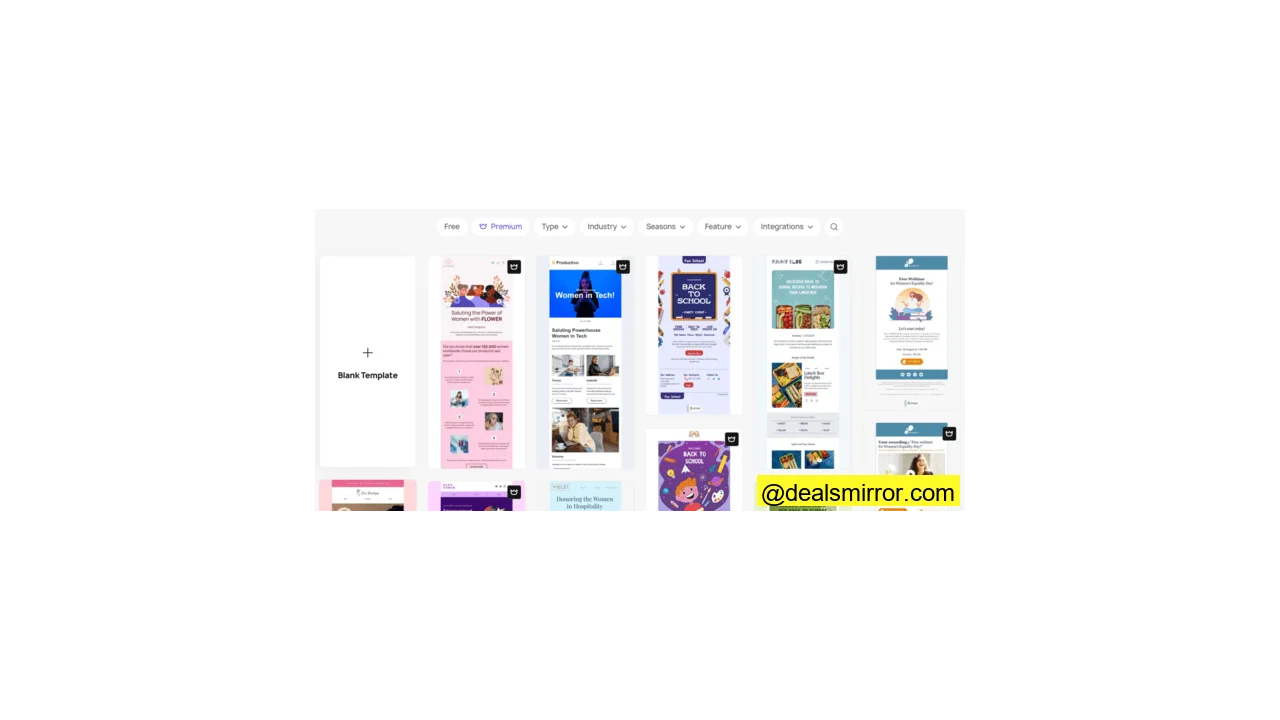
Once you’ve chosen a template, customizing it is straightforward using the content blocks on the left-hand side. The editor is designed for quick learning and efficiency.
Stripo also integrates effectively with Gmail and offers a free Gmail Promotion Annotations feature. This allows you to provide email recipients with key information like a promo code, a compelling preview image, and promotion details directly in their inbox, ideal for promotional campaigns.
You can also easily import email templates into Gmail. Simply export your finalized email template, link your Stripo and Gmail accounts, then access your template in your Gmail Drafts folder.
Beyond the free plan, a paid version of Stripo starts from $16.67/month (annual plan) for a single user. This might be a valuable upgrade for regular users, as the free version allows storage for only 10 email templates simultaneously.
2. Chamaileon
Chamaileon is an email creation platform designed to help businesses create responsive and high-quality emails without the need for coding.
A notable feature is the ability to import your existing email HTML or build your email design system from scratch using its user-friendly interface.
The free trial provides access to 9 distinct email templates, covering a diverse range of options from business outreach to ecommerce and seasonal designs.
After making your selection, click “Use this template now” to begin editing. An HTML code block is available for those who wish to further customize their pre-built template.
The drag-and-drop editor simplifies template customization and includes box/multicolumn options, allowing for easy adjustments to your email template’s structure.
If you’re interested in exploring its paid features, Chamaileon offers a free 14-day trial that accommodates up to five users, along with email and live chat support.
The trial also boasts features like real-time collaboration, role management, and integrations with up to five apps (including Gmail). Paid plans start from $125/month (annual plan), making it a higher-tier option compared to some other builders listed.
To get started, simply provide your name, work email address, and company name, then verify your email to unlock access.
3. MailerLite
MailerLite empowers users to create email newsletters, automations, websites, and landing pages. In addition to its robust drag-and-drop editor, MailerLite offers rich text and HTML email editing capabilities.
Explore its extensive email template gallery, featuring over 90 pre-made email templates categorized into 15 themes.
Unique content blocks include email surveys, ecommerce blocks, and interactive elements. Interactive blocks enable you to add features like carousel image galleries, event RSVPs, and more.
You can embed videos, quotes, countdowns, and save templates for efficient reuse. MailerLite functions as a comprehensive email marketing platform, allowing you to set up email automations, monitor campaign performance, and leverage an AI writing assistant for generating headlines, product descriptions, or full email copy.
The free plan includes up to 12,000 monthly emails. The Growth plan, starting from $9/month (annual plan), offers unlimited monthly emails and templates, 24/7 email support, and up to 3 users per account.
An additional benefit of MailerLite is its commitment to round-the-clock customer support, ensuring quick resolution of any issues.
4. Moosend
Moosend is a full-fledged email marketing platform tailored for small businesses, providing excellent email templates and a landing page builder. You can browse over 75 email newsletter templates categorized across 9 themes, including ecommerce, bloggers, events, SaaS, and announcements.
The drag-and-drop editor is highly customizable. It features pre-designed containers that can be easily dragged into the newsletter to construct your desired layout.
You have full control to adjust colors, fonts, and borders, ensuring your emails consistently align with your brand’s aesthetic.
Moosend offers a free 30-day trial to experience the entire platform. After the trial period, a paid plan is required. Pricing starts from $9/month (annual plan), which includes unlimited emails, landing pages, and Gmail integration.
5. Beefree
Beefree is a versatile drag-and-drop email template builder designed to help you create mobile-friendly emails and landing pages. Its free email templates are an excellent choice for beginners and experienced designers alike.
The platform makes it easy to edit pre-built templates, ensuring you achieve professional and beautiful email designs. You can opt to build your email from scratch or explore its extensive catalog of over 1350+ HTML email templates.
All edits are automatically saved, eliminating concerns about losing your progress. A key advantage is that all content is mobile-optimized; templates intelligently rearrange their layout to suit various screen sizes. The free plan also includes a co-editing feature, allowing others to collaborate on template adjustments.
While these features are free, upgrading to the Professional plan (starting from $30/month) unlocks reusable content blocks, unlimited emails, and direct integration with Gmail, allowing your designs to be pushed straight to Gmail drafts.
Beefree also provides landing page templates (both free and paid) that are fully customizable. For those looking to learn more, a step-by-step guide is available on how to create email templates.
6. Unlayer
Unlayer is a drag-and-drop editing tool tailored for small and medium businesses, enabling the creation of stunning, mobile-responsive emails. All templates and emails designed within Unlayer are optimized to display perfectly across different screen sizes.
The free plan includes the intuitive drag-and-drop editor, custom file storage, customizable tools and blocks, and convenient features like undo and redo functionality.
You’ll find over 1,000 free stock templates to suit every need, which can be filtered by free or premium, season, popularity, and more.
The template builder is straightforward: select your template and make edits using the content blocks and settings. There are 10 content blocks available to add buttons, rearrange columns, or insert headings, images, and videos. Each block comes with numerous settings, and you can further personalize your newsletter with HTML code.
Before committing to Unlayer’s paid plan (starting from $15/month), it’s recommended to begin with its free 14-day trial to access all paid features without requiring a credit card.
Paid features include the ability to save custom blocks, edit campaigns, personalize emails with merge tags, and implement custom HTML code. You can also assign and define user roles.
For those new to HTML, a helpful guide on how to edit HTML email templates (for beginners to pros) is available.
Direct integration with Gmail is exclusive to paid plans. If you opt for the free version, you’ll need to export your template (by clicking “Export”) to download a zip file containing HTML and images, which can then be manually uploaded to Gmail.
7. TOPOL
TOPOL is another notable drag-and-drop email editor worth considering. Its free-forever tier offers limited features, but a significant advantage is access to all email templates, which you can export or download for free.
In Editor mode, you are limited by pre-defined font sizes and a small selection of content blocks, including text, image, button, and spacer blocks. Despite these limitations, you can still create appealing emails, especially if your needs don’t require complex designs.
However, note that transferring your email template into Gmail might require more manual effort compared to other builders on this list. You’ll first need to download the raw HTML file for your template (via a zip file), then open Gmail and paste it into your email draft.
If you plan to use TOPOL long-term, consider upgrading to TOPOL Pro. The Pro version allows you to invite collaborators, save custom blocks for future use, and gain unlimited access to predefined templates and a library of free images.
The paid plan includes a free 14-day trial, after which it costs $10/month for an annual plan or $15/month for a monthly plan (for up to three team members).
Finding Your Ideal Email Template Builder
Utilizing the right email template can significantly enhance your presence in a prospect’s crowded inbox and boost brand awareness. The tools listed above represent some of the best email template builders available on the market.
We highly recommend experimenting with the free versions of these email template builders to discover which one best suits your specific needs and workflow. Through experimentation, you’ll gradually build a reliable library of pre-built templates to craft beautiful and effective emails.
Regardless of your final choice, the software featured here is largely Gmail-compatible, and their templates can be further enhanced with custom HTML code for ultimate personalization. For those seeking specialized designs, you can also explore a curated collection of top HTML email templates for various sectors like eCommerce, SaaS, real estate, transactional emails, and Gmail.