
Marketing automation might seem daunting, conjuring images of complex factory lines rather than dynamic marketing teams. However, it’s an indispensable tool that empowers marketers to work smarter, faster, and more effectively. By streamlining repetitive tasks, it frees up valuable time, strengthens customer relationships, and significantly boosts conversions.
This article aims to demystify marketing automation by providing a comprehensive series of workflow examples, explaining their functionality, highlighting their benefits, and demonstrating how you can implement them.
What is Marketing Automation?
Marketing automation is the use of software to automate marketing tasks.
Marketing involves numerous small tasks: adding and updating contact details, sending emails, text messages, and notifications, posting to social media, and following up leads. While each task is crucial, repeatedly performing them manually can be time-consuming and overwhelming.
Marketing automation handles these smaller, simpler, and more repetitive tasks, freeing you to focus on strategic planning and creative initiatives.
What is a Marketing Automation Workflow?
A marketing automation workflow is a set of instructions designed to automate specific tasks. Workflows typically consist of three main components:
- A trigger for launching the workflow. The simplest trigger is a pre-set time. More advanced automations use user actions and behaviors, such as a new contact submitting a form, which can trigger a common ‘welcome email’ workflow.
- Conditions to control the automation. Conditions allow you to set different ‘yes/no’ paths based on whether a criterion is met. For example, an “open” condition can check if a contact opened a previous email, splitting the workflow so those who opened receive different follow-up emails than those who didn’t.
- Actions, which are the tasks or activities that get automated. Common examples include sending emails, SMS, and notifications, updating contact fields, and adding tags.
The best marketing automation tools feature visual automation editors, eliminating the need for programming skills to build effective automations.
Why Use Marketing Automation?
Marketing automation streamlines processes and significantly improves efficiency. It liberates marketers from repetitive tasks, creating space to develop superior customer experiences.
Additional benefits include enhanced speed, scalability, and accuracy. Software doesn’t tire or make mistakes; once a workflow’s instructions are set, it operates consistently and at speeds and scales far beyond human capabilities—a capacity only increasing with AI integration.
Here are more ways marketing automation can make a substantial difference:
- Optimizing performance: Optimization is the most frequently cited reason marketers use automation, leveraging it to enhance overall performance.
- Reducing costs: Increased efficiency typically leads to less waste and better outputs, resulting in lower costs. Marketing automation has been linked to a 12.2% reduction in marketing spend, with 21% of marketers aiming to expand its use for this reason.
- Increasing conversions and revenues: Improved efficiency and accuracy in marketing directly translate to higher conversion rates, subsequently boosting marketing ROI. In email marketing, automated workflows generate 30 times more revenue per recipient than traditional campaigns, with 31% of email orders originating from targeted marketing automation workflows, despite accounting for only 1.8% of emails sent.
- Improving targeting and personalization: Automation excels at audience segmentation and personalizing content. 30% of marketers utilize automation to enhance personalization efforts.
- Getting more from data: Automation makes data utilization quick, efficient, and accurate across all marketing data. 37% of marketers report that automation helps them improve the quality of data collected, and 30% use it to automate tracking, data collection, and entry.
What to Automate?
While marketing automation can’t handle every task, its capabilities are extensive.
Marketing automation workflows can significantly enhance lead capture. This includes building workflows to send push notifications as people browse a web page or automating invitations in social posts to attract potential leads.
Many aspects of lead nurturing can also be automated. For instance, if a contact browses a specific product page, web tracking can capture this action. This can then trigger automated follow-ups, such as sending more information, inviting them to chat with a sales representative, or simply adding a tag to their profile data.
This seamlessly transitions into targeting and personalization. Tags and segmentation enable automated targeting of different individuals with tailored content.
Workflows can also automate re-engagement. Keeping track of contacts who lose touch is time-consuming. A simple workflow can manage this for you: set a condition for five unopened emails, and if met, it triggers a re-engagement email automation.
Abandoned cart workflows are a specialized type of re-engagement automation. If a customer leaves products in their shopping cart without completing a purchase, a message can be triggered to prompt them to continue.
11 Marketing Automation Workflow Examples
Here are 11 powerful marketing automation workflow examples that illustrate their design and function. While many platforms offer variations, the following examples are commonly found in robust tools like ActiveCampaign, which features over 900 pre-made templates and a user-friendly visual builder.
Welcome New Email Subscribers
Welcome series are among the most common types of marketing automation workflows. They trigger emails whenever a new contact submits a form, effectively connecting lead capture to lead nurturing.
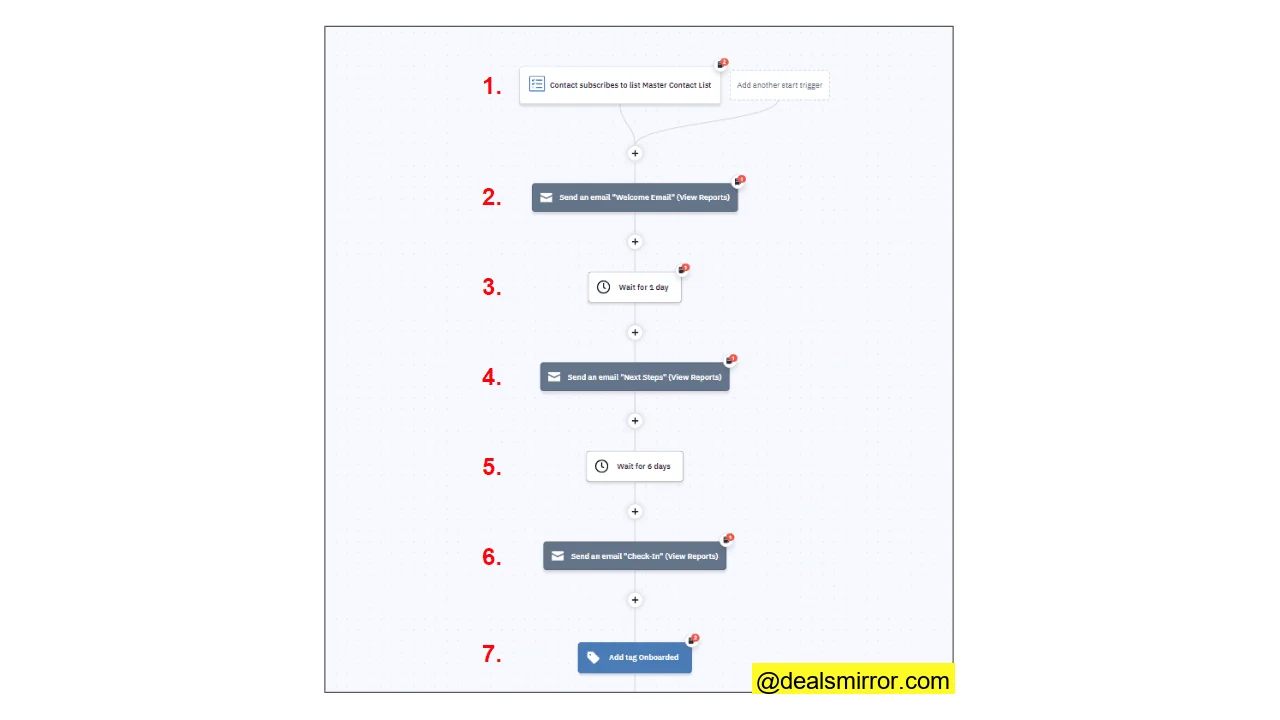
Here’s an example of a basic automated series for welcome emails:
- The workflow triggers whenever a new contact is added to a list, for example, when they submit a sign-up form.
- A welcome email is sent to the new contact.
- The workflow pauses for a specified duration, such as a couple of days or hours.
- After the pause, a follow-up ‘Next Steps’ email is sent.
- Another, longer delay occurs.
- A third and final ‘check-in’ email is sent.
- The final action is adding a tag to indicate the contact has completed the onboarding/welcome process. This tag can prevent sending similar emails in the future or create a segment for the next workflow in their nurturing journey.
This type of email marketing workflow is known as a ‘drip’ campaign, delivering emails over several days. Delaying more direct, sales-focused emails after the initial welcome helps avoid appearing overly pushy.
This workflow exemplifies using conditions to create a more targeted experience. It’s still a welcome series, but its goal is to track clicks to gauge new contacts’ engagement levels.
- The workflow begins with a new contact trigger and a welcome email.
- The first yes/no condition checks if the new lead has clicked a link in the first email, with a one-week delay to allow time for interaction.
- If yes, the contact is tagged as an ‘early engager’ and receives a follow-up email. This tag can later help segment your most engaged leads.
- If no, the new lead receives a ‘welcome reminder’ email. Another delay is applied to give them a chance to respond.
- A second ‘yes/no’ condition then checks for a link click. If they click, the workflow ends. If not, a note is added to their profile indicating a lack of engagement.
This example shows a welcome email built in ActiveCampaign, part of a series aimed at increasing engagement from museum visitors. It goes beyond a simple greeting, explaining the museum’s mission and offerings, outlining expectations for future emails, and inviting subscribers to ‘click through’ for more information.
Surprise Subscribers on Their Birthday with a Gift
The anniversary email is another classic email marketing automation workflow—a simple yet effective way to maintain connections with existing customers. It’s also easily automated. Here’s how a basic workflow operates:
- The workflow is triggered on a specific date saved in a contact’s profile, most commonly their birthday or subscription date.
- The email could be a simple ‘Happy Birthday’ message or similar best wishes, or it could offer a gift like a coupon.
- A delay provides the contact time to view the email and utilize the gift.
- A yes/no condition distinguishes those who use the gift from those who don’t.
- Contacts who use the gift have a tag added to their profile.
To use a birthday as a trigger, you need a corresponding field in your customer data. Birthday dates can be collected through sign-up forms.
Here’s a creative twist on the birthday email concept from a hospitality marketing company. This email is sent two weeks before a contact’s birthday, with the aim of encouraging them to use the coupon to book a special treat in advance.
Recover Abandoned Carts
Cart abandonment workflows are highly common and effective ecommerce automations, accounting for over half of all automation workflows in ecommerce. Many visitors add products to a shopping cart but, for various reasons, do not complete the purchase. Each abandoned cart represents a potential lost sale, and abandoned cart emails can recover some of these sales.
Here’s how a typical abandoned cart recovery workflow operates:
- The trigger is a contact abandoning a cart. ‘Deep Data Integration’ implies connection with an ecommerce software.
- A condition checks the customer’s last order date, with a 24-hour delay before the check to ensure the purchase wasn’t completed before the abandoned cart email is sent.
- If a purchase was made in the last 24 hours, the automation ends, and no email is sent.
- If the contact did not buy anything in the last 24 hours, a cart abandonment email is sent.
Here’s an example of an abandoned cart email:
Notice how this email avoids being overly pushy or ‘sales-y’. The tone is conversational and light. The subject line is catchy and playful, with ‘Don’t miss out!’ effectively leveraging FOMO (Fear Of Missing Out). The body text also includes a plug for a sale, offering a way for the customer to save money, which can be a strong incentive for those who initially hesitated to purchase.
Follow-up New Customers for Onboarding
This is an example of a drip campaign designed for first-time customers. Similar to a Welcome campaign, its trigger is a purchase rather than a newsletter sign-up. The objective is to cultivate a relationship that transforms a one-time buyer into a regular customer.
- The workflow is triggered by a contact making a purchase, requiring integration with an ecommerce platform.
- The first follow-up email is a simple ‘thank you’ for the purchase.
- A 2-day delay is applied between emails.
- The subsequent steps in the workflow focus on ‘onboarding’ the customer, familiarizing them with your brand, addressing questions, and making recommendations for other purchases through a series of useful, informative emails, starting with a “How to Get Started” email.
- After another delay, the next email directs the customer to help and support resources.
- The final ‘onboarding’ email provides further tips and tricks.
The content of these emails can be customized, and the sequence can be shortened or lengthened, making it a flexible template for any post-purchase workflow.
Up- and Cross-Sell with Workflows
Up-selling and cross-selling aim to encourage customers to spend more on additional or higher-value items. Here’s an example of how this can function as an email marketing workflow.
- The trigger is a contact making a purchase.
- The first email is delayed to avoid appearing too pushy. While much cross-selling happens at the point of purchase, email follow-ups are often more effective with a little space, making this a ‘delayed’ cross-sell.
- A cross-sell email provides a product recommendation, such as “Thanks for buying product X the other day. We wondered if you might like product Y to go with it,” including a ‘buy now’ link.
- A one-week delay allows the customer time to respond to the cross-sell email.
- A subsequent condition checks if the customer has made another purchase in the last 7 days, creating a second opportunity for the cross-sell.
- If the condition is met, the contact is tagged, recording that they purchased a product offered in the cross-sell email. This data can be used for future offers.
- If the condition isn’t met, a second cross-sell email is sent.
- After another delay, the condition is repeated: has the contact made a purchase since the follow-up email was sent?
- If yes, they are tagged to indicate they took the offer, and the automation ends.
- If no, the workflow concludes with no further action.
Automated Lead Scoring
Lead scoring assists B2B marketers in distinguishing the most promising prospects from the least engaged, focusing efforts on leads most likely to convert into customers. Alternatively, it helps target highly engaged, active contacts and less engaged leads with different strategies.
This is a very simple workflow for automating lead scoring:
- The workflow triggers when a contact visits a specified page.
- The action involves adding points to their lead score.
- With points added, the workflow concludes.
Anything can trigger points being added: browsing a product or pricing page, clicking or responding to a link in an email, submitting a query, or signing up for a newsletter or loyalty program. Whatever signifies ‘engaged’ for your business can be converted into points. Accumulating these points then reveals who is interacting with your brand the most.
Follow-up Contacts Who Download Your Lead Magnet
A lead magnet is an incentive, typically a special offer, discount, or digital download like an ebook, used to encourage people to subscribe to your email list. This workflow automates the email delivery of the lead magnet and simultaneously creates a deal to add to a sales pipeline.
The goal is to move from lead capture to conversion as swiftly as possible, with the lead magnet acting as ‘bait’ and the new lead flowing directly into a pipeline for your sales team to target.
- The trigger is a lead submitting a form.
- The automated email contains what ActiveCampaign calls ‘gated content,’ meaning content accessible only after filling out the form.
- Concurrently with the email, a deal is created.
- An optional short delay after deal creation separates the lead magnet email from any follow-up sales emails.
- A member of the sales team is notified that a new deal has been created. This ‘deal owner’ is responsible for moving the deal through the pipeline.
- The final action is creating a follow-up task for the deal owner, which could be emailing the contact, making a call, or booking an appointment.
Gather Feedback with Automation
Another valuable post-purchase task is requesting customer feedback. This not only demonstrates care and helps build relationships but also gathers crucial data on customer perceptions of your products.
- The trigger is a completed purchase, requiring an ecommerce platform integration for this workflow.
- A delay is implemented to allow the customer time to experience the purchase, with a suggested default of 7 days.
- After the delay period, an email is sent requesting feedback on the purchase.
Reengage Sleeping Subscribers
Contacts sometimes stop opening your emails. Reengaging ‘sleeping’ leads is more cost-effective than acquiring new ones, but it remains time-consuming. A re-engagement workflow helps expedite this process. Here’s an example of a simple re-engagement email workflow:
- The automation starts when a contact receives the ‘Disengaged’ tag. This tag can be automatically applied to contacts who haven’t opened their past 5-10 emails or whose lead score falls below a certain threshold (e.g., 20 out of 100).
- A re-engagement email asks if the contact still wishes to receive communications, perhaps offering an incentive like a discount.
- A delay allows the contact time to respond.
- A condition sorts contacts who have clicked a link or opened an email in the past 7 days.
- If yes, the contact is considered re-engaged, the automation ends, and they continue receiving emails.
- If no, they are removed from your list and no longer receive emails.
Removing disengaged contacts reduces bounce rates and protects your sender reputation. Consider using specialized list cleaning tools like those found at cleanio.com to maintain a healthy subscriber list.
Build Buzz with Webinar/Event Automation
The following workflow is a prime example of email automation for event organizers. It’s divided into two phases: first, sending pre-event reminders to build engagement, and then sending follow-ups after the event. For a webinar, this is excellent for distributing a recording of the session, for instance.
- The trigger is a contact signing up for the event via a form.
- This sends a registration confirmation email.
- The next step is a Goal. Goals are a type of condition that allow you to set different rules or targets to meet, rather than a simple yes/no. Here, it acts as a delay to hold the next action until 7 days before the webinar. This differs from a standard delay, which always counts from after the last action. With a goal, you can create a date field (e.g., the date of your event) and use it as a condition.
- The first reminder email is sent 7 days before the webinar/event.
- The second date goal is set for the day of the event.
- This sends a reminder email on the day of the event.
- Once the webinar concludes, the workflow returns to standard delay steps. This one is set for the event’s closing time.
- This sends a ‘thank you for attending’ email.
- The next delay sets a slightly later time, or you could use a ‘wait one hour’ instruction.
- The next email sends a recording of the webinar. For a non-digital event, this could be replaced with a feedback request or an invitation for follow-up questions.
- The purpose of this final email is to conduct follow-up marketing. Suggestions include promoting future events, products, or services; offering an attendees’ special discount; or inviting people to sign up for future updates—anything that aligns with your marketing goals.
Increase Customer Loyalty with Automation
Loyalty programs are notoriously administration-heavy, but marketing automation simplifies their online management. Just as lead scoring segments ‘hot’ and ‘cold’ leads, you can easily build workflows to log loyalty points and use conditions and segmentation to trigger rewards.
This workflow manages a ‘tiered’ loyalty program, where members are organized into three levels—Bronze, Silver, and Gold—based on points earned. These levels can then be used in other workflows to segment different rewards or benefits.
- This workflow is triggered whenever a contact’s score changes. A contact score is a numerical field within their contact data, similar to a lead score.
- The workflow operates through a series of yes/no conditions, each checking the contact’s total score. The first condition asks if the total falls within the 0 to 20 range.
- If yes, the customer is placed in the Bronze tier.
- If no, the next condition applies: Is the total in the range of 21 to 60?
- If yes, the customer enters the Silver tier.
- If no, the workflow proceeds to the final condition: Is the total 61 or higher? If yes, the customer is placed in the Gold tier.
You can then build separate workflows for each tier to send updates and offers tailored to their loyalty level.
8 Real Marketing Automation Examples
The workflow examples presented previously are customizable templates. Now, let’s explore some real-world marketing automation examples from various companies.
Go! Running Tours Gets 40% of Bookings from Repeat Customers Using Welcome Automations
Go! Running, a running tours company, demonstrates exceptional customer engagement. It leverages ActiveCampaign to manage a sophisticated deal management process, sourcing leads through strong B2B partnerships and meticulously gathering detailed data to personalize every customer journey. This data is then used to create inspiring and tailored experiences.
Much of this process is automated, starting with a comprehensive welcome workflow. Go! Running’s welcome series extends beyond a simple thank you, functioning as a drip campaign to familiarize new customers with the brand’s services. Different emails promote various tours and holidays over several days, concluding with a customer feedback email.
The workflow notably features a high number of tags, indicating Go! Running’s serious approach to segmentation. Its workflows collect extensive customer data, enabling precise targeting of products and services based on preferences, location, and behavior, which contributes significantly to its impressive repeat business.
Your Therapy Source Gets 30% of its Revenue From Abandoned Cart Automation
Simple automations can profoundly impact business performance. Therapist Margaret Rice initially managed email marketing separately from her website, lacking a way to measure its impact on sales. She decided to integrate ActiveCampaign with her WooCommerce site, and the results have been remarkable.
Margaret now enjoys a 2000% return on her ActiveCampaign investment, with 50% of her revenue stemming from email marketing, primarily driven by abandoned cart automation.
Made for Freedom Uses Marketing Automation to Fight Human Trafficking
Made for Freedom is a fashion retailer with a powerful mission: it sources unique products globally and donates 20% of its profits to organizations supporting victims of trafficking. The company also actively recruits volunteers for these charities.
The company utilizes ActiveCampaign for both email marketing and marketing automation, covering standard brand and product promotions, newsletters, and special offers. It also employs automations to manage volunteer recruitment.
Here’s a workflow designed for onboarding new volunteers:
Prospective volunteers sign up via a form, which triggers an email detailing available opportunities. An interesting condition is whether they reply: if yes, a deal is created, moving the process from a marketing workflow into a sales pipeline. This ensures each volunteer query is handled personally.
Marketing Automation Does the Work of Two Full-Time Employees for Palmetto Fortis
Education service provider Palmetto Fortis outgrew its previous marketing platform, needing a solution that met all its marketing needs while remaining user-friendly. ActiveCampaign’s marketing automation tools proved to be the decisive factor.
Marketing in the education sector thrives on a slow-burn, carefully targeted approach. Palmetto Fortis had amassed a database of 23,000 contacts, making detailed segmentation and long-term drip campaigns unmanageable manually.
Marketing director Meagan Ingersoll credits automation with saving the work of two full-time employees. This includes meticulous tracking and tagging of contact behavior, which informs personalized content and campaigns. The company also uses marketing automation workflows for detailed lead scoring, with ActiveCampaign’s Salesforce integration automatically feeding this data to the sales team.
The results include a 52% increase in open rates, a doubling of click rates, and a 20% increase in sales.
TAGGUN Sees 28.9% Increase in Free Trial Sign-Ups
TAGGUN, which sells AI software for instant data capture from receipts and invoices, turned to ActiveCampaign to scale its business. It employs marketing automation workflows to build automated pipelines at critical points of the customer journey.
One such pipeline addresses customers signing up for a free trial. TAGGUN observed that many prospects initiated the sign-up form but didn’t complete it. By adding an abandoned cart workflow to this pipeline, they saw free trial sign-ups increase by 28.9%.
The company also uses workflows to manage customer transitions between subscription levels. The workflow above governs how leads move from the free trial to the pay-as-you-go tier, utilizing conditions and goals to sort prospects through different deal stages.
Oh Crap! Uses Automation to Predict Repurchase Opportunities
Australian compostable dog poop bag vendor Oh Crap! had already achieved significant success using ActiveCampaign, with 73% open rates for email marketing campaigns and unsubscribe rates below 1%.
A notable example is their clever replenishment flow, which predicts repurchase opportunities. Oh Crap! boxes come in sizes of 45, 180, or 375 bags. Using the simple formula of one bag used per day, the system predicts when a box will run out. When that number of days passes after a purchase, it triggers the replenishment workflow.
The workflow includes a purchase reminder email and adds customers to a custom Facebook audience.
Biletto Achieved a 32% Cost Saving with Advanced Automation and CRM Integrations
Biletto, an online ticketing and event management platform operating in 14 European markets with diverse B2B clients, found managing separate marketing and CRM tools inefficient and complex due to varied customer journeys. With ActiveCampaign, they discovered an intuitive platform that facilitated the automation of complex processes all in one place.
This image illustrates one of Biletto’s account management workflows. While it appears intricate, it’s essentially a re-engagement workflow, similar to the basic template discussed earlier, but with more conditions to segment additional customer groups and more actions added to each branch. It’s an excellent demonstration of how simple building blocks can create advanced workflows.
Swim University Optimizes Send Times Seasonally and Regionally
Swim University, a pool care business centered around a popular blog and YouTube channel, monetizes pool care advice through online courses. Founder Matt Giovanisci had long used email marketing but struggled with the burden of deciding what to send and when.
Matt sought a way to make drip campaigns offering pool cleaning advice seasonal, as typical pool cleaning problems vary throughout the year. He also wanted his emails to align with different seasons across various countries.
Automation workflows, as shown above, are configured to optimize send times in multiple ways. First, they are customized for different regions and time zones, ensuring relevant campaigns are delivered at the appropriate moment. Contacts are tagged when they open emails and click links, allowing the company to easily segment based on engagement levels. Finally, predictive sending analyzes open rates by date and time, dispatching emails when they are most likely to achieve the highest open rates.
This increased relevance has helped Swim University gain 14,000 new subscribers, and combined with targeted sales funnels, their revenues have grown by 66%.
The Best Marketing Automation Tools
To excel with marketing automation, selecting the right tools is paramount. The best software offers flexibility for diverse tasks, sophistication for complex workflows, and user-friendliness—often through visual workflow editors. Here are some of the top picks for marketing automation software:
ActiveCampaign
It’s hard to overlook ActiveCampaign when it comes to marketing automation. It stands out as an excellent all-in-one sales and marketing platform for growing businesses, encompassing email marketing, sales CRM, transactional emails, and more.
As previously mentioned, ActiveCampaign‘s main strengths as a marketing automation tool include over 900 workflow templates and an outstanding visual workflow builder. You can choose from dozens of triggers, actions, and conditions, with no limits on the size or complexity of your workflows. It excels at connecting various processes, such as linking marketing campaigns to sales pipelines across the entire customer lifecycle, allowing you to automate virtually anything you desire. For more details about ActiveCampaign automation, explore further.
Starting from ActiveCampaign pricing a month, the Pro plan, which unlocks the full marketing automation package, costs $79 a month. Small business solutions are also available. For comprehensive details, check the ActiveCampaign pricing page.
HubSpot
HubSpot is one of the largest and most popular CRM platforms available, featuring six different Hubs, including Marketing and Sales. You can build custom packages by mixing and matching features to suit your specific needs.
Automation is integrated throughout HubSpot. The Marketing Hub includes a visual workflow builder for automating emails, ad targeting, contact tagging, and more. For larger businesses, the Operations Hub provides tools for process integration and advanced automation, including options to code your own automations. Find out more about features, pros, and cons in the HubSpot Marketing Hub overview.
HubSpot pricing starts per user a month, with professional and enterprise tiers costing significantly more. It also offers a free Marketing Hub plan, though automation tools are limited. For detailed costs and onboarding fees, refer to the HubSpot pricing page.
GetResponse
GetResponse is an email marketing platform where automation tools begin with simple autoresponders on the email marketing tier, offering basic timed sequences with simple triggers. The marketing automation tier unlocks more complex event-based workflows, providing templates for common workflow types and a user-friendly visual editor. You can track contact behavior for segmentation and set up lead scoring. Ecommerce automation features include AI product recommendations and transactional emails. For more information on GetResponse marketing automation features, pros, and cons, explore the details.
GetResponse pricing starts a month for 1,000 contacts. Marketing automation begins at $41.30 a month, and ecommerce features at $83.30. A free plan is available with basic email tools but no automation. Find all pricing details on their GetResponse pricing page.
MailerLite
MailerLite is recognized as one of the best value email marketing services, offering excellent marketing automation features for its price point. It boasts an amazing drag-and-drop email editor with templates, and allows you to build websites and run blogs. It also includes payment tools for selling digital products and paid subscriptions.
MailerLite emphasizes ease of use, and its automation tools are no exception, featuring one of the most user-friendly visual workflow builders available. However, unlike many basic ‘easy’ automation builders, MailerLite is robust: you can set up web tracking for event-based triggers and use conditional logic to create multiple automated pathways. For more details about MailerLite automation, check their features.
MailerLite pricing starts a month, including the automation builder and all core features. Automations are even included in the free plan. See all pricing details on the MailerLite pricing page.
Brevo
Brevo is another highly affordable marketing platform offering advanced automation tools. Its multichannel marketing platform covers email, SMS, WhatsApp, and web and push notifications. It also includes a sales CRM, a sending API for transactional emails, and a chatbot builder.
Brevo provides both marketing and sales automation, featuring an excellent, user-friendly drag-and-drop workflow builder. You can mix and match communication channels within the same workflow and trigger automations via integrations with other platforms. While the sales automation tools are more basic, they are still useful for moving deals through pipelines and creating tasks. Learn more about Brevo’s automation features.
Brevo pricing starts per user per month, but the Business tier, unlocking marketing automation, starts at $18 a month. A free plan is available, but it doesn’t include automation tools. Check the Brevo pricing page to find out what’s included in each plan.
How to get the most out of marketing automation quickly
Marketing automation should be an integral part of your marketing strategy. Even if you are new to it, you can quickly benefit from its capabilities. As demonstrated, there are numerous marketing automation examples you can readily implement.
The journey begins with selecting the right marketing automation software. A highly recommended option is ActiveCampaign, known for its extensive features and user-friendly interface. However, other good and affordable options exist. Choose a platform that offers plenty of pre-made workflows and start with simple, common examples like welcome series, anniversary automations, and abandoned carts—these are quick wins for building engagement and increasing conversions.
As your confidence grows, create automations to collect customer data through tags and other fields, which can be used in future campaigns or to segment workflows with conditions. Gradually build up to more advanced techniques like lead scoring and goals. Before long, you will be automating large portions of your interactions with leads and customers, saving time, increasing efficiency, and improving revenue.
FAQs about Marketing Automation Examples
What is considered marketing automation?
What are marketing automation strategies?
How do you create a marketing automation?
How do you automate a marketing process?
While this might sound complicated, modern marketing automation tools make it quite straightforward. You don’t need to code or program software. Platforms come with visual builders for creating marketing automation workflows, allowing you to piece together your instructions on screen, set the rules, and launch your automation.