
MailerLite is a popular and affordable email marketing software. Founded in 2005, the company has seen impressive growth, with over 800,000 businesses currently using their platform every month. Given its widespread adoption, you might be wondering: is MailerLite the best email marketing service for your specific needs?
For this comprehensive MailerLite review, we thoroughly tested the platform. Below, you’ll find an in-depth overview of all its features, benefits, drawbacks, and pricing.
MailerLite Review Summary:
- MailerLite is a simple, effective, and free email newsletter software that performs its core functions admirably.
- It boasts an excellent free version, and even its paid plans are more affordable than competitors like Mailchimp.
- While its automation features aren’t as extensive as, for example, ActiveCampaign, they are straightforward and highly effective for most users.
- We found this email program user-friendly and exceptionally easy to set up.
- With all the essential features you’d expect, MailerLite certainly offers significant value.
MailerLite Email Marketing Software: A Detailed Review
You can use MailerLite to send emails, promotions, and newsletters to your subscribers. Beyond that, MailerLite also offers functionalities for creating web pages and automating emails. Let’s delve deeper into its capabilities.
What We’ll Cover in This MailerLite Review:
- Key Features
- MailerLite in Action: From Campaign Creation to Automation
- Conclusion: Is MailerLite Worth It?
- Pricing & Discounts
- MailerLite vs. Other Software
1. MailerLite: Key Features Overview
You might be asking: “What exactly does MailerLite email marketing do?”
For an easy-to-use email marketing service, it offers a surprisingly rich set of tools. Here are the most notable features of MailerLite:
- Send Email Campaigns: With MailerLite, you can craft engaging email newsletters, dispatch promotional emails, or leverage RSS to automatically send updates from your blog.
- A/B Split Testing: Optimize your email campaigns by A/B testing various elements such as subject lines and content.
- Grow Your Audience: Create compelling forms and strategically placed pop-ups on your website to expand your email list and gain more subscribers.
- Segment Your Subscribers: “Marie Kondo” your subscriber list to send the most relevant messages. You can group subscribers by characteristics (e.g., age, gender, country) and activities (e.g., opened and/or clicked emails) to create targeted lists.
- Build Websites and Landing Pages: MailerLite isn’t just for emails; it also allows you to create landing pages, opt-in forms, and even mini-sites, all hosted directly by MailerLite.
- Marketing Automation: Start with a simple automated welcome email or build a sophisticated multi-step onboarding process for new customers. This feature can be incredibly powerful for nurturing leads.
- Excellent Price and Value: MailerLite is highly cost-effective compared to its competitors, offering exceptional value for your investment.
- Reliable Support: MailerLite provides 24/7 live chat support to help resolve issues, available with all paid versions of MailerLite.
2. MailerLite Email Campaigns: Sending & Optimization
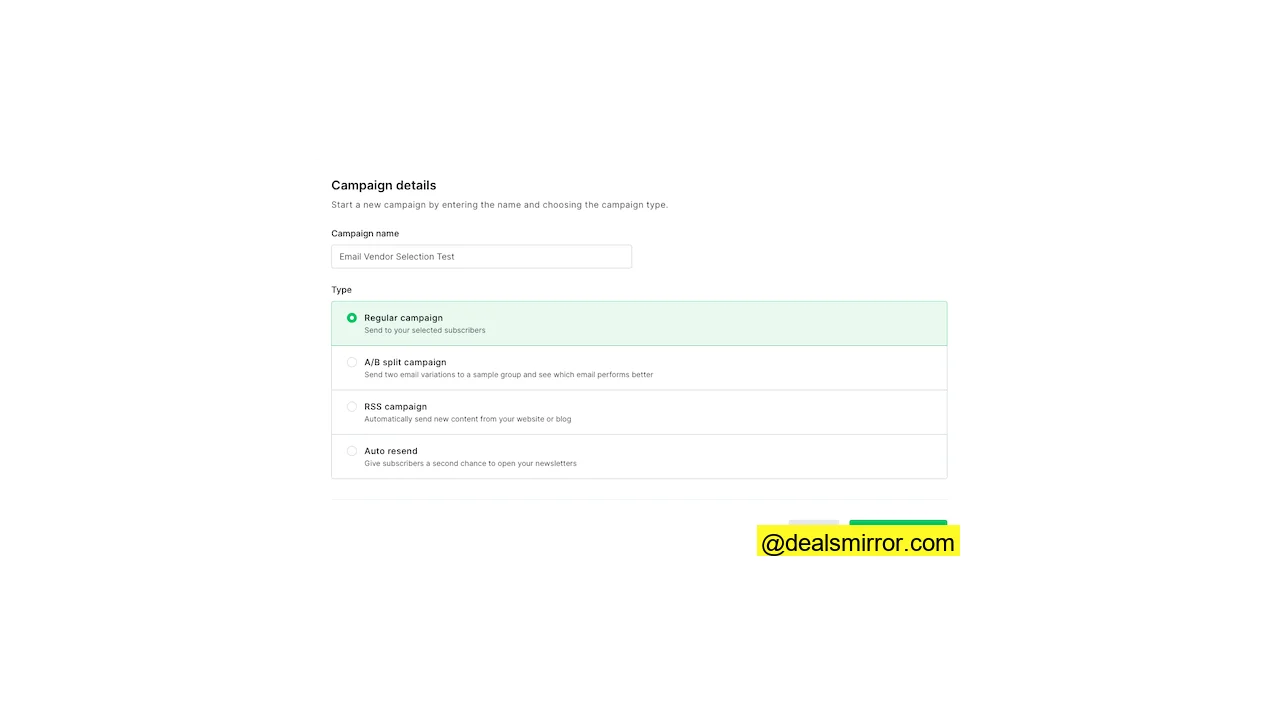
While you can, of course, send standard email campaigns with MailerLite, more advanced functionalities are also available. Let’s explore the four types of email campaigns you can send:
- Regular Email Campaigns: This is your standard email broadcast. You name the campaign, target a specific segment of subscribers, and design an email to send.
- A/B Split Test Campaigns: Use this feature to optimize your emails by comparing the results of different variations. You can test subject lines, sender names, and email content.
- Auto Resend Campaigns: Similar to a regular campaign, but this functionality automatically resends the campaign to those who didn’t open your initial email. This is a handy feature for boosting open and click rates.
- RSS Campaigns: Do you have a blog? This feature automates new campaigns that are sent out whenever you publish new content on your website, perfect for bloggers and low-maintenance email newsletters.
Email Editor, Free Templates, and Flows
To quickly launch your campaign, you can utilize one of the over 60 free email newsletter templates provided by MailerLite in the Pro plan. These templates offer great variety, are modern, and adapt well to various screen sizes, making it easy to create a beautiful email quickly.
Prefer to create your own standard template? No problem! Your business is unique, after all. Most users start with the drag-and-drop email editor. However, you can also import your own HTML. Once you’ve created your templates, you can reuse previous emails as templates for future campaigns.
The drag-and-drop editor is where your creativity can truly shine. With over 20 modules, you can simply drag them from the left pane onto your canvas.

Dynamic Content Blocks
After choosing an email template, the real customization begins. In MailerLite, you can make your email content dynamic, choosing to display a block only to a specific group for direct email personalization. A minor limitation is that if you want to show one block for loyal customers and another for new customers, you’ll need to use two separate blocks, as you cannot have “variations” of the same block without duplicating them. However, this small drawback is unlikely to be a deal-breaker.
Special Drag-and-Drop Blocks Include:
- Video blocks with animated GIFs
- Blocks featuring products and their attributes
- Social media post blocks
- Countdown timers
- RSS feed templates
- Survey blocks
Your headers and footers can be easily set as standard for all emails, so you don’t have to update them individually if you need to make changes.
Integrating YouTube into Emails
Video in email is a major trend, and MailerLite makes it easy to embed a YouTube video directly into your email. Once you enter the URL into the email editor, the video automatically transforms into a GIF animation – a pretty cool feature!
Sending Test Versions
Once your email is ready, you can first share a preview via email with your colleagues to collectively review its completeness. You can also share the email via a link or a PDF, available in both desktop and mobile modes. However, personalization is not included in these email previews.
Scheduling the Send
Next, you select your email subscribers. MailerLite offers advanced logic to precisely target your email to the right segments. You can schedule a send for a static time or based on your subscribers’ time zones (ensuring all subscribers receive the email at the same local time).
MailerLite Email Campaigns: Our Verdict
Most of the time spent in email marketing software revolves around creating emails, so this functionality needs to be robust. MailerLite does not disappoint here.
- A robust email marketing platform with extensive capabilities.
- A powerful email editor featuring over 60 modern email templates.
- Easy to use, yet offers several advanced functions (like excellent YouTube integration!).
Overall, we are impressed with what you get for the price. The email editor, in particular, has a wealth of options. The email templates give you a head start in creating beautiful email campaigns. It’s incredibly user-friendly (Mailchimp users will feel right at home) while also allowing for fairly advanced operations.
Many large companies, we know, don’t even utilize half of these functionalities. So, it will take a while before you outgrow the platform for email editing and campaign deployment.
3. MailerLite Forms: Grow Your Audience with Forms & Pop-ups
With MailerLite Forms, you can build your “conversion tools.” This includes designing newsletter signup forms and pop-ups that promote subscriptions or products to website visitors.
There are two types of forms: pop-up forms and embedded website forms. Although the form templates differ, you build them in MailerLite in a similar way.
The Form and Pop-up Editor
When building a website pop-up, you typically start with a template. Another option is to design your own template using the editor. Creating a form or pop-up is quite straightforward.
You can customize fonts, text, and colors, and add images. Additionally, you can add form fields to collect more than just an email address, such as customer preferences, names, and addresses.
Forms are simpler to create than email newsletters. You choose a format (standard, horizontal, or image display), and that’s what you get.
Automation with Forms and Pop-ups
After building your opt-in form, you add the subsequent steps. Perhaps you want new subscribers to confirm their subscription and then receive a series of automated follow-up emails (MailerLite marketing automation).
It’s convenient that you can choose double opt-in for each form. A double opt-in is an extra confirmation a customer receives after an action, such as signing up for a newsletter.
You can decide for which forms you want this. For example, you could create a European form and a different one for the US, where email regulations are, let’s say, a bit more relaxed!
Next, you set when the pop-up appears. This can be based on time, page/scroll depth, or only on specific pages. Exit-intent pop-ups, which display when someone intends to leave a web page, are particularly effective.
There are also MailerLite WordPress plugins and a Shopify integration, allowing forms and pop-ups to be automatically added to those platforms.
MailerLite Forms & Pop-ups: Advanced Functionality
The forms functionality in MailerLite is included and quite advanced, eliminating the need for separate pop-up software. The pop-up forms offer various triggers, and you can automate almost anything after a form is submitted.
Marketers can leverage this functionality to set up sophisticated campaigns, such as one where a user fills out a form and then proceeds through a series of emails designed to sell a specific product. This alone makes the platform well worth the price.
4. MailerLite Website & Landing Page Builder
MailerLite also features a website and landing page builder. But do MailerLite’s landing page capabilities truly compete with a CMS like WordPress?
You can host MailerLite’s landing pages and websites on their domain (.mailerpage.com) or display them on your own website. So, if you already have an established website, you might use MailerLite’s landing page builder to add a few extra pages.
If you don’t have a website yet, you can use the website builder to create a mini-site. MailerLite’s hosting allows you to publish a page quickly, and you can always migrate to something else in the future.
Let’s take a closer look at this functionality.
MailerLite’s Landing Page Editor

You can create a landing page from scratch or use one of the 30 MailerLite templates for landing pages, which are available with a paid plan.
The page editor looks and feels identical to the email editor (as it should!). You can add modular “content blocks” using the drag-and-drop editor.

On the final page, you can edit the landing page settings. These include:
- Page title
- Page URL
- SEO settings, such as page metadata
- Descriptions and metadata for social sharing
- Google Analytics tracking codes
MailerLite’s Website Builder
With MailerLite’s website builder, you can create simple, multi-page websites.
The only peculiarity is that when you create a MailerLite site, you must link it to a subscriber group. This isn’t a negative, as it doesn’t truly affect functionality; it’s just a bit confusing initially. Forms, however, can be connected to multiple groups.
The website templates are designed for various industries and use cases. To test, we chose a real estate website template. This was a five-page template featuring prominent houses on the homepage, individual listing pages, and a “meet the team” page. We haven’t sold a house yet, but who knows!
The editor is the same as the landing page editor. The templates are quite good, requiring minimal changes to get started.
MailerLite Site Builder: Our Verdict
This is truly a fantastic feature. You can set up a rather slick website using a function integrated directly into your email marketing software. What are the best aspects?
- A fully-featured website builder.
- The ability to receive payments (coming soon via Stripe).
- User-friendly interface and a range of helpful templates included.
While the email marketing functionality might resemble that of MailerLite’s competitors, the landing page and website functionality surpasses many of them. This gives users a strong incentive to explore beyond just email marketing. Not everyone will use these features, but if you do, it can save you a significant amount of money.
5. Segmentation & Personalization: Managing Subscribers in MailerLite
Let’s examine the “Subscribers” section in MailerLite. In this section, you manage your email list, create segmentation groups, add new fields, and access reporting per email list. We’ll focus on the email list management features.
Exploring the Subscriber Section
Here, you’ll find all your subscribers. Filters allow you to categorize subscribers into groups. For instance, you can filter by any database field or by behavior-based criteria such as received campaigns or the number of emails sent.
You can combine filters to create even more advanced selections. Once you’ve made your selection, save the segment for use in other parts of MailerLite.
Add new subscribers as they sign up. Other options include uploading a CSV/TXT file, copying and pasting from Excel, or importing from a linked Mailchimp database. This is particularly convenient if you’re migrating from Mailchimp.
Segmenting Your Subscribers in MailerLite
Segments and groups are powerful tools in MailerLite. Here, you build automated dynamic or static groups of your subscribers. For Mailchimp users, MailerLite groups are comparable to Mailchimp Lists, and MailerLite segmentations are similar to Mailchimp segments.
So, how would you use segments? You can create a segmentation or group based on:
- Existing group membership (static lists)
- Any arbitrary database field
- Any other segment
- Subscribers included in an email campaign
- Subscribers participating in the email flow (see email automation)
- Behavior (number of sent, opened, or clicked emails)
- Purchases (with an integration with your online shop)
You can combine all the segmentation options above, which should allow for virtually any unique segmentation you can imagine.
Email Analytics in MailerLite
The statistics section provides comprehensive reports. You can view statistics for “all subscribers” or for a specific group. MailerLite collects all data for this group, helping you gain insights into your subscribers.
Available email statistics include: list growth, average open and click rates, and unsubscribe statistics. You can also view top domains and email clients.
Cool Feature: Automatically Remove Inactive Subscribers
The last tab offers a neat feature called “Clean up inactives.” This function quickly identifies individuals on your list who haven’t opened an email in six months and automatically unsubscribes them. This helps maintain a list of active subscribers, improves deliverability, and reduces the chance of landing in the spam folder. Naturally, it’s in everyone’s best interest to achieve high inbox placement and email deliverability.
MailerLite Subscriber Management: Review
The subscriber and list management features in MailerLite are robust without being overwhelming.
- Group subscribers dynamically (via segments) or statically (via groups).
- Create your own custom fields.
- Comprehensive reporting on email subscribers.
The segmentation capabilities empower you to execute more advanced email marketing strategies. Compared to Mailchimp, MailerLite’s segmentation and reporting are very strong. We would, however, like to see tag-based segmentation introduced soon, similar to what you find in ActiveCampaign.
6. Email Automation in MailerLite
MailerLite automation enables automated emails to your subscribers. For example, you can set up a series of welcome emails using MailerLite autoresponders. You begin in the MailerLite Automations dashboard.
We create a workflow and build our automated flows in the automation editor. Start with a trigger: what action initiates this workflow?
Available Automation Triggers in MailerLite:
- When a subscriber joins a group.
- When a specific link is clicked.
- When a subscriber fills out a form.
- When a subscriber’s field is updated.
- On the anniversary of a date.
- On the exact match of a specific date from your database.
This means you can start workflows based on obvious actions like form submissions and subscriptions, but also on less obvious ones, such as at the end of a free trial period (based on a date) or when subscribers join specific groups. Unfortunately, you cannot trigger based on website visits.
You use modules to guide people to action. There are four module options: Email, Delay, Conditions, and Actions.
Here’s an example of a signup flow to guide Canadians and Germans through a signup confirmation, while others would not receive that email.
By adding steps in MailerLite, you can build fairly advanced automation. This is more than sufficient for those who don’t require overly complex campaigns. If you try MailerLite and get stuck, you can refer to one of their automation tutorial videos.
MailerLite’s Automation Feature: General Views
MailerLite’s email automation offers excellent value for money. This functionality is included in every plan. You can use the automation for quite advanced setups. In the Mailchimp vs. MailerLite comparison, MailerLite is the leader in automation. However, MailerLite is not as advanced as comprehensive marketing automation tools like ActiveCampaign.
If you’re looking to implement more triggered email marketing and autoresponders, you’ll find MailerLite’s automation highly beneficial.
7. MailerLite Integrations
MailerLite offers dozens of native integrations with e-commerce and CMS systems, including Shopify, WooCommerce, and the MailerLite WordPress plugin. Additionally, you can integrate almost any functionality via Zapier, a middleware that connects software without requiring coding. Another option is to use the MailerLite API.
These integrations save you significant time. They eliminate the need for manual subscriber entry, allow you to trigger abandoned cart emails, and easily integrate products from Shopify into the email editor. The more you integrate, the more time you save.
Remember that MailerLite already provides many functionalities similar to these external tools. For example, MailerLite has list growth pop-ups much like specialized pop-up software. The beauty is you can use the tool that works best for you, whether it’s MailerLite’s built-in features or a third-party integration.
8. MailerLite Pricing: How Much Does MailerLite Cost?
The price of MailerLite is based on the number of subscribers. You can send an unlimited number of emails and gain access to all platform features.
If you wish to try the software first, MailerLite offers a free plan for up to 1,000 subscribers and 12,000 emails per month. This free version includes most features.
Once you upgrade to a paid plan with MailerLite, you also get access to 24/7 live chat support, a wide array of email templates, and the option to automatically resend emails. You can see the complete pricing information on their website.
MailerLite’s pricing & packages are extremely competitive for what you receive. It’s well worth trying their platform to explore their email marketing, forms, site builder, and marketing automation tools.
Want to see how MailerLite compares to the competition? Here’s a cost comparison between MailerLite and similar software:
Standard
* For Sendinblue, the price is based on 4 emails per contact per month.
MailerLite Discounts
Ready to try MailerLite email marketing software? We have an exclusive discount for you. When we spoke with the MailerLite team, they wanted to ensure you could get started with your preferred plan, essentially for free.
If you register for a new account and start your free trial via this page, you’ll receive:
- A full month free on any paid plan with all features.
- An additional 10% discount if you pay annually.
MailerLite Price Details, In Detail:
- 0-1,000 subscribers: Free, or $10 per month for unlimited emails.
- 1,000-2,500 subscribers: $17 per month for unlimited emails.
- 2,501-5,000 subscribers, unlimited emails – $32 per month.
- 5,001-10,000 subscribers, unlimited emails – $54 per month.
- 10,001-15,000 subscribers, unlimited emails – $87 per month.
- 15,001-20,000 subscribers, unlimited emails – $119 per month.
- 20,001-25,000 subscribers, unlimited emails – $139 per month.
- 25,001-30,000 subscribers, unlimited emails – $159 per month.
- 30,001-35,000 subscribers, unlimited emails – $179 per month.
- 35,001-40,000 subscribers, unlimited emails – $199 per month.
- 40,001-45,000 subscribers, unlimited emails – $220 per month.
- 45,001-50,000 subscribers, unlimited emails – $239 per month.
MailerLite: Pros and Cons
MailerLite has many advantages. Realistically, its most impressive aspect is its pricing. It is more affordable than almost all other programs with comparable features and stands up well against market leader Mailchimp.
What We Like Most:
- It’s highly affordable email marketing software.
- Solid landing page and website builder functionality.
- Advanced automation tools.
- Simple, clean, and intuitive interface.
- Powerful email editor with excellent, user-friendly modules.
Areas for Improvement:
- ActiveCampaign and other competitors offer automation triggered by website visits, which MailerLite currently lacks.
MailerLite vs. Mailchimp: Email Services Compared
Are you looking for an email marketing service similar to Mailchimp? The comparison between Mailchimp vs. MailerLite is one many people will make.
Key Differences:
- Email Editor: The email editing experience in MailerLite vs. Mailchimp is very similar. Both are exceptionally easy to use.
- Pricing: MailerLite is approximately 50% cheaper for 5,000 contacts and about 43% cheaper for 10,000 contacts than Mailchimp. The exact price difference varies depending on your number of subscribers.
- Postcard Sending: Mailchimp allows you to send physical postcards to 27 countries, similar to how you’d send email campaigns. MailerLite does not offer this feature.
- Web Builder Functionality: MailerLite’s web page builder is stronger, and they provide more templates to start with.
- Automation Functionality: There’s a significant difference here. You can achieve much more extensive automation with MailerLite compared to Mailchimp.
- Advertising Functionality: Mailchimp enables you to create Google Ads and Facebook/Instagram ads directly from their platform. If you use MailerLite, you would create these ads directly within the respective advertising platforms.
The remaining pros and cons likely boil down to personal preference. Both platforms are highly effective at what they do, offering an impressive range of capabilities for a very reasonable price.
MailerLite Review: Conclusion and Score
MailerLite is an email marketing service that offers far more power than just sending emails. For as little as €10/month, you can create email campaigns, automate an onboarding process for new subscribers, and build and host your landing pages. That’s incredible value.
- MailerLite is simple and effective. It’s newsletter software that consistently delivers.
- The MailerLite email editor is user-friendly, and the entire system is straightforward to set up.
- MailerLite provides an excellent free plan, and its paid plans are more affordable than competitors like Mailchimp.
- Its automation is effective, though not as comprehensive as dedicated full marketing automation tools.
- With all the features you’d expect, MailerLite is certainly a worthwhile investment.
If you’re just starting, they offer a free plan for up to 1,000 subscribers and 12,000 emails per month.
Our Scores for MailerLite:
- Ease of Use: 4.5 / 5
- Value for Money: 4.5 / 5
- Editor and Templates: 4.5 / 5
- Features: 5 / 5
- Email Automation: 4.5 / 5
- Customer Service: 4 / 5
- Overall Score: 4.5 / 5
Based on our in-depth evaluation, MailerLite stands out as one of the top choices for bloggers, small businesses, and anyone who appreciates a clean and efficient email interface. In particular, MailerLite presents itself as an excellent alternative for existing Mailchimp users looking for enhanced features and better value.